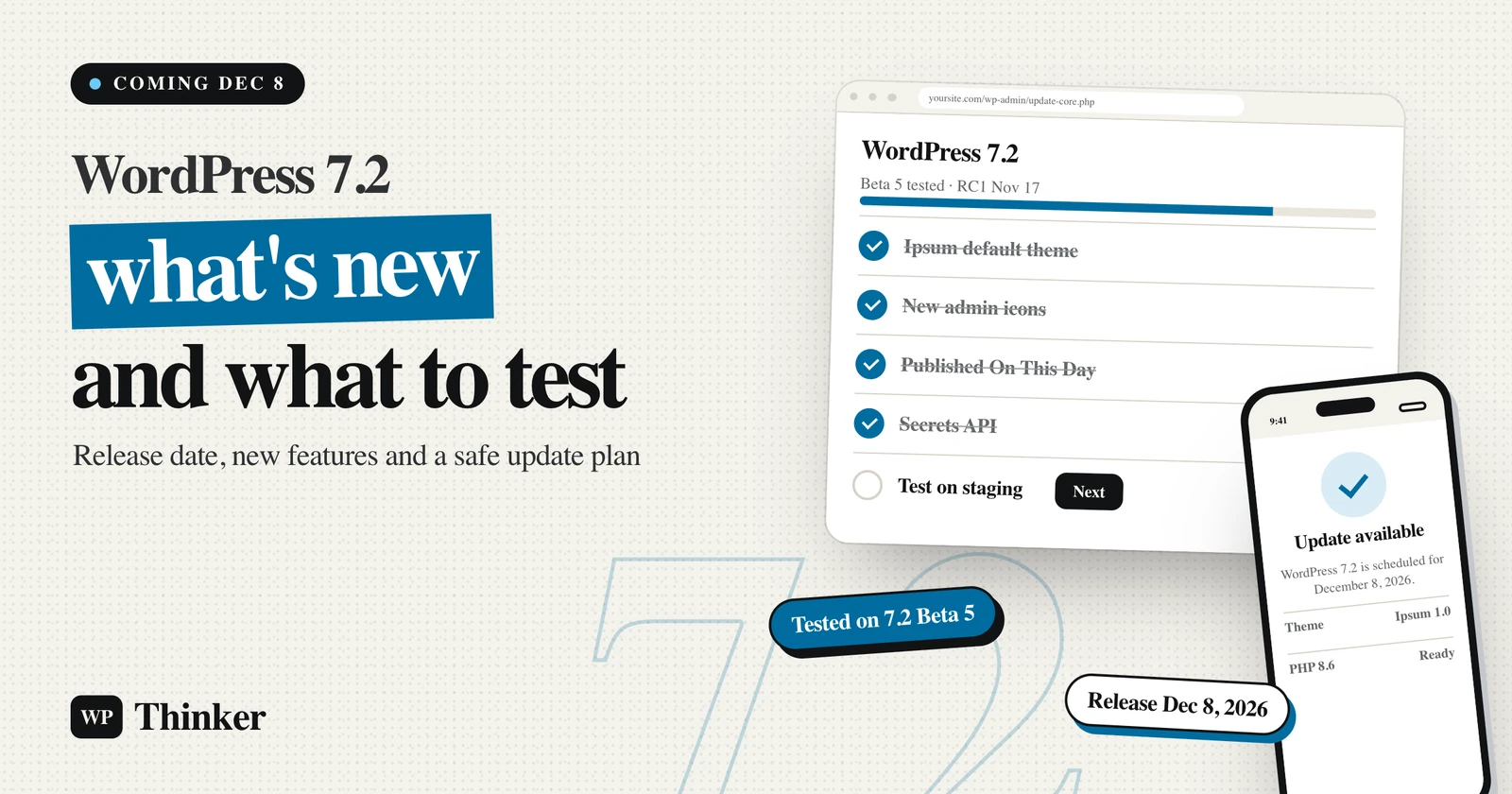
Every December, WordPress ships one last big update before the holidays, and this year it's WordPress 7.2. The final release is scheduled for December 8, 2026. That's about a week after Cyber Monday, right when many store owners are busy with holiday orders. So the timing alone is a reason to know what's coming. Below you'll find the release date, the new features, and what I'd test before you click Update.
A bit about me first: I've been using WordPress since 2014, and several of my online stores still run on it with WooCommerce. On November 16, 2026, I opened WordPress 7.2 Beta 5 in WordPress Playground and went through it screen by screen. I also read every official beta post on WordPress.org. The screenshots here come from that test site, and wherever I couldn't check something myself, I've said so.
WordPress 7.2 is due on December 8, 2026. It brings a new default theme called Ipsum, text shadow controls, more responsive design settings, better Notes for teams, image processing in the browser before upload, SVG icons in the admin, and a "Published On This Day" list on the Dashboard. Developers get a new Secrets API for storing API keys safely, more Abilities API tools for AI agents, and support for PHP 8.6. Real-time collaborative editing is not part of this release.
When Is WordPress 7.2 Coming Out?
WordPress 7.2 is scheduled for release on Tuesday, December 8, 2026. According to the official WordPress 7.2 release page, the core team will do a dry run and a 24-hour code freeze on December 7, the day before.
Here's how the release cycle has gone so far, and what's still left:
| Date (2026) | Milestone | Status on November 16 |
|---|---|---|
| October 20 | Beta 1 | Released |
| October 27 | Beta 2 | Released |
| October 28 | Beta 3, shipped along with WordPress 7.1.4 | Released |
| November 3 | Beta 4 | Released |
| November 10 | Beta 5 | Released (the version I tested) |
| November 17 | Release Candidate 1, plus the hard string freeze | Scheduled |
| November 24 | Release Candidate 2 | Scheduled |
| December 1 | Release Candidate 3 | Scheduled |
| December 8 | WordPress 7.2 final release | Scheduled |
Dates can still move if a serious bug turns up during the release candidates. That doesn't happen often, but it does happen, so keep an eye on the WordPress News blog in early December.
For context, the previous major version, WordPress 7.1 "Mary Lou", came out on August 19, 2026. So 7.2 is the third and last major release of 2026.
What's New in WordPress 7.2 at a Glance
Not every change matters to every reader. Here's the short version, sorted by who will actually notice it:
| Change | Who will notice it | Did I see it in Beta 5? |
|---|---|---|
| Ipsum, the new default theme | New sites and theme shoppers | Yes, version 1.0, active by default |
| SVG icons in the admin menu and toolbar | Everyone who logs in | Yes |
| "Published On This Day" on the Dashboard | Bloggers with a few years of posts | Yes, inside the Activity box |
| Text shadow, responsive and Global Styles tools | Anyone who designs pages | Listed in the beta notes |
| Notes with emoji reactions and a minimized mode | Teams that review drafts together | Listed in the beta notes |
| Image resizing and compression in the browser | Sites on cheaper hosting | Listed in the beta notes |
| Translation updates you can pick one by one | Sites that aren't in English | Listed in the beta notes |
| Secrets API | Plugin developers | Yes, the functions are in core |
| Random post redirect at /?random | Blogs with big archives | Yes, it worked |
| PHP 8.6 support | Hosts and developers | All known issues fixed, per Beta 5 notes |
Ipsum: The New Default Theme in WordPress 7.2
Every few releases, WordPress gets a fresh default theme, and this time it's Ipsum. When I opened Appearance, then Themes, on my Beta 5 site, Ipsum 1.0 was the only theme installed, and it was already active.
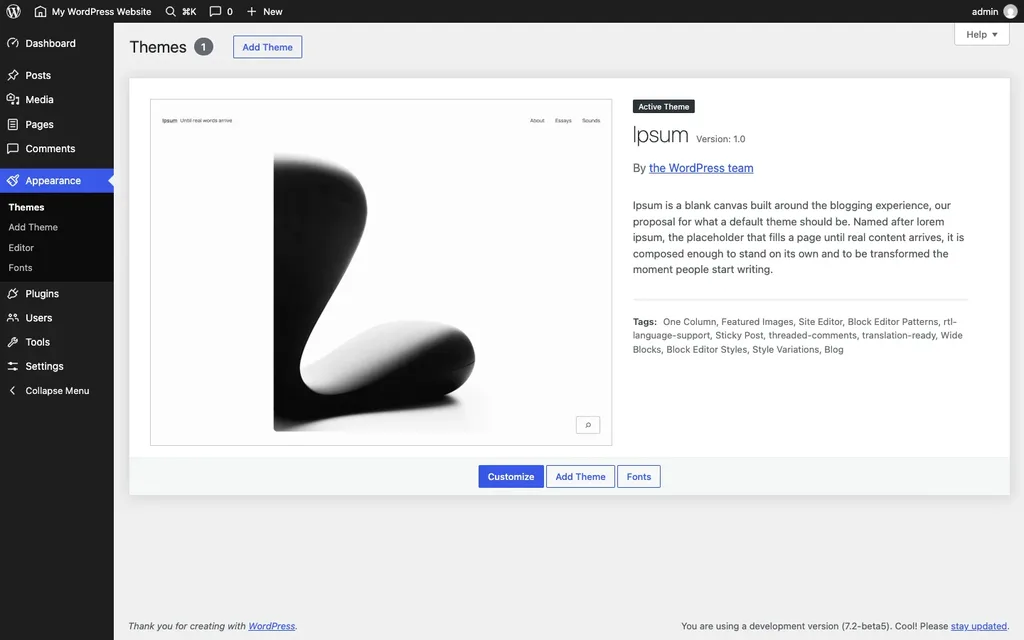
The theme's own description calls it a blank canvas built around blogging, and the name comes from "lorem ipsum", the dummy text designers put on a page until real words arrive. It's a block theme with one column, style variations and support for right-to-left languages. On the front end, it's very plain: lots of white space, simple typography, and almost no decoration.
Here's one detail I didn't expect. Ipsum registers its own ability, called ipsum/get-design-guide, through the Abilities API. In plain words, an AI tool connected to your site can ask the theme for its design rules before it builds a page. That's the first default theme I've seen do anything like that.
Do you have to switch to Ipsum? No. Updating WordPress never changes your active theme. Ipsum is just installed for new sites, and you can try it whenever you want.
Changes You'll Notice in the Dashboard
New Icons Across the Admin
The first thing I noticed after logging in was the menu. The old Dashicons font is gone from the admin sidebar and toolbar, and WordPress now uses SVG icons from its own icon library, the same set the block editor uses. They look thinner and cleaner. Nothing moves around, though, so you won't have to hunt for Posts or Plugins.
"Published On This Day"
The beta notes call this an "On This Day" dashboard widget. On my test site, though, it didn't show up as a separate box. It appeared as a new "Published On This Day" list inside the existing Activity box.
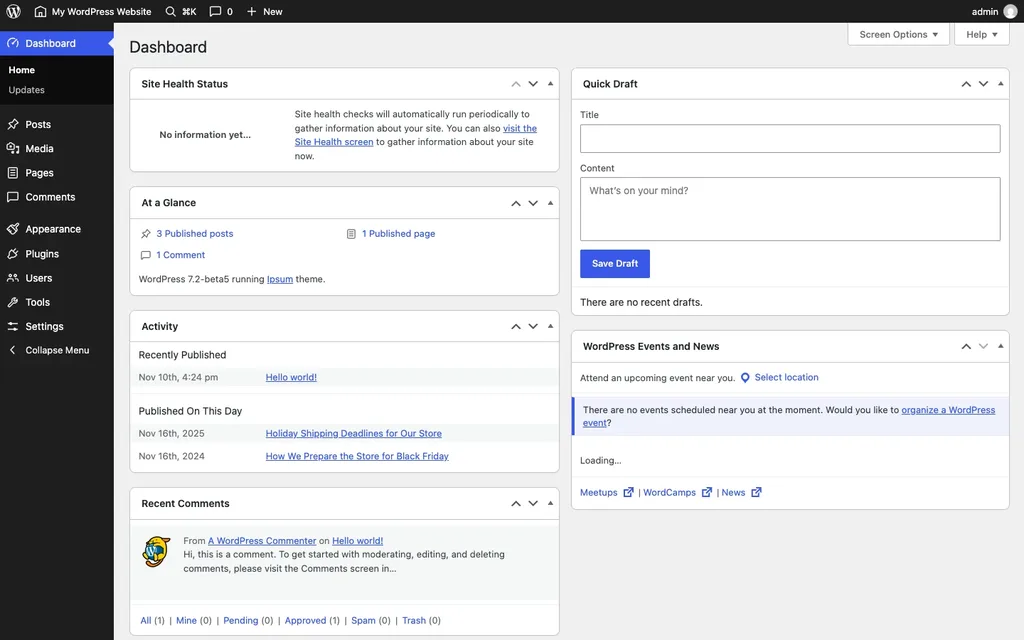
To test it, I added two posts dated November 16 of 2024 and 2025, and both showed up right away. For a blog with years of archives, this is a handy nudge. Say you see last year's Black Friday post on November 27. That's a good moment to update the prices and share it again.
Translation Updates, One at a Time
Run your site in Spanish, French or any other language? Since Beta 4, the Updates screen lists each available translation update separately. You can pick which ones to install, just like you do with plugins and themes.
A Faster, Clearer Admin
WordPress 7.2 changes how admin scripts and stylesheets load. Instead of joining them into large combined files, it now loads them one by one, so your browser can cache them better. It also tries to guess which admin screen you'll open next and loads that screen's files in advance. I didn't time this in Playground, because Playground runs inside your browser and its speed tells you nothing about real hosting. Error messages are clearer too, with more helpful feedback when something fails.
An Email When Someone Creates an Application Password
This small change from Beta 5 is a real security win. WordPress now sends an email when a new application password is created on your account. Application passwords let apps log in without your main password, so if one appears that you didn't create, you'll know straight away. My WordPress security checklist explains why these deserve a regular look.
Editing and Design Updates in WordPress 7.2
Most of the editor work in 7.2 comes from the Gutenberg plugin, versions 23.7 to 24.3. According to the Beta 1 announcement, these are the main changes:
- Text shadow controls: You can add a shadow to text from the block settings, and theme authors can define shadow presets in theme.json. Headings on photo backgrounds will read much better.
- More responsive settings: 7.1 started screen-size styling, and 7.2 extends it. The Gallery block, for example, can now use different columns, cropping and aspect ratios on phones and desktops.
- A "Customized" filter in Global Styles: It shows only the blocks whose styles you've changed. Inherited values now appear right in the block settings, and you can style form elements too.
- Easier menu editing: You can add, reorder and edit navigation links from the Site Editor sidebar.
- A new block settings panel: It's built on the DataForm components and is still being tested, so expect it to change.
Better Notes for Teams
Notes, the comment feature for drafts that arrived in WordPress 6.9, gets a solid upgrade. Notes now sit in the margin next to your content. You can react with emoji, open them from a toolbar icon, and keep notes and block settings open at the same time. There's also a minimized mode for when the margin feels crowded. If an editor and a writer pass drafts back and forth, this saves a lot of clicking.
Faster Image Uploads, Processed in Your Browser
Here's a change many people won't see but will feel. In WordPress 7.2, the Media Library can resize, compress and convert images in your browser before they're uploaded. Normally, your server does that work after the upload, and cheap shared plans often struggle with it, especially with big phone photos.
The beta notes say this can speed up uploads, reduce the load on your server and improve support for modern formats on hosts with weak image tools. I'd still keep an image optimization plugin for now, at least until we see how this works on real sites.
What Developers Get in WordPress 7.2
The Secrets API
This is the developer feature I'm happiest about. Plugins have always saved API keys as plain options in the database, and anyone who can read the database can read the keys. The new Secrets API gives plugins a standard place to store them, with encryption at rest, key rotation and custom storage providers.
On my test site, the core functions were all there, including wp_set_secret(), wp_get_secret(), wp_delete_secret(), wp_list_secrets() and wp_is_secrets_api_available(). Site Health also gets new checks for secrets that can't be decrypted or that need rotating. Of course, it only helps once plugin authors start using it. Until then, my advice from the WordPress environment variables guide still applies.
More Abilities for AI Agents
The Abilities API lets plugins describe what they can do in a way AI tools can understand. In 7.2, core registers six abilities of its own. On my Beta 5 site, I counted core/get-site-info, core/get-user-info, core/get-environment-info, core/settings-get, core/users-query and core/content-query. Going by their names, all six read information rather than change it. AI connections through the MCP Adapter still live in a plugin, not in core. I've covered the plugin side in my list of the best AI plugins for WordPress.
Random Post Redirects
WordPress 7.2 adds a random query variable. I typed /?random after my test site's address, and it took me straight to one of my posts. A "Surprise me" link in your menu is now just one URL, with no plugin needed.
Interactivity, HTML and REST API Work
The Interactivity API gets new ways to render trusted HTML and handle reactive navigation, and the HTML API and REST API pick up fixes. DataViews and DataForm can now be registered on the server side as well. If you build custom blocks or admin screens, the Field Guide due with Release Candidate 1 will have the details.
WordPress 7.2 and PHP 8.6
PHP 8.6 is scheduled for release on November 19, 2026, and the Beta 5 post says all known compatibility issues with it have been fixed in core. That's WordPress's side. Your plugins and themes still need to be ready before you switch PHP versions.
My advice? Don't rush to PHP 8.6 in December. Update WordPress first, give your plugins a few weeks to catch up, and then move PHP on a staging copy. Here's how to check your PHP version and how to update PHP in WordPress when you're ready.
What's Not in WordPress 7.2
Two things people keep asking about aren't coming this time:
- Real-time collaborative editing: Google Docs-style editing with several people in one post was left out of 7.2 on purpose, according to the Roadmap to 7.2. The improved Notes are what you get for now.
- Built-in AI features: The AI work, such as the MCP Adapter, stays in the separate AI plugin. Core only gets the groundwork, like the Abilities API.
Some smaller roadmap items, such as a Description List block, weren't mentioned in any beta post, so I wouldn't count on them until the final release notes come out.
How to Test WordPress 7.2 Before December 8
Never test a beta on a live site; the WordPress team says so in every beta post. Here are the four safe ways, from easiest to most hands-on:
- WordPress Playground: Open the 7.2 link from the latest beta or RC post, and a full WordPress site runs in your browser tab. Nothing gets installed. This is how I tested Beta 5, and it booted in under 20 seconds.
- A staging copy of your site: This is the best test for a real site, because it has your own plugins and theme. Many hosts offer one-click staging; I've listed other options in my guide to WordPress staging tools.
- The WordPress Beta Tester plugin: Install it on your staging site, pick the "Bleeding edge" channel and the "Beta/RC Only" stream, then update.
- WP-CLI: On staging, run
wp core update --version=7.2-RC1once Release Candidate 1 is out.
Should You Update to WordPress 7.2 on Day One?
For a simple blog with a few well-known plugins, updating in the first week is usually fine. For an online store, I'd be more careful. December 8 falls in the middle of holiday shopping season, and a broken checkout in mid-December costs real money. I call my approach the Three-Copy Test:
- Copy one, Playground: Look at the new features without risk. It takes five minutes.
- Copy two, staging: Update a staging copy of your real site. Place a test order, submit your forms and click through your main pages.
- Copy three, live: Take a fresh backup, then update the live site. If something breaks, roll back and wait for 7.2.1.
Store owners can also wait until the holiday rush is over. Minor releases like 7.2.1 usually fix early bugs within a few weeks, and security fixes reach 7.1 too. If you need a refresher, see how to back up and restore WordPress and how to update WordPress. If an update gets stuck, my fix for the "Briefly unavailable for scheduled maintenance" error will help.
WordPress 7.2 FAQs
What is the WordPress 7.2 release date?
WordPress 7.2 is scheduled for December 8, 2026. Release Candidate 1 is due on November 17, followed by RC2 on November 24 and RC3 on December 1.
Will WordPress 7.2 change my theme?
No. Ipsum is installed as the new default theme, but updating never switches your active theme. Your site will look the same after the update.
Does WordPress 7.2 have AI built in?
Not really. Core gets more of the Abilities API, including six core abilities that AI tools can use to read site information. Features like the MCP Adapter stay in the separate AI plugin, so you choose whether to add them.
Which PHP version does WordPress 7.2 need?
The beta posts don't announce a new minimum. WordPress recommends PHP 8.3 or newer, and 7.2 is built to work with PHP 8.6. Check that your plugins support your PHP version before you upgrade it.
Is it safe to install the WordPress 7.2 beta on my site?
Not on a live site. Betas and release candidates are for testing only. Use Playground, a local install or a staging copy instead.
What is the "On This Day" feature in WordPress 7.2?
It's a list on the Dashboard showing posts you published on the same date in earlier years. In Beta 5, it appears inside the Activity box as "Published On This Day."
Summing Up
WordPress 7.2 isn't a dramatic release, and honestly, that's fine. You get a calm new default theme, cleaner admin icons, better Notes, smarter image uploads and a long-awaited safe place for API keys. Most of it you'll simply notice over time. For stores, the real story is the date, so test on staging first and don't rush it in the middle of holiday orders.
That's all for now. Have you tried the WordPress 7.2 beta yet, and which feature are you waiting for? Do let us know in the comment box below.