Every second plugin in the WordPress directory now has "AI" somewhere in its official name. Some of them are genuinely brilliant, while others are nothing but a chat box glued onto an old plugin, with a monthly bill attached. So how do you pick the best AI plugins for WordPress without wasting a weekend and a credit card? Well, that's exactly what this list is designed to help with.
A quick word about me first: WordPress has been my daily tool since 2014, and today several of my own online stores run on it, with WooCommerce doing the selling. For this list, I sat with every plugin's WordPress.org page and its pricing page on 28 October 2026, and noted down what the free version really gives you. I also installed the two plugins that hook AI into WordPress itself (new to plugins? here's how to install WordPress plugins), the official AI plugin and AI Engine, on a fresh WordPress 7.1.3 test site, so the screenshots below are completely genuine. What I didn't do is buy credits for all twelve and evaluate their writing, so I won't pretend I did.
Short on time? Go with AI Engine if you want one plugin that does a bit of everything. Bloggers who live in the editor will like Jetpack AI Assistant, SEO folks should look at Rank Math's Content AI, and if you'd rather stick with something official, try the AI plugin from WordPress.org. For alt text, it's AltText.ai, and for an AI chatbot that answers customers, Tidio's Lyro. Almost all of them let you try for free; serious use means a subscription, or paying an AI company through your own API key.
The Intern Rule
Before the list, one rule I'd like you to remember. Treat every AI plugin like an intelligent new intern.
Think about it. Interns are quick, keen and never complain about overtime. Hand over the boring jobs (first drafts, alt text, translations, the same customer question for the hundredth time) and you'll get hours of your week back. Still, would you let someone who joined two weeks ago post on your company website without checking? I wouldn't. Same here, because AI gets facts wrong with complete confidence, so somebody has to check its work before it goes live.
And like an intern, it isn't free: either the plugin charges you for credits, or you pay an AI company like OpenAI or Anthropic for the work, through your own API key. Keep that in mind as you read the pricing details below.
First, WordPress Has Its Own AI Switchboard Now
This is new in 2026, so older lists won't mention it. Since WordPress 7.0, there's a screen under Settings called Connectors. On my test site, it listed Anthropic, Google and OpenAI, each with an Install button, and its own description says your API keys are "stored here and shared across plugins", so you configure once and use them everywhere.
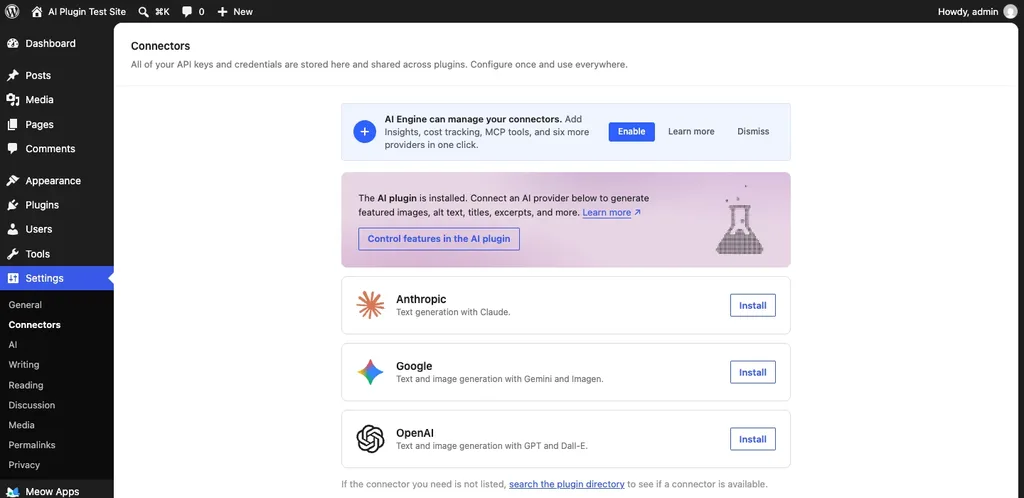
One security point, though: according to the Make WordPress Core announcement, keys saved in the database are masked on screen but not encrypted, and encryption is still being worked on. The good news? WordPress will happily read the key from an environment variable or a PHP constant instead, and if your host allows that, I'd keep it there.
Desk 1: Writing and SEO
1. Jetpack AI Assistant
Jetpack's AI Assistant lives right inside the block editor, next to your paragraphs. You can ask it for a first draft, turn rough notes into a list or a table, make the tone friendlier, fix grammar, translate a paragraph, or get an SEO title and meta description out of it. Because it sits where you already write, it's the least complicated option here for regular bloggers.
The free allowance is fairly small: Jetpack gives you 20 requests to try it, and its FAQ calls them "the initial 20 requests", not a monthly quota. After that, Jetpack AI cost $4.95 a month for the first year when I checked, billed yearly at $59.40, renewing at $9.95 a month. Jetpack itself has 3+ million active installs, though its rating sits at 3.7 out of 5, lower than most plugins on this list.
2. Rank Math SEO (Content AI)
If you already use Rank Math for SEO, its Content AI is the obvious next step. It has 40+ AI tools, a chat assistant called RankBot, AI-written meta titles and descriptions, alt text, and even one-click long articles. One feature that stands out is "Fix SEO Tests with AI", which tries to sort out the red marks in your SEO checklist for you.
Free users get a small monthly allowance. Beyond that, Content AI is sold separately from Rank Math PRO, and Rank Math lists its prices in euros: from €5.99 a month billed yearly on the Starter plan, renewing at €83.88 a year. You can't plug in your own OpenAI key here. Rank Math has 4+ million active installs and a 4.8 rating. (Using Yoast instead? Here's my Yoast SEO review.)
3. GetGenie
GetGenie is an AI writer and SEO assistant rolled into one. It does keyword research, checks what's ranking on Google for your topic, walks you through a blog post with its Blog Wizard, and gives your draft an "AI Readiness Score" for AI answer engines. Particularly handy if you write regularly and don't own a separate SEO tool.
The free plan is genuinely decent: 2,500 AI words a month, plus a few keyword and SERP checks, with no card needed. Paid plans start at $10 a month on the list price, and GetGenie was running a sale when I looked, at $5.50 a month billed yearly for 20,000 words. It has 70,000 active installs and a 4.8 rating.
4. AI Puffer
You might know this one by its old name, AI Power; its FAQ confirms it's the same plugin. It packs an impressive amount into the free version: a chatbot, a content writer, auto-blogging, AI forms, image generation and a knowledge base.
You've got two ways to pay for the AI. Bring your own key from OpenAI, Claude, Gemini and several others, or use AI Puffer's own cloud, which gives verified accounts 25 free AI credits a month. Pro starts at $9.99 a month per site, and it's the smallest plugin here at 10,000 active installs, with a 4.6 rating. Go easy on auto-blogging, though, and remember the intern rule!
Desk 2: Chatbots and Customer Support
5. AI Engine
If I had to keep just one AI plugin, it would be this one. AI Engine, by Meow Apps, gives you chatbots, a content generator, an image generator, editor tools, alt text, and an MCP server, which lets assistants like Claude or ChatGPT work on your site. On my test site, it added a Meow Apps menu, plus shortcuts under Tools and Posts.
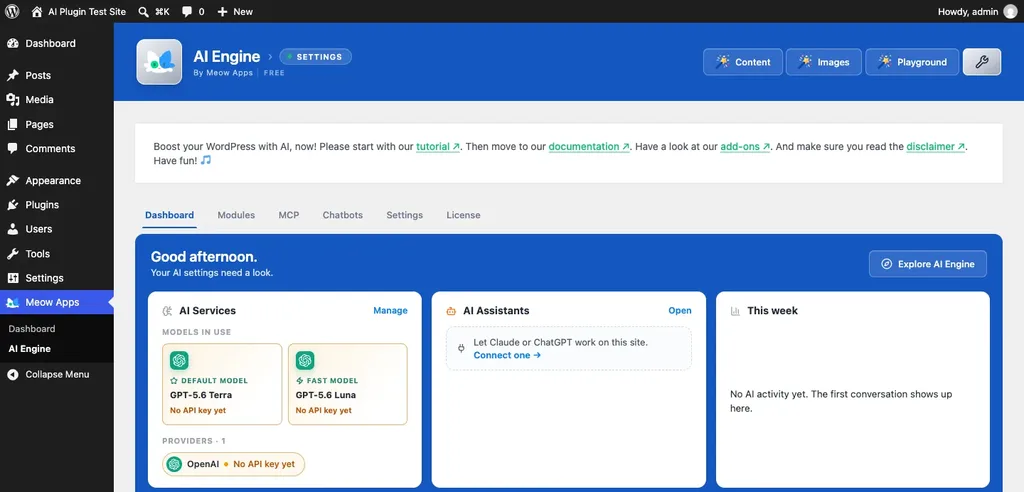
The free version is remarkably generous, but you bring your own API keys, so you pay the AI provider directly and Meow Apps adds no markup. Pro starts at $69 a year for one site and adds things like AI forms, knowledge bases and extra MCP tools. With 90,000 active installs and a 4.9 rating from 872 reviews, it shares the top rating on this list with Starter Templates.
6. Tidio (Lyro AI Agent)
Tidio is a live chat tool, and Lyro is its AI agent. It learns from your FAQs and answers customers when you're busy or asleep; Tidio says it can handle up to 70% of questions, though that's the vendor's own figure. For a small store owner who gets the same "where's my order?" message ten times a day, this one makes practical sense.
Your first 50 Lyro conversations are free, and that's a lifetime allowance, not a monthly one. Lyro on its own starts at $32.50 a month billed yearly, for 50 conversations a month. Around 70,000 sites use the plugin, and it's rated 4.8. Running a WooCommerce store? My list of the best WooCommerce plugins has more ideas.
Desk 3: Design, Pages and Forms
7. Angie by Elementor
Elementor's AI has a new name and a new home. It's now Angie, a separate plugin from the Elementor team, and it builds full Elementor pages, widgets, design systems and code snippets from a plain-English prompt. It can even work on the rest of your WordPress site through conversation.
The free plan has limited daily credits, and you can't buy additional Angie credits on their own. Proper AI credits come with Elementor One plans, which were $180 for the first year when I checked, renewing at $228. Angie has 100,000 active installs but only a 3.2 rating from 19 reviews, and its own page tells you to back up your site before using it. Fair warning, I'd say. Still choosing a builder? See my list of the best page builder plugins.
8. Starter Templates (AI Website Builder)
Starter Templates, from the team behind the Astra theme, can build a whole website from a short description of your business, copy and images included, in a couple of minutes. For someone who wants a decent first version fast and plans to tweak it afterwards, that's a reasonable deal.
The AI builder needs a free ZipWP account, and the free plan gives you 2 AI site generations in total. If you need more, ZipWP's Starter plan was $99 for the first year when I checked (up to 3 sites), and it goes to $149 at renewal. Over a million sites run the plugin, and its 4.9 rating says people are happy with it. Prefer to build things yourself, one step at a time? Follow my guide on how to build a WordPress website.
9. WPForms
WPForms now calls itself an AI form builder: describe the form you want, and WPForms AI builds it, fields and all. The free Lite version doesn't get the full thing, mind you. Lite has smaller AI helpers like AI Choices, which fills in dropdown and checkbox options for you, while building a whole form with AI needs a paid plan.
Paid plans start at $49.50 for the first year on Basic, renewing at $99. WPForms has 5+ million active installs and a 4.8 rating, so it's the most widely used plugin on this list.
Desk 4: Images and Languages
10. AltText.ai
Writing alt text for hundreds of old images is nobody's idea of entertainment. That's where AltText.ai comes in. Upload a picture and the alt text is already there; point it at your old media library and it works through the backlog in bulk. Store owners will like that it can slip WooCommerce product names and your SEO keyphrase into the text, and it speaks 130+ languages too.
To start, you get 25 free credits, and each credit covers one image. After that, plans begin at $5 a month for 100 images, and unused credits roll over. It has 20,000 active installs and a 4.7 rating. Do read a few of its descriptions before trusting the automatic bulk run, though.
11. TranslatePress
Want your site in Hindi, Telugu or Spanish as well? TranslatePress lets you translate pages visually, right on the front end, and its AI does the first pass for you, and then you check and polish everything afterwards.
The free version includes 2,000 AI words, which is enough to properly test it on a page or two. You can also connect your own Google Translate API key instead. Paid plans are priced in euros, starting at €99 a year for one site with 50,000 AI words. TranslatePress has 400,000 active installs and a 4.7 rating.
Desk 5: The Official Option
12. AI (by WordPress.org)
This one comes straight from WordPress.org's own AI team, and it's simply called "AI". It costs nothing, and the team openly labels it experimental, so expect things to change. Switch on its features and it'll suggest titles, excerpts, meta descriptions and alt text for you; it can also create or edit images, summarise long posts, translate content and lend a hand with comment moderation.
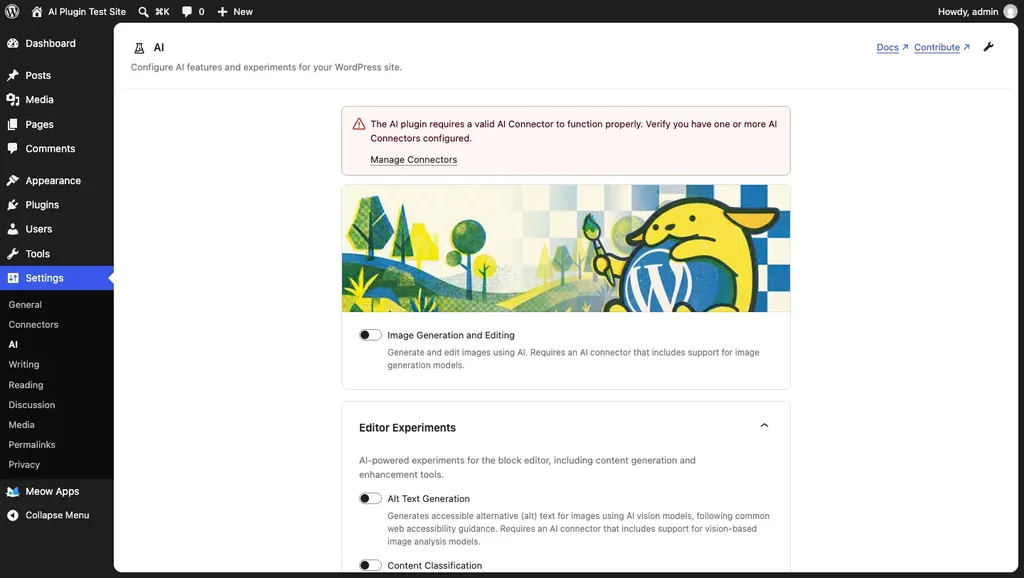
On my test site, it showed up under Settings as "AI", with each feature behind its own toggle and a warning that it needs a working AI connector first. So you install a connector plugin, like AI Provider for Anthropic or OpenAI, and add your key in Settings, then Connectors. It can even use a local model through Ollama. It has 60,000 active installs and a 4.2 rating from just 10 reviews, so it's still early days. One heads-up: AI Engine's FAQ advises against running both plugins together.
Best AI Plugins for WordPress: Free vs Paid at a Glance
Here's the financial side in one place, as it stood on 28 October 2026:
| Plugin | What you get free | Paid from |
|---|---|---|
| Jetpack AI Assistant | 20 requests to try it | $4.95/mo first year, billed yearly |
| Rank Math Content AI | A small monthly allowance | €5.99/mo, billed yearly |
| GetGenie | 2,500 AI words a month | $5.50/mo on sale, billed yearly |
| AI Puffer | Your own key, or 25 cloud credits a month | $9.99/mo |
| AI Engine | Most features, with your own key | $69/yr |
| Tidio Lyro | 50 conversations, once | $32.50/mo, billed yearly |
| Angie by Elementor | Limited daily credits | $180 first year (Elementor One) |
| Starter Templates | 2 AI site generations | $99/yr (ZipWP) |
| WPForms | AI Choices in Lite | $49.50 first year |
| AltText.ai | 25 images | $5/mo |
| TranslatePress | 2,000 AI words to test with | €99/yr |
| AI (WordPress.org) | Everything, but bring your own key | Nothing; your AI provider bills you |
Do watch the renewals, because quite a few of these first-year prices jump later. The pricing pages do mention it, just not in big letters.
How I Chose These 12
My starting point was a simple WordPress.org search for AI plugins, sorted by active installs. Anything that looked abandoned, had poor ratings or hid what it really costs, I dropped. All twelve say they're tested up to WordPress 7.1.3, and each one got an update in the two months before I checked. I also didn't want six copies of the same writing bot, so I picked plugins for different jobs: writing, chat, design, images and languages.
As for testing, I put the official AI plugin and AI Engine on a fresh WordPress 7.1.3 site and looked at where they show up and what they ask you for. What I didn't test: the quality of each plugin's AI output with paid credits. For that, start every plugin on its free tier and evaluate it on your own content.
FAQs: Best AI Plugins for WordPress
Will AI-written content hurt my Google rankings?
Not just because AI helped write it. Google's own guidance on AI-generated content is pretty clear: it rewards good, helpful content no matter how it was made, while content made mainly to game rankings is treated as spam. My advice? Let AI write the rough draft, then add what you know from experience and double-check every number.
Will I need my own OpenAI API key?
Only for some: AI Engine and the official AI plugin run on your own provider key, and AI Puffer gives you the choice. Jetpack, Rank Math, GetGenie, AltText.ai, Tidio, Angie and TranslatePress use their own credits, so you pay them instead.
What's the best free AI plugin for WordPress?
For a pure free start, the official AI plugin and AI Engine cost nothing to install, though you'll still pay your AI provider for usage. If you want no API key at all, GetGenie's 2,500 free AI words a month is a good place to start.
Can I use the official AI plugin and AI Engine together?
AI Engine's own FAQ advises against installing both simultaneously. AI Engine can manage the keys on the Connectors screen, so pick one of the two as your main AI layer.
Are AI plugins safe to use?
Mostly, yes, as long as you treat them like any other plugin. Get them from trusted sources, keep them updated, run one of the best security plugins, and take regular backups with a backup plugin. One thing people forget: when these plugins work, your text goes off to an outside AI company. Say so in your privacy policy. And store API keys outside the database where you can.
How many AI plugins should I install?
One or two, honestly: pick one main AI plugin for writing and one for a specific job, like alt text or chat. Every extra plugin adds updates, potential conflicts and another monthly bill.
Summing Up
So, which are the best AI plugins for WordPress? AI Engine is my pick for most people, Jetpack AI suits bloggers who live in the editor, Rank Math's Content AI is the SEO choice, and the official AI plugin is the one to watch as WordPress builds AI into its own core. Whatever you choose, follow the intern rule: let AI do the heavy lifting, and keep the final say for yourself.
That's all for now. Which AI plugin are you using on your site? Do let us know in the comment box below.