Ask ten WordPress folks which SEO plugin you should install, and trust me, you'll hear ten very confident answers. Usually it's just whichever one they installed first, years ago. Fair enough for a quick tip at a meetup. But picking the best SEO plugins for WordPress deserves a little more than that, because the right one really depends on how you like to work. So I skipped the feature-list copying, put six popular plugins through one identical test, and noted down what each one did.
Quick background on me first. I've been building with WordPress since 2014, and a few of my own eCommerce sites still run on it, so I've lived with SEO plugins for a long, long time. Here's how this test went. For every plugin, I fired up a brand-new WordPress 7.1.4 site on WordPress Playground (PHP 8.3). Same post each time, same focus keyword ("start a food blog"), same meta description. Then I looked at what ended up in the page and in the database. Install counts and ratings come from WordPress.org, and prices come from each company's own pricing page, all checked on 30 October 2026.
For most sites, the best free pick is Rank Math, because redirects, a 404 log and five focus keywords per post cost nothing there. Rather have someone check your writing? Then go with Yoast SEO, the old reliable, which also started working the very second I switched it on. Prefer set-it-and-forget-it? The SEO Framework and Slim SEO barely need any settings at all. Sick of upsell banners? SEOPress. And if you like a checklist holding your hand, All in One SEO.
How to Choose: The ACT Test
Here's the thing nobody tells you. All six get the basics right, honestly. What really separates them is how involved they want you to be. Picture a long drive down I-95. One friend flips on cruise control and zones out. Another wants a driving instructor riding shotgun. And the third shows up in a pickup with a toolbox in the bed, because you never know.
I call this the ACT Test, and every SEO plugin fits one of these three styles:
- Autopilot: it fills in titles, descriptions, schema and sitemaps for you and stays out of the way. The SEO Framework and Slim SEO live here.
- Coach: it reads over your shoulder while you write and points out what to fix, sort of like a strict editor. That's Yoast SEO and All in One SEO.
- Toolbox: redirects, 404 logs, schema options, you name it, all crammed into one plugin. Rank Math and SEOPress are the big ones here.
So, which friend are you? Figure that out first, and you'll save yourself a weekend of installing and uninstalling plugins.
What Our Test Showed
First, a baseline. With no SEO plugin at all, my test post had 4 meta tags, no meta description, no social tags and no schema. Here's what each plugin changed:
| Plugin | Meta tags | Schema on our post | New database tables | Download size |
|---|---|---|---|---|
| Yoast SEO | 16 | Article, breadcrumbs and 4 more | 6 | 5 MB |
| Rank Math | 20, after the account step | BlogPosting and 4 more | 6 | 4 MB |
| All in One SEO | 18 | BlogPosting, breadcrumbs and 5 more | 13 | 8 MB |
| SEOPress | 17 | none on default settings | 1 | 3 MB |
| The SEO Framework | 15 | WebPage, breadcrumbs and 3 more | none | 0.8 MB |
| Slim SEO | 16 | Article, breadcrumbs and 4 more | none | 0.4 MB |
A few things stood out. Rank Math did nothing at all until I skipped its account step, which I explain below. All in One SEO added the most database tables, 13 of them, while The SEO Framework and Slim SEO added none. SEOPress, surprisingly, added no schema at all on its default settings. Slim SEO did add schema, just at the bottom of the page rather than in the head, and search engines are fine with that. Do any of these numbers decide your rankings? Nope. They just show how much each plugin does for you without being asked.
The 6 Best SEO Plugins for WordPress
1. Rank Math: Best Free Toolbox
Rank Math has grown to more than 4 million active installs since it arrived on WordPress.org in 2018, and it holds a 4.8 rating from 7,520 reviews. Its free version is the most generous here. You get five focus keywords per post, a redirection manager, a 404 monitor, Google Search Console data and internal link suggestions, all without paying.
There's one catch, though. On my test site, Rank Math added nothing to the page until I either connected a free Rank Math account or pressed skip on its setup screen. After that, it produced 20 meta tags, the most of any plugin here, including 7 Twitter tags. It also added 6 database tables, 2 of its own and 4 for a background task library it bundles.
Price: free, or Rank Math PRO at 5.59 a month billed yearly on its current offer, renewing at 8.99 a month (107.88 a year) for all the websites you own. ACT style: Toolbox.
2. Yoast SEO: Best Writing Coach
Yoast is the one everyone has heard of, with more than 10 million active installs and a 4.8 rating from 27,821 reviews. It worked the second I activated it. On my test post it added 16 meta tags and a neat schema graph that included breadcrumbs, which Rank Math and SEOPress didn't add on their default settings.
Where Yoast really shines is the editor. Its readability check flags long sentences, passive voice and missing transition words, so your posts get easier to read over time. The free version gives you one focus keyphrase, though, and redirects need Premium. I go deeper into this pair in my Yoast vs Rank Math comparison.
Price: free, or Yoast SEO Premium at $118.80 a year per site. ACT style: Coach.
3. All in One SEO: Best Guided Checklist
All in One SEO, or AIOSEO, is the grandpa of this list. It showed up on WordPress.org back in 2007, and today more than 2 million sites run it, with a 4.7 rating from 5,231 reviews. Its TruSEO score walks you through each post like a checklist, and a setup wizard helps you with the first settings.
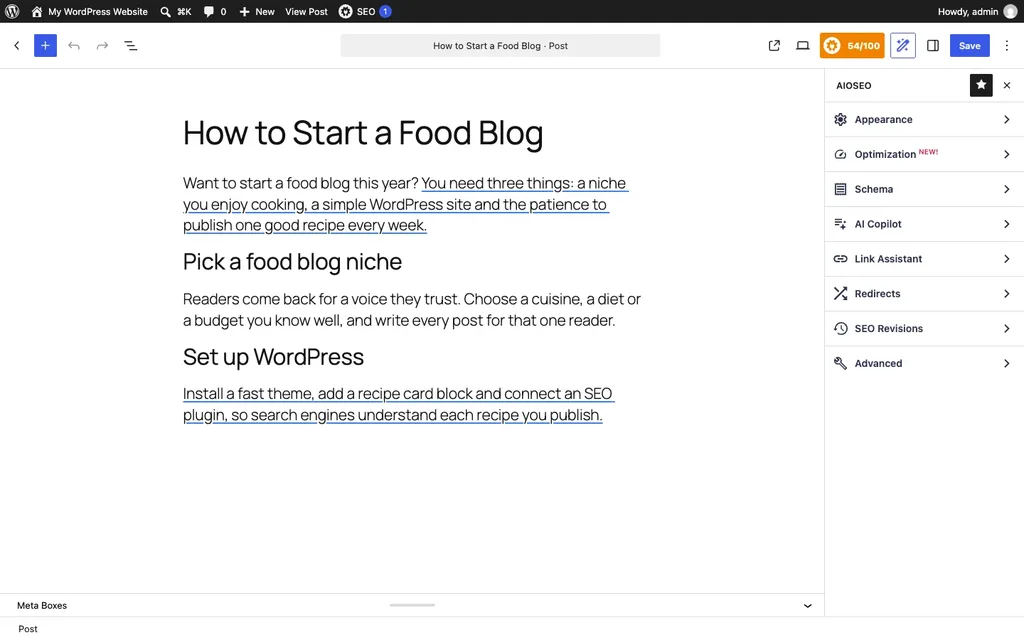
On my test post it added 18 meta tags and a full schema graph with BlogPosting, breadcrumbs and an Organization, and it even wrote a meta description from the post on its own, since I hadn't filled one in. It also created 13 database tables, by far the most in this test. It's also the heaviest download here, at 8 MB, and TruSEO gave my short test post 54 out of 100.
Price: free, or AIOSEO Basic at $49.50 for the first year for one site. Read the fine print, though: AIOSEO's own pricing page says Basic renews at $99 a year, and the other plans also renew at roughly double. ACT style: Coach.
4. SEOPress: Best for No Upsells
SEOPress is smaller, with more than 300,000 active installs, but it's rated 4.8 from 1,267 reviews and it was updated the day before my test. Its free version includes unlimited target keywords, redirections, XML and HTML sitemaps, Google and social previews, and no tracking or ads in your dashboard. That last part matters more than you'd think after a year of banners from other plugins.
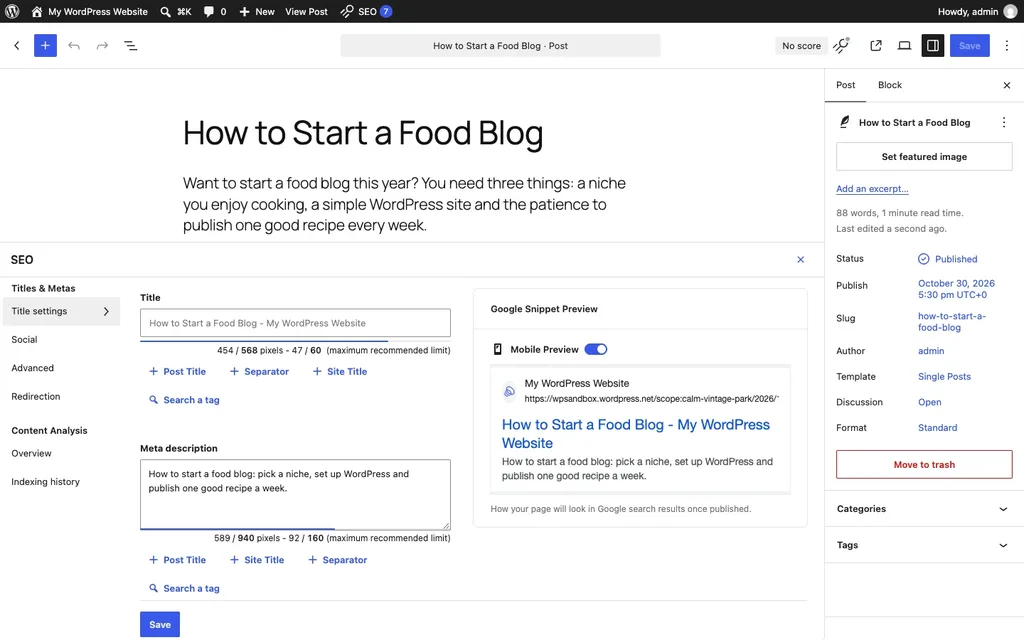
On my test post, SEOPress added 17 meta tags, including the description and the social tags, and just 1 database table. It added no schema on its default settings, though, so you'll want to fill in its Knowledge Graph settings and check which schema options your plan includes. Its editor box is handy, by the way, with live pixel counts for the title and description right next to a Google preview.
Price: free, or SEOPress PRO at $49 a year for one site, $59 for five sites or $149 for unlimited sites. The price you pay is also your renewal price, and there's a 14-day money-back guarantee. ACT style: Toolbox.
5. The SEO Framework: Best Autopilot
The SEO Framework has more than 200,000 active installs and the best rating on this list, 4.9 from 380 reviews. It's built for people who want SEO handled without a dashboard full of scores. Titles, descriptions, canonical links and schema are filled in automatically, and the plugin is free of ads and branding.
On my test post it added 15 meta tags and a schema graph with the web page, breadcrumbs and an Organization, without me touching a single setting, and it created no extra database tables at all. It's also a small download, under 1 MB.
Price: free, with extensions through its companion plugin. Paid plans start at $7 a month, paid yearly, for two sites. ACT style: Autopilot.
6. Slim SEO: Best Lightweight Pick
Slim SEO is the smallest plugin here, a 0.4 MB download, with more than 70,000 active installs and a 4.7 rating from 136 reviews. It generates meta tags, sitemaps and breadcrumbs automatically, and the free version even includes redirects, 404 monitoring and an automatic redirect when you change a post's URL.
In my test it added 16 meta tags, including 7 Open Graph tags, and a schema graph with Article and breadcrumbs, placed at the bottom of the page instead of the head. It created no database tables either, which fits the name.
Price: free, or Slim SEO Pro at $59 a year for one site, $119 for 10 sites or $179 for unlimited sites, renewing at the same regular price. ACT style: Autopilot.
Free vs Paid: What You Actually Get
So, do you need to pay at all? For most blogs and small business sites, I'd say no. Titles, meta descriptions, canonical links, XML sitemaps, social tags: every plugin here does all of that for free. What the paid plans sell is mostly convenience, like AI writing help, extra schema types, keyword rank tracking, and more sites on one license.
The one thing I'd check before choosing is redirects. Rename a page even once, and you'll need one. Rank Math, SEOPress and Slim SEO include them for free, while Yoast keeps its redirect manager for Premium. If your plugin doesn't have one, our guide on how to redirect a page in WordPress covers the other options.
Which SEO Plugin Should You Choose?
Bring back the ACT Test. Here's how it plays out for the usual kinds of sites:
- A new blog on zero budget: Rank Math free, since it covers redirects and a 404 log you'll need sooner or later.
- Writers who want to improve: Yoast SEO, for its readability coach.
- A business site you don't want to babysit: The SEO Framework or Slim SEO, set up once and left alone.
- Agencies and freelancers: SEOPress PRO, because $149 a year covers unlimited sites and the price doesn't jump at renewal.
- Online stores: any of the big four can handle WooCommerce products, so pair your pick with the right tools from my list of the best WooCommerce plugins.
Already using one and happy with it? Then don't switch just because a list told you to. The plugin is rarely the reason a page isn't ranking.
FAQs: Best SEO Plugins for WordPress
Do I really need an SEO plugin?
For most sites, yes. WordPress on its own doesn't let you write a meta description, and it adds no social tags or schema, as my no-plugin baseline showed. An SEO plugin fills those gaps in a few minutes.
Can I use two SEO plugins at once?
Please don't. Each one writes its own meta tags and schema markup into every page, so running two gives search engines everything twice. Keep one and deactivate the other.
Will switching SEO plugins hurt my rankings?
Not if you do it carefully. Most of these plugins can import titles and descriptions from the others. Take a full backup first, as I explain in my guide on how to back up and restore a WordPress site, then spot-check a few pages afterwards.
How can I see which SEO plugin a site uses?
Run it through our free WordPress theme and plugin detector. It spots SEO plugins even when they load no files, by reading the comments they leave in the page, and it shows the version too.
Summing Up
So, which are the best SEO plugins for WordPress in 2026? Rank Math gives you the most for free, Yoast SEO is the best writing coach, All in One SEO offers the most hand-holding, SEOPress has the fairest pricing, and The SEO Framework and Slim SEO are the best if you'd rather not think about SEO settings at all. Run the ACT Test, pick the style that matches how you work, and then get back to writing, because that's what actually moves your rankings. If you're curious about a broader set of tools, our older list of WordPress plugins and tools for SEO covers more than plugins.
That's all for now. So tell me, which SEO plugin is running on your site right now? Do let us know in the comment box below.