Start a WordPress site and, I promise you, within one week some well-wisher will say, "Bro, install an SEO plugin." Then the real fight begins. Yoast or Rank Math? People have been arguing about Yoast vs Rank Math in forums and Facebook groups for years, and most of that arguing is just feature lists copied off sales pages. Boring, right? So I did the even more boring thing. I installed both, gave them the very same post, and watched what came out the other end.
A quick word about me first. I've been playing with WordPress since 2014, and a few of my own eCommerce sites still run on it, so SEO plugins are like old furniture in my house by now. For this test, I spun up two fresh WordPress Playground sites (WordPress 7.1.4, PHP 8.3). One got Yoast SEO 28.8. The other got Rank Math 1.0.280. Both got the exact same test post, the same focus keyword ("start a food blog") and the same meta description. Prices come from each company's official pricing page, checked on 30 October 2026, and the installation numbers come from WordPress.org.
Coming to the matter straight away: if free features are what you want, go for Rank Math. Redirects, a 404 monitor and five focus keywords per post are all free there, while Yoast either charges for them or simply doesn't have them. Prefer something calm and proven that also teaches you to write better? Then Yoast, no doubt. Over 10 million sites run it, and its readability checks feel like a strict teacher looking over your shoulder. On the paid side, Rank Math PRO covers all your own sites for one price, while Yoast Premium costs $118.80 a year per site.
Yoast vs Rank Math: The Thali Test
Whenever someone asks me to pick between these two, I end up talking about food, believe me. Rank Math is a full South Indian thali. You get rice, sambar, rasam, two or three curries, curd, papad and some payasam to finish, and the whole banana leaf costs one fixed price. Will you finish everything? Probably not. But it's sitting right there if you get hungry.
Yoast is different. Think of the dosa hotel near your old school that has made the same crispy masala dosa since before you were born, and still has a line outside every Sunday. Want extra chutney or a side of vada, though? That goes on the bill, and those paid sides are what Yoast calls Premium.
I call this the Thali Test, and it comes down to three plain questions:
- Do you need the side dishes for free? I mean redirects, a 404 log, and more than one focus keyword per post.
- Do you want a writing coach? Some folks love being told their sentences are too long. Others want to throw the laptop.
- How many sites are you feeding? Paying for one blog is one thing; paying for ten sites is a whole other story, and these two companies bill very differently.
Remember your answers. By the end, I bet the choice picks itself.
Yoast and Rank Math at a Glance
First, some cold numbers. I pulled these straight off WordPress.org on 30 October 2026:
- Yoast SEO: over 10 million active installs, and 27,821 people have rated it, for an average of 4.8 out of 5. The newest version came out on 27 October 2026, and it wants WordPress 7.0 and PHP 7.4 at minimum. Fun fact: Yoast says its story started back in 2008, but its WordPress.org page only goes back to 2010.
- Rank Math SEO: 4 million plus installs, and funnily enough the very same 4.8 rating, though from 7,520 reviews. Its latest update came out on 6 October 2026. It's happy with WordPress 6.7 and PHP 7.4, and it only showed up on WordPress.org in 2018.
Same rating, then, although Yoast has more than double the installs and almost four times the reviews. That's what eight extra years in the market buys you. Rank Math, on the other hand, has reached 4 million sites in about eight years, which is quick growth for a newcomer.
What We Found When We Installed Both
Rank Math did nothing until I skipped its account step
This one genuinely surprised me: after activating Rank Math, I opened my test post and checked the page source. Nothing. The page had the same 4 meta tags as a site with no SEO plugin at all, and the editor showed no Rank Math panel either.
So I dug into the plugin's code to understand why. Rank Math keeps its modules switched off until you either connect a free Rank Math account or press the skip button on its setup screen. Once I skipped that step, every module activated properly. It's not a big deal, but if you install Rank Math and wonder why your meta descriptions aren't showing, now you know where to look. Yoast, by contrast, started working immediately after activation.
What each plugin adds to your page
Coming to the real work, here's what each plugin put in the page head of my test post:
- No SEO plugin: 4 meta tags, a canonical link, no meta description, no social tags and no schema.
- Yoast SEO: 16 meta tags, including my meta description, 6 Open Graph tags for Facebook and 3 Twitter tags, plus one schema graph with Article, WebPage, BreadcrumbList, WebSite, Person and ImageObject.
- Rank Math: 20 meta tags this time. Same description, 6 Open Graph tags, and a generous 7 Twitter tags, along with a schema graph listing BlogPosting, WebPage, WebSite, Person and ImageObject.
Good news first: neither one messed up the basics. Title, meta description, canonical link, robots tag, all present and correct. The small difference is the schema markup. Yoast added breadcrumb schema to a plain blog post by default, whereas Rank Math didn't on its default settings. Neither of these will make or break your rankings, but it reveals each plugin's philosophy. Yoast quietly does more for you automatically, while Rank Math gives you more settings to configure.
Inside the editor
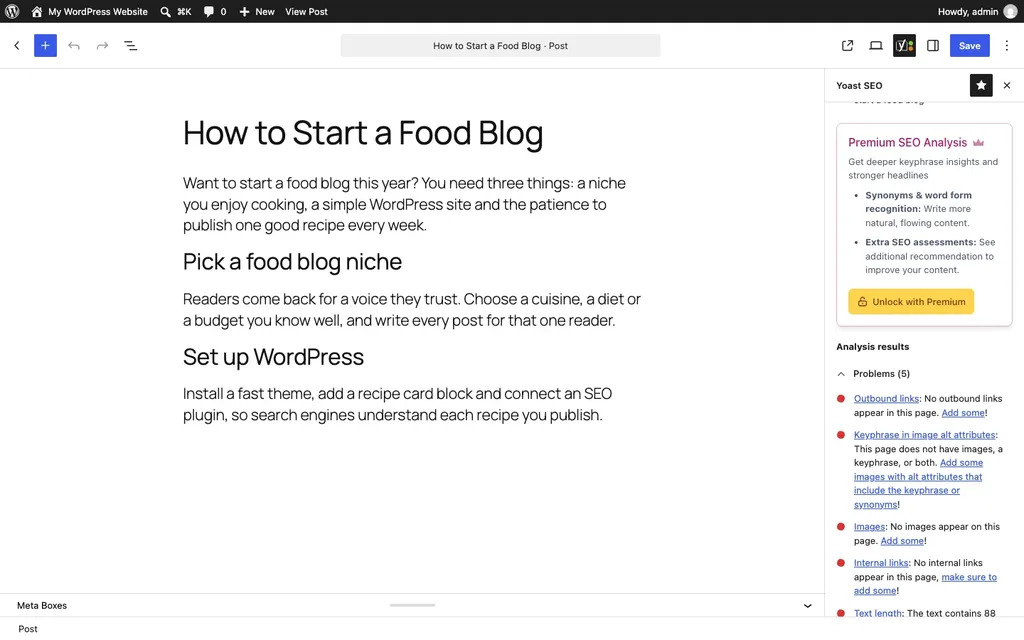
My test post was deliberately short, just 88 words, with no images and no links. Yoast flagged five problems: no outbound links, no internal links, no images, no keyphrase in image alt text, and a text that was far too short. Fair enough, every one of them was accurate.
Rank Math, meanwhile, slapped a 58/100 badge on the top bar, with a second Content AI badge sitting at 0 (I never touched its AI tools, so that's fair). Open its sidebar and you'll see little green ticks for the keyword in the SEO title, in the meta description and in the URL.

A small warning here. Don't marry these scores. They tick boxes on a checklist; they have no idea what Google will actually do with your page. It's easy to waste a whole evening chasing a perfect green light when the post simply needs better information. Treat the numbers as gentle reminders and move on.
Under the hood
Out of curiosity, I also checked what each plugin left in the database. Yoast created 6 tables of its own, which it uses for its indexables and internal link counting, and stored about 11 KB of settings that load on every page request. Rank Math created 2 tables and stored about 9 KB of such settings. Turn on more Rank Math modules, like redirections or the 404 monitor, and it adds tables for those too.
The download sizes were close as well: 5 MB and 1,949 files for Yoast, against 4 MB and 1,337 files for Rank Math. Bigger doesn't automatically mean slower, mind you, because a plugin only runs the code a page actually needs. I didn't run speed tests here, since a Playground sandbox isn't a reliable environment for measuring performance.
Free Features: Where Rank Math Gives More
This is the part that made Rank Math popular, and it's still true in 2026. I went through both plugin pages on WordPress.org line by line, and this is how the free versions stack up:
- Focus keywords: Rank Math free allows five per post. With Yoast free you get exactly one, and the other four are a Premium thing.
- Redirects: changed a post's URL? In Rank Math free, you just add a 301 redirect from the old address to the new one, without leaving the plugin. Yoast keeps its redirect manager for Premium. My guide on how to redirect a page in WordPress shows the other ways to do it.
- 404 monitor: Rank Math free logs broken URLs that visitors hit. Yoast's plugin page doesn't list one at all.
- Google Search Console data: Rank Math free can pull it into your dashboard. Yoast lists Search Console insights too, through its Site Kit integration.
- Internal link suggestions: free in Rank Math, Premium in Yoast.
- Readability: here Yoast wins, hands down. Even the free version grumbles about long sentences, long paragraphs, passive voice and missing transition words, much like a school English teacher with a red pen. Rank Math has fewer of these checks, and they're mostly about layout.
- The basics: both give you an XML sitemap, breadcrumbs, schema, Open Graph tags for social sharing and an llms.txt file for AI crawlers.
One privacy note while we're here. Rank Math's own documentation says that every time you type in its focus keyword field, the keyword and your site's language are sent to api.rankmath.com to fetch suggestions. No account is needed for that, and it's harmless for most blogs. Still, if you work on confidential client projects, it's good to know.
Yoast Premium vs Rank Math PRO: What You Pay
Now let's talk money, because this is where the two companies really differ.
Yoast SEO Premium costs $118.80 a year (before tax) for one site. Got five sites? You'll need five subscriptions, though Yoast does give a bulk discount at checkout. One team seat is included, and extra seats cost $5 a month each. Premium brings the redirect manager, internal linking suggestions, up to five keyphrases and Yoast's AI tools, with no separate AI credits to buy.
Rank Math PRO was on a 38% discount when I checked its pricing page, at 5.59 a month, billed yearly, and it renews at 8.99 a month, which works out to 107.88 a year. The page showed me euros, but its own comparison table lists the same figures in US dollars. The big difference? PRO covers unlimited websites that you own. Client sites aren't included, so freelancers and agencies need the Business plan, which renews at 27.99 a month.
So if you operate one site, the yearly bills are similar. Run three or four sites of your own, though, and Rank Math PRO costs a fraction of what Yoast would.
Yoast vs Rank Math: Side by Side
| Yoast SEO | Rank Math | |
|---|---|---|
| Active installs | 10 million plus | 4 million plus |
| Works right after activation? | yes, straight away | only after you connect an account or skip that step |
| Focus keywords in the free plugin | just one | five per post |
| Redirects and 404 log | redirects need Premium, and there's no 404 log | both free |
| Writing help | a strict readability coach | a few structure checks |
| Meta tags on our test post | 16 | 20 |
| Paid plan | $118.80 a year, per site | 107.88 a year after the offer, for all your own sites |
| Pick it if… | you want a proven plugin that teaches you to write cleaner posts | you want every tool free today, or you run several sites of your own |
Which SEO Plugin Should You Pick?
Time to bring back the Thali Test. Here's how it plays out for the usual kinds of sites:
- A new blog on a tight budget. Go with Rank Math free, since you get redirects and a 404 log without spending anything, and you'll need both the first time you rename a post.
- Writers who want to improve. Choose Yoast, because its readability analysis is the closest thing to an editor sitting next to you, and it costs nothing.
- Several sites of your own. Rank Math PRO, easily, because one subscription covers all of them.
- An online store. Both work with WooCommerce. Rank Math's free plugin has a WooCommerce module, and PRO adds more product schema options, while Yoast sells its WooCommerce SEO add-on on top of Premium. My list of the best WooCommerce plugins covers the rest of a store's toolkit.
- Already happy with one of them? Then stay put, because switching plugins for a few extra features rarely moves your rankings.
FAQs: Yoast vs Rank Math
Is Rank Math better than Yoast?
For free features, yes, Rank Math gives you more. For readability guidance and a long, steady track record, Yoast still has the edge. In our test, both handled the basics correctly, so "better" really depends on which extras you'll actually use.
Is Rank Math really free?
The core plugin is free, and so are its redirects, 404 monitor and five focus keywords. You do have to connect a free account or skip that step on its setup screen before it starts working. Paid PRO plans add things like the advanced schema builder and keyword rank tracking.
Can I use Yoast and Rank Math together?
Please don't. Each one writes its own meta tags and schema into every page, so with both switched on, Google gets everything twice. Keep one SEO plugin, deactivate the other, and sleep peacefully.
Will switching from Yoast to Rank Math hurt my rankings?
Done carefully, no. Rank Math has a one-click import for Yoast's SEO data and settings. Still, take a full backup first, as I explain in my guide on how to back up and restore a WordPress site, and spot-check a few pages afterwards to make sure every title and description came across.
Which is better for beginners?
Both are beginner-friendly, to be honest. Yoast works the moment you activate it and explains everything in plain words. Rank Math asks a few more questions up front through its setup wizard, but it gives you more for free. If you're not sure, start with Yoast and come back to this question in six months. You can read our older Yoast SEO plugin review for a closer look at how it has grown.
Summing Up
So, Yoast vs Rank Math, who wins? Rank Math is the full thali: more tools on the plate for free, and one PRO price for all your own sites, as long as you get past its account step. Yoast is the trusted dosa place: it worked from the first second in our test, coaches your writing better than anything else, and charges per site for the extras. Run the Thali Test honestly, pick the one that fits how you work, and then stop worrying about plugins and get back to creating content, because that's where your rankings really come from.
That's all for now. So tell me, which side are you on, team Yoast or team Rank Math? Do let us know in the comment box below.