WooCommerce 11.3 came out on November 11, 2026, about two weeks before Black Friday. It's a backwards-compatible release, but it includes a database update, a change to how refunds are created through the REST API, and the removal of an old MCP endpoint. For most stores, the visible changes are friendlier sale badges, more block styling options and smoother product gallery swipes on phones. Below we go through what's new, who needs to test what, and whether to update before your busiest week of the year.
We installed 11.3 on a fresh WordPress Playground site to check the new settings for this post. Every developer change listed here comes from the WooCommerce developer blog.
WooCommerce 11.3 at a Glance
| Detail | WooCommerce 11.3 |
|---|---|
| Release date | November 11, 2026 |
| Backwards compatible | Yes |
| Database update | Yes (runs in the background) |
| Minimum versions | WordPress 7.0 and PHP 7.4 |
| Size of the release | 1,343 pull requests from 111 contributors |
What's New for Store Owners
Sale Badges Can Show the Discount
The On-Sale Badge block no longer has to say just "Sale." In the block settings, under Badge content → Show, you can now choose one of three options:
- Text: "Sale" or your own wording, like "Special offer"
- Amount: the money saved, like "$5.00"
- Percentage: the discount, like "25%"
Amount and Percentage can also take a prefix and suffix, so "Save " and " off" turns the badge into "Save 25% off." For variable products, the badge shows the biggest discount as "Up to 50%," and then updates when a shopper picks a variation. If that variation isn't on sale, the badge disappears. Existing badges keep saying "Sale," so nothing changes until you edit them.
This is a nice touch for Black Friday. A badge that says "Save 30%" tells shoppers more than a plain "Sale" label, and you can set it up in the Site Editor without any custom code.
More Styling Controls for Product Blocks
The Product, Featured Product, Featured Category and Product Categories List blocks, along with other catalog blocks, get new color, spacing and border controls. WooCommerce says each block gets a curated set of options rather than every possible setting. The Featured Category block can also be used inside a Terms Query block, which makes it easier to build a grid of category cards with one consistent design.
Smoother Product Gallery Swipes on Phones
The Product Gallery block now uses the browser's native scrolling and scroll snap. In plain terms, images follow your finger and respond to quick flicks the way shoppers expect on a phone. Since most store traffic is mobile, this is a small change that people will actually notice.
A Setting for Your Refund and Returns Policy Page
You can now choose your refund and returns policy page under WooCommerce → Settings → Advanced → Page setup. WooCommerce labels that page in your Pages list and adds structured data that links to it, so search engines can find your returns policy without extra markup.
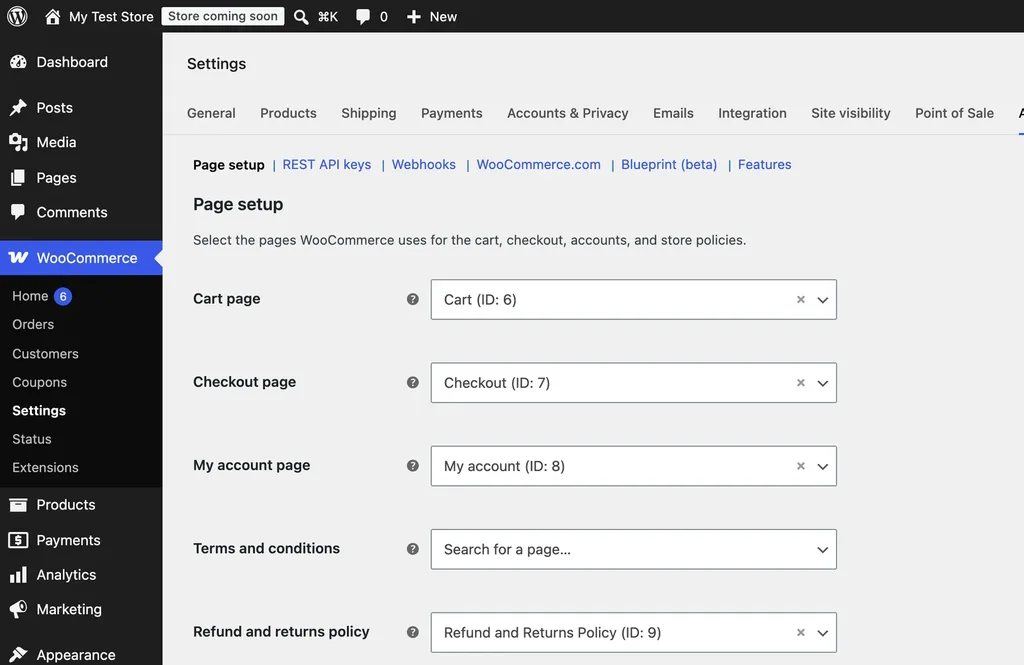
On our fresh test store, WooCommerce had already selected the draft "Refund and Returns Policy" page it creates during setup. If you use a different page, pick it here, and make sure the page is published with your real terms.
Payment Methods in Analytics
The Analytics Orders report now shows the payment method as a column, includes it in CSV exports and adds it as a filter. That makes it easy to see how many Black Friday orders came through PayPal versus cards, for example. Existing orders are filled in by a background task, so older data may take a while to appear.
One more change: stores that start on WooCommerce 11.3 or later no longer see the old WooCommerce → Reports menu. Existing stores keep it. The legacy screen still works at its old address, but WooCommerce is clearly moving everyone to Analytics.
What Developers Need to Check
If you only use well-known plugins and a standard theme, you can skip most of this section. If you have custom code, a custom app or an integration that talks to your store, these are the changes from the WooCommerce 11.3 developer advisory to test.
- REST API refunds are validated. Refunds created with
POST /wp-json/wc/v3/orders/{order_id}/refundsnow check that line-item amounts add up and don't exceed what's refundable. Invalid requests return HTTP 400 or 422 instead of creating a refund. Integrations should treat those responses as failures. - The old MCP endpoint is gone. WooCommerce removed
/wp-json/woocommerce/mcpand its REST API key connection. AI clients now connect through the WordPress MCP Adapter plugin with an application password. - Products API filters behave differently. Using
on_saletogether withincludeorexcludenow returns only products that match both. Used alone, each parameter works as before. - Custom Analytics SQL may break. The
wc_order_statstable gets its ownpayment_methodcolumn. Custom queries that joinwc_ordersand use a barepayment_methodwill fail with an "ambiguous column" error until you add the table name. - The Shop page template value changes. With a block theme, reading the Shop page's
_wp_page_templatenow returnsarchive-product. - VAT exemptions now persist. A customer's VAT-exempt flag and calculated shipping now survive account saves, so code that relied on a save to reset the flag needs updating.
Large Stores: Plan the Database Update
The database update adds a column and an index to the wc_order_stats table, then fills it in the background through Action Scheduler, 500 orders at a time. On MySQL 8.0 or later, adding the column is instant and building the index doesn't block orders. It still reads every row, though, and WooCommerce estimates the index at about 47 MB per million orders. On older servers like MySQL 5.7, the whole table gets rebuilt.
If your store has years of orders, run the update at a quiet time and check your disk space first. Your host's control panel or our guide to checking your PHP version can help you confirm what your server runs.
Should You Update Before Black Friday?
For a small or mid-sized store with mainstream plugins, we'd update now rather than in the middle of Black Friday week. That leaves about two weeks to spot problems while traffic is still normal. Here is the order we recommend.
- Take a full backup of files and database. Our backup plugins guide covers the options.
- Update a staging copy first and place a test order with each payment method.
- Test refunds if an app or plugin creates them for you, such as a returns or accounting tool.
- Update the live store during a quiet hour and watch WooCommerce → Status → Scheduled Actions until the background update finishes.
If your store relies on custom refund code, an MCP connection or custom Analytics queries, test those changes first. If you can't test them before Black Friday, it's reasonable to wait until early December, as long as you keep WordPress and your plugins patched for security in the meantime.
WooCommerce 11.3: FAQs
When was WooCommerce 11.3 released?
WooCommerce 11.3.0 was released on November 11, 2026.
Does WooCommerce 11.3 need a database update?
Yes. It adds a payment method column and an index to the Analytics order stats table, and fills it for existing orders in the background.
What are the minimum requirements for WooCommerce 11.3?
The WordPress.org plugin page lists WordPress 7.0 or later and PHP 7.4 or later. A newer PHP version is faster and still receives security fixes, so it's worth upgrading if your host allows it.
Will WooCommerce 11.3 change my existing sale badges?
No. Existing On-Sale Badge blocks keep showing "Sale" until you edit them and choose Amount or Percentage.
Final Thoughts
WooCommerce 11.3 is a solid, practical release. Store owners get sale badges that show real savings, more design control over product blocks, and a proper home for the returns policy. Developers have a few more changes to check, especially around refunds, the MCP endpoint and custom Analytics queries. Back up, test on staging and update before the Black Friday rush if you can. If you're new to the platform, our WooCommerce guide and list of the best WooCommerce plugins are good next reads.