Open a slow WordPress site, and very often the real culprit is sitting right there on the page: a 4 MB photo straight from someone's phone, squeezed into a 700-pixel space. The theme isn't the problem, honestly. The images are. So, which of the many image optimization plugins for WordPress actually fix that, and which free plans are just a trial in disguise? That's what this list sorts out.
About me, quickly. I've been working with WordPress since 2014, and several of my own online stores still run on it with WooCommerce, so slow product photos are something I take personally. Here's what I did for this list. On 29 October 2026 I collected the WordPress.org numbers for 13 well-known image plugins (installs, ratings, last update, and which WordPress version each one was tested on), then went through each plugin's own page to find out what its free plan truly gives. Two of them, Modern Image Formats and Converter for Media, I also installed on fresh WordPress 7.1.4 test sites, just to look at their settings with my own eyes.
Want one name? Smush (1+ million installs, 96% rating) is the easiest start, and EWWW Image Optimizer is the best truly unlimited free option if your server allows it. For WebP without any monthly cap, Converter for Media is free; for AVIF too, ShortPixel and Imagify do both on small free plans (100 credits and 20 MB a month). If you'd rather not add a company's service at all, Modern Image Formats comes from WordPress's own performance team.
What Do Image Optimization Plugins Actually Do?
In short, image optimization plugins make your pictures lighter so pages open faster, and a good one does it without making them look any worse. Let me explain it the way most Indian families pack for a wedding trip. Nobody carries the whole wardrobe, right? You choose the outfits that suit the occasion, fold them tight, put them in a better bag, and leave the heavy stuff in the car till it's needed. I call this the Packing Rule, and every decent image plugin does some mix of these four jobs:
- Resize: shrink that 4000-pixel phone photo to the size your theme really shows.
- Squeeze: squash the file down. Lossless keeps every pixel exactly as it was, while lossy gives up a tiny bit of quality for a far smaller file.
- Convert: save a WebP or AVIF copy, two newer formats that fit the same picture into fewer bytes.
- Delay: hold back images lower on the page until the visitor actually scrolls down to them, which is what lazy loading means.
Where does the work happen? Some plugins crunch images on your own server, while others ship them off to their cloud and send them back lighter. Honestly, that one difference explains most of the pros and cons you'll see below.
How I Picked These 10
Popularity alone wasn't enough. A plugin made the list if it was actively maintained (updated within the last few months), tested with the current WordPress 7.1 series, well rated by real users, and honest about what its free plan includes. Two very popular plugins didn't pass that test, and I'll tell you why near the end. Numbers below are from WordPress.org on 29 October 2026.
The 10 Best Image Optimization Plugins for WordPress
1. Smush: Best All-Rounder for Beginners
Smush had 1+ million active installs and a 96% rating from over 6,000 reviews, the most of any plugin here. The free version compresses images on upload, bulk-optimizes your existing library and adds lazy loading. Here's the catch, though. Its FAQ spells it out: on the free version, any image above 5 MB is just skipped, and both WebP/AVIF serving and the image CDN need Pro.
Pick it if: you want something that simply works, and you don't mind shrinking huge photos yourself before they go up.
2. EWWW Image Optimizer: Best Truly Unlimited Free Plan
EWWW Image Optimizer also had 1+ million installs and a 96% rating. What makes it special is that it can compress images using tools on your own server, so there's no monthly limit at all. According to its page, that needs PHP's exec() function on a compatible server; if your host blocks it, EWWW still offers unlimited lossless JPG compression and WebP conversion through its free Compress API. EWWW says its lossless mode saves about 8% on average, and WebP conversion about 60%.
Pick it if: you have lots of images and don't want to count credits every month.
3. ShortPixel: Best for Quality Control
ShortPixel had 300,000+ installs and a 90% rating. You get 100 free credits a month, and its page lists unlimited monthly credits at $9.99, or one-time packs from $19.99. Three compression styles are on offer (lossy, glossy and lossless), it converts to both WebP and AVIF, and it quietly keeps a backup of your originals, so one click brings them back if you don't like the result. Even big files up to 100 MB are fine.
Pick it if: you're fussy about image quality and like knowing there's an undo button.
4. Imagify: Best for a Clean, One-Click Setup
Imagify had 900,000+ installs and an 86% rating. On the free plan you can optimize up to 20 MB of images a month, and that includes compression, resizing and WebP or AVIF conversion. Twenty MB may sound generous, but a handful of full-size phone photos can finish it off, so it's a better fit for small blogs than for stores.
Pick it if: you only add a few images a month and want the least fiddly setup of the lot.
5. Converter for Media: Best Free WebP Converter
Converter for Media had 500,000+ installs and the best rating on this list, 98%. When I opened its settings on my test site, WebP was free and ready, while AVIF and "AVIF + WebP" were locked behind the Pro version.
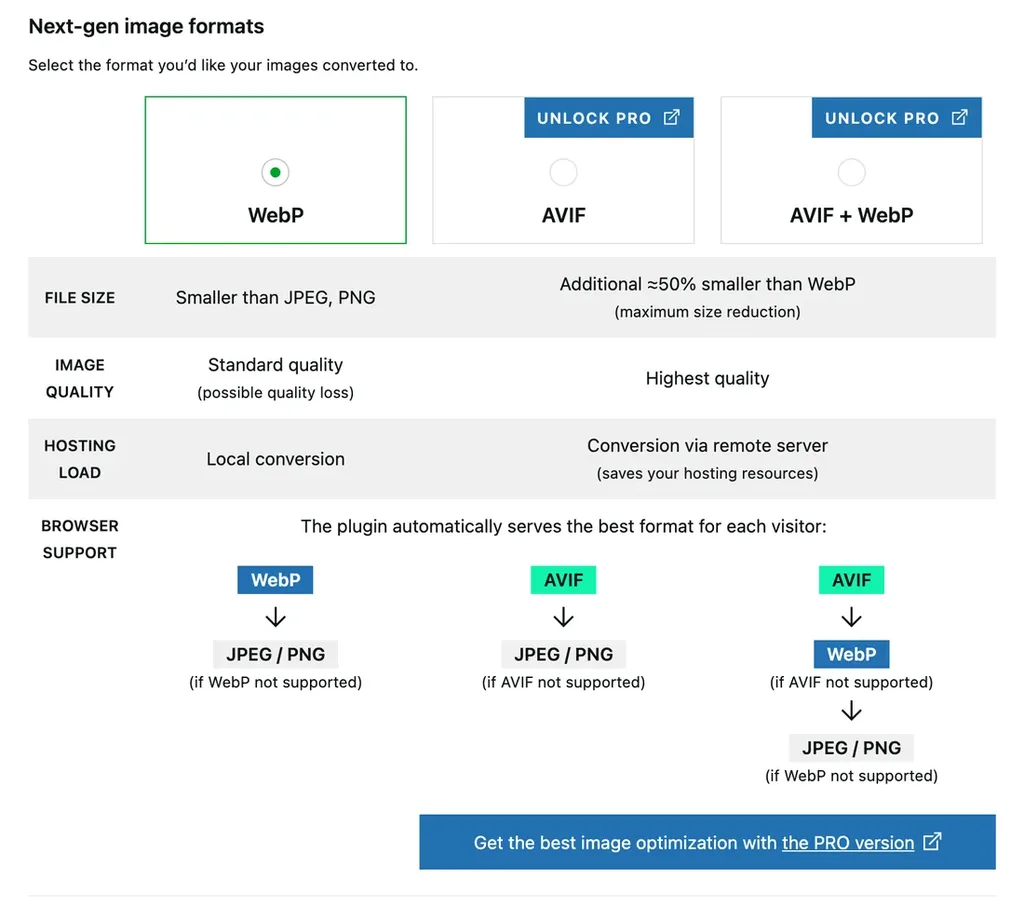
Browsers that understand WebP get the WebP file, and the rest quietly receive the original JPEG or PNG. One heads-up from its own documentation: on an Nginx server, you'll need some extra server configuration. My Playground test site showed a "Server configuration error" panel too, because that sandbox can't run the server rules the plugin relies on.
Pick it if: you mainly want WebP, for free, with no monthly cap.
6. Optimole: Best Hands-Off Option With a CDN
Optimole had 200,000+ installs and a 94% rating. It works differently: images are optimized in the cloud and served through a CDN with more than 450 locations, in WebP or AVIF. The free plan includes all features but is meant for sites with up to 2,000 visits a month, so busier sites will need a paid plan.
Pick it if: you have a small site and want images handled completely, including delivery.
7. TinyPNG: Best for Occasional Uploads
TinyPNG had 100,000+ installs and a 90% rating. You get 500 free compressions each month, and the plugin's page explains that this works out to roughly 100 images, since WordPress makes several sizes of every upload. It now converts to WebP and AVIF as well. Beyond the free limit, you pay per compression.
Pick it if: you upload a few images a week and like its well-known compression.
8. Modern Image Formats: Best Official, No-Account Option
Modern Image Formats is made by the WordPress Performance Team, the same group that works on speed features for WordPress itself. It had 100,000+ installs and a 72% rating, though that's from just 26 reviews. It adds WebP and AVIF output for new uploads, with no account, no API key and no outside service. On my test site, it defaulted to AVIF.
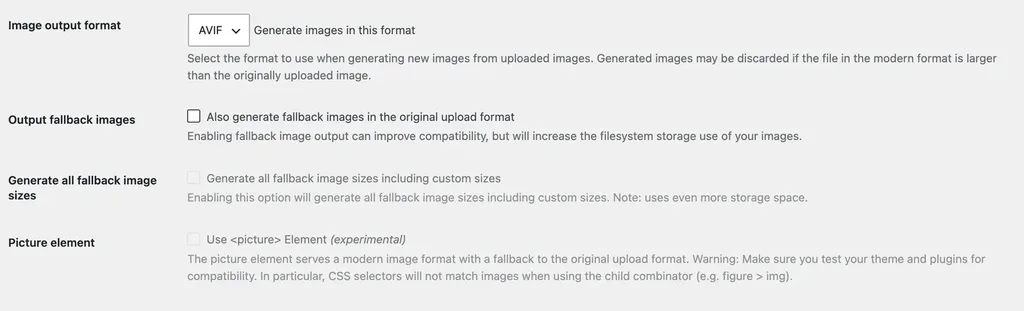
Two things to know. Existing images aren't converted until you regenerate them, and the options for fallback images and the <picture> element affect storage and compatibility, as the settings screen itself warns. I couldn't finish a compression test inside my browser-based test site, so I can't give you my own numbers for this one.
Pick it if: you'd rather keep everything inside WordPress, with no third-party service.
9. Robin Image Optimizer: Best Free Plan With No API Key
Robin Image Optimizer had 100,000+ installs and an 88% rating. Its page promises unlimited image optimization and WebP conversion for free, with no API key and no account needed; AVIF is a Pro feature. It's a good quiet option for small sites that just want lighter images.
Pick it if: you want unlimited free compression without signing up anywhere.
10. reSmush.it: Best Simple Free Compressor
reSmush.it had 100,000+ installs and an 86% rating. It's completely free, and the only limit its FAQ mentions is that each image must be under 5 MB. There's no WebP conversion yet, though; its FAQ says they're working on it.
Pick it if: all you need is plain, free compression of JPEG and PNG files.
Image Optimization Plugins Compared
| Plugin | Free plan | WebP / AVIF on free | Pick it if… |
|---|---|---|---|
| Smush | skips files over 5 MB | no, both are Pro | you want the easiest start |
| EWWW Image Optimizer | unlimited | WebP yes | you have a big library |
| ShortPixel | 100 credits a month | both | quality and backups matter |
| Imagify | 20 MB a month | both | you post only now and then |
| Converter for Media | unlimited WebP | WebP yes, AVIF Pro | WebP is all you need |
| Optimole | up to 2,000 visits a month | both | you want a CDN included |
| TinyPNG | 500 compressions a month | both | you upload a few a week |
| Modern Image Formats | fully free | both, new uploads | you want no outside service |
| Robin Image Optimizer | unlimited | WebP yes, AVIF Pro | you hate signing up |
| reSmush.it | free, under 5 MB each | not yet | plain compression is enough |
Two Popular Plugins That Didn't Make My List
Image Optimizer by Elementor had 1+ million installs, but only a 34% rating from 81 reviews when I checked. That's too big a gap between popularity and happy users for me to recommend it right now. WebP Express had 300,000+ installs and an 88% rating, but its WordPress.org page still said tested up to WordPress 6.9.11, while every plugin above had been tested with 7.1. Maybe it works perfectly well. I simply like plugins that keep up.
Which Image Optimization Plugin Should You Use?
- A personal blog: go with Smush, or Converter for Media if WebP is all you're after.
- A WooCommerce store with hundreds of product photos: EWWW for unlimited compression, or ShortPixel if you want AVIF and backups.
- A photographer's portfolio: ShortPixel, for its glossy and lossless modes.
- Want zero outside services: Modern Image Formats.
Whatever you pick, use only one. Two image plugins working on the same files can step on each other. And take a full backup before running any bulk optimization; my guide on how to back up and restore a WordPress site shows how. Images are one piece of the speed puzzle, so also see my tips to optimize WordPress for Core Web Vitals and how to serve scaled images in WordPress.
FAQs: Image Optimization Plugins for WordPress
Do I really need an image optimization plugin?
If your site has photos, yes. Images are often the heaviest part of a page. WordPress does make smaller copies of each upload, but it doesn't convert them to WebP or AVIF by default, and it won't squeeze files as hard as a dedicated plugin. A plugin handles all of it automatically every time you upload.
WebP or AVIF: which is better?
Both are much lighter than JPEG and PNG. AVIF usually makes even smaller files; Converter for Media's own settings describe it as about 50% smaller again than WebP. WebP is the safer, more widely supported choice, and several free plans include it.
Will optimizing images reduce their quality?
Lossless compression doesn't change quality at all. Lossy does change the file a little, but most visitors won't spot the difference. And with a plugin like ShortPixel, your originals are kept aside, so you can always go back.
Can I use two image optimization plugins together?
Better not. Two plugins compressing or converting the same images can double the work or clash. Pick one, and switch completely if you change your mind.
Which image optimization plugin is completely free?
EWWW Image Optimizer, Robin Image Optimizer, Modern Image Formats and reSmush.it all have free options without a monthly cap, each with its own limits explained above.
Summing Up
So, those are the 10 best image optimization plugins for WordPress, as of October 2026. If you want the easiest start, take Smush. For unlimited free compression, EWWW is hard to beat. ShortPixel and Imagify give you WebP and AVIF on small free plans, and Modern Image Formats keeps everything inside WordPress itself. Whichever you choose, remember the Packing Rule (resize, squeeze, convert and delay), stick to a single plugin, and take a backup before the first bulk run.
That's all for now. Which image plugin are you using on your site? Do let us know in the comment box below.