Here's a strange one. For a few seconds while WordPress updates itself, the update can become the way in. That's CVE-2026-119977, a flaw in the WordPress core updater that attackers are now actively using. The U.S. Cybersecurity and Infrastructure Security Agency (CISA) added it to its list of known exploited vulnerabilities on November 3, 2026. The fix is in WordPress 7.1.4. But there's a twist: the update that installs the fix can be attacked one last time. So "just click Update" isn't the full answer this time.
A bit about me: I've been using WordPress since 2014, and several of my online stores run on it with WooCommerce, so a core flaw like this gets my full attention. For this guide, I read the WordPress 7.1.4 release notes and the researcher's own technical write-up. I then compared the updater code in WordPress 7.1.3 and 7.1.4 line by line. Finally, on November 16, 2026, I tested the recommended blocking rules on a throwaway Apache server on my own computer. You'll see those results below.
CVE-2026-119977 lets an attacker with no account run code on your server during a WordPress core update. It affects WordPress 4.7 through 7.1.3, and the fix is WordPress 7.1.4 or the latest security release of your branch. Before you update, block web access to the wp-content/upgrade folder and confirm it returns a 403 error. Then update, and check for strange admin accounts, plugins and PHP files afterward.
What Is CVE-2026-119977?
CVE-2026-119977 is a race condition in the WordPress core updater. During a full core update, WordPress unpacks a complete copy of the new version into a temporary folder inside wp-content/upgrade. That copy includes the WordPress installer, and the web server can usually reach it. If an attacker finds the folder and calls the installer before WordPress deletes it, they can end up running PHP code on your server.
Here are the key facts in one place:
| Detail | What we know |
|---|---|
| Type | Time-of-check time-of-use (TOCTOU) race condition in the core updater |
| Who can attack | Anyone; no login needed |
| Affected versions | WordPress 4.7 through 7.1.3 (the weak code goes back to 2.7, released in 2008) |
| Fixed in | WordPress 7.1.4 (October 28, 2026), plus security releases for older branches back to 4.7 |
| Severity | 8.1 out of 10 (High) in the CVE record from Wordfence; the WordPress project's own advisory rates it low |
| Exploited? | Yes. CISA added it to its Known Exploited Vulnerabilities catalog on November 3, 2026 |
| Found by | Umut Bayram of Picus Security |
Why the gap between "high" and "low"? The attack window is tiny, usually a few seconds, and it only opens while an update is running. But if someone does hit it, the damage is serious. Both views are fair, and that's exactly why the safe update steps below matter.
How the Attack Works, in Plain English
Think of a contractor changing the locks on your house. For a few seconds, a full spare set of keys sits on the seat of an open truck in your driveway. Most days, nobody notices. But a thief who keeps circling the block, waiting for that truck, will.
According to Bayram's technical write-up for Picus Security, this is what happens during a vulnerable update:
- WordPress downloads the new version and unpacks it into
wp-content/upgrade/. - On WordPress 5.9 and later, that folder is named after the download, such as
wordpress-7.1.4, so an attacker can guess it. - The unpacked copy includes
setup-config.php, the installer that createswp-config.php. It only looks for a config file inside the temporary copy, so it doesn't see your real one. - The attacker calls that installer and points it at a database they control. The installer needs no login, so it obeys.
- On unpatched versions, WordPress then copies the attacker's wp-config.php over your real one. Your site now talks to the attacker's empty database and shows the WordPress install screen.
- The attacker creates the first admin account, uploads a plugin with their own PHP code, and runs it on your server.
Bayram says he found the flaw in about four hours, with an AI model as his research partner. The bug had sat in the updater since 2008. That alone tells you how quickly new WordPress bugs may surface from now on.
Which WordPress Sites Are Affected?
Two things decide whether a site is at risk during an update: whether the attacker can guess the temporary folder's name, and whether a fix exists for that version. Going by the Picus write-up, here's how the versions break down:
| WordPress version | Temporary folder name | Fix available? |
|---|---|---|
| 2.7 to 4.3 | Fixed or based on the download, so it can be guessed | No. Move to a supported version |
| 4.4 to 4.6 | Adds 6 random characters | No. Move to a supported version |
| 4.7 to 5.8 | Adds 6 random characters, so it's hard to guess unless an error message leaks it | Yes, the latest security release of your branch |
| 5.9 to 7.1.3 | Based on the download name, so it's easy to guess | Yes, 7.1.4 or your branch's latest release |
| 7.1.4 and fixed branch releases | Adds 16 random characters | Already fixed |
Not sure which version you run? Log in and look at the "At a Glance" box on your Dashboard. If it says 7.1.4, or WordPress 7.2 once that arrives, you're past the main danger.
Is CVE-2026-119977 Really Being Exploited?
Yes. CISA added the flaw to its Known Exploited Vulnerabilities catalog on November 3 and gave U.S. federal agencies until November 6 to patch. As reported by The Hacker News, Wordfence recorded more than 18,500 requests aimed at staged setup-config.php paths in the first 21 hours after the flaw went public. By November 4, it was still blocking thousands a day: 12,632 attempts in the previous 24 hours.
The attacks started fast. Wordfence saw the first attempts nine minutes after it deployed its firewall rule. Two of the busiest sources kept checking small groups of sites for about 14.5 hours, which looks a lot like attackers waiting for the exact moment a site updates.
Two more things worth knowing:
- Code that claims to exploit the flaw has appeared on GitHub. Nobody has confirmed whether it works.
- The window lasts only seconds, so most attempts miss. But bots can try thousands of times, and one hit is all it takes.
What WordPress 7.1.4 Fixed
The WordPress 7.1.4 release came out on October 28, 2026, with a dozen security fixes. The very first item on the list is a weakness in the upgrade process that could let someone run code on the server while an update is in progress. The same fixes were backported to every branch that still gets security updates, back to 4.7.
I wanted to see the fix with my own eyes, so I opened the updater files from WordPress 7.1.3 and 7.1.4 and compared them. Two of the three changes are easy to spot:
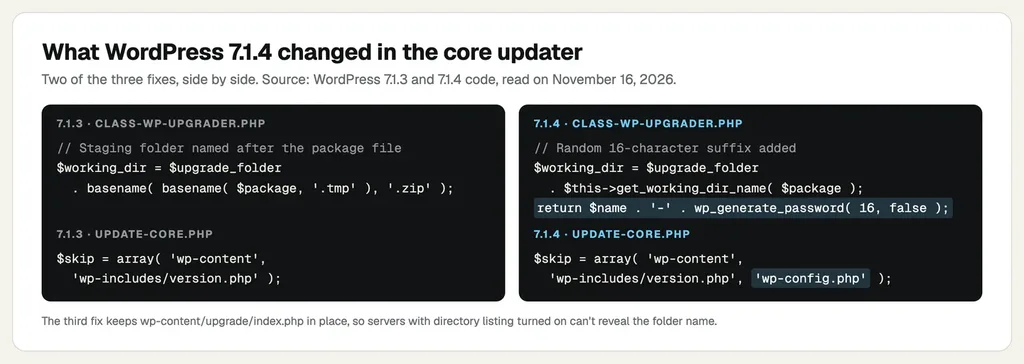
- A random folder name: The temporary folder now gets 16 random characters added to its name, so an attacker can't guess it.
- wp-config.php is never copied: The file is now on the updater's skip list, so a fake config in the temporary copy can't replace your real one.
- The upgrade folder keeps its index.php: Older versions deleted it during cleanup. On servers that list folder contents, that could reveal the random name.
Why Updating Can Still Expose Your Site One Last Time
This is the part that caught many people off guard. A core update runs code from two versions. Your old, unpatched version unpacks the new files. Only after that does WordPress load the new version's code to copy them into place.
So when a site on 7.0.7 updates to 7.1.4, the old code still creates a guessable folder, wp-content/upgrade/wordpress-7.1.4/. The new code does stop the config swap. But according to Bayram, an attacker who catches the window can still set up the temporary copy with their own database, log in to it and run PHP on your server before the copy is deleted.
Does every update expose the installer? Not always. Complete update packages always include it. Smaller "partial" packages, built for one starting version, only expose it if they happen to contain those files. When The Hacker News checked WordPress.org's update service, an update from 7.1.3 to 7.1.4 got a partial package, while 7.0.7 to 7.1.4 got only complete ones. WordPress also falls back to a complete package if your core files don't match the official checksums. As Bayram put it, the deciding factor is "whether the updater already installed on the site has been fixed."
How to Patch CVE-2026-119977 Safely: Block, Update, Check
I call this the Block, Update, Check routine. It isn't a long job, even if you've never edited a server file before. Take a fresh backup of your files and database before you start.
Step 1: Block Web Access to wp-content/upgrade
WordPress works with this folder directly on the disk. It never needs visitors to reach it over the web, so blocking it doesn't break updates. Use whichever option fits your server:
- Nginx (in the server block):
location ^~ /wp-content/upgrade/ { deny all; } - Apache (in the virtual host config): a
<Directory>block forwp-content/upgradecontainingRequire all denied - Only .htaccess access: add
RedirectMatch 403 ^/wp-content/upgrade/to the .htaccess file in your WordPress root, above the "# BEGIN WordPress" block
One trap here: don't put a new .htaccess file inside wp-content/upgrade itself. The old updater deletes everything in that folder before it unpacks an update, so your rule would vanish right when you need it. Here's my guide on how to find and edit the .htaccess file if you haven't touched it before.
I tested both Apache options on a local Apache 2.4.67 server, with a stand-in folder copying the real staging path. Without a rule, both the folder and the installer path returned 200, meaning anyone could reach them. With either rule, they returned 403, while a normal file in wp-content/uploads still loaded fine.
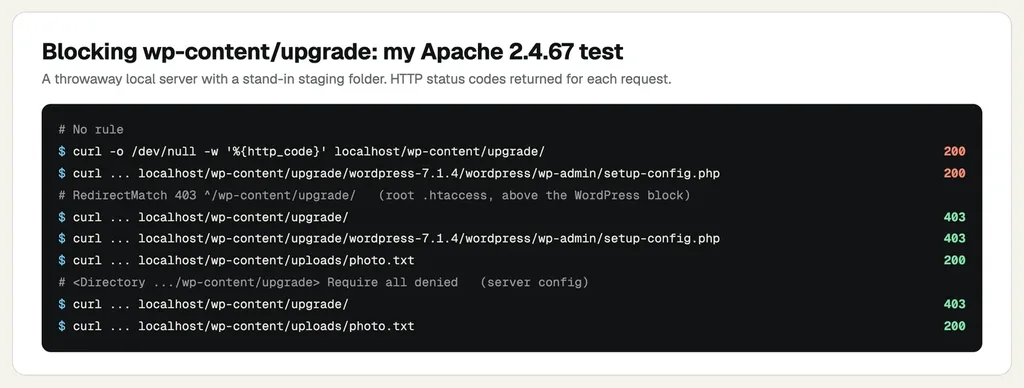
I didn't have an Nginx server to test, so that line comes straight from the researcher's advice. Either way, confirm the block on your own site. Open yoursite.com/wp-content/upgrade/ in your browser, and you want to see "403 Forbidden." If you see a list of files or a blank page that loads, the folder is still open. A 404 doesn't prove much, because the folder may simply not exist at that moment.
Step 2: Update WordPress
Once the folder is blocked, update the usual way: Dashboard, then Updates, then "Update Now." Aim for 7.1.4, or the latest security release of your branch if you're staying on an older version. My guide on how to update WordPress walks through it.
Comfortable on the command line? The other safe route is a manual update. Unpack the new release in a folder the web server doesn't serve, copy the core files into place without touching wp-config.php or wp-content, then run the database update. One warning: wp core update in WP-CLI doesn't count as a manual update. It uses the same updater and the same wp-content/upgrade folder.
Step 3: Check for Signs of a Break-In
If your site sat on an affected version after October 28, take five minutes for this. Wordfence suggests looking for:
- unexpected requests to PHP files under
wp-content/upgradein your server logs - administrator accounts nobody recognizes
- plugins nobody installed
- PHP files in
wp-content/upgradethat nobody put there
Find any of these? Don't panic, but act today. My guides on what to do when a WordPress site is hacked and how to find and fix a backdoor cover the clean-up step by step.
What If You Can't Edit Server Files?
On a lot of shared and managed WordPress hosting, you can't touch the Nginx or Apache config, and some hosts don't even use .htaccess. In that case, send your host a short support message. Ask whether they block web access to wp-content/upgrade for CVE-2026-119977, and whether your site is already on 7.1.4. Hosts can block the folder at the server level for you, but don't assume yours already has. Get it in writing, then do the browser check from Step 1 yourself.
A good security plugin with a firewall can also block requests to that folder. I've compared the options in my list of the best security plugins for WordPress.
Already on 7.1.4? Here's What Still Matters
Good news first: once 7.1.4 or a fixed branch release is installed, every later update uses a random folder name. And it never copies a config file from the temporary copy. You're protected from this flaw going forward.
Still, I'd keep the block rule in place for good. It costs nothing, it doesn't break anything, and it closes the same door if a similar bug ever turns up. For the bigger picture, my WordPress security checklist and my explainer on common WordPress vulnerabilities are good next reads. WordPress 7.2 is also due on December 8, and you can see what's new in WordPress 7.2 here.
CVE-2026-119977 FAQs
Is my site hacked if I haven't updated yet?
Not automatically. The attack only works during a core update, in a window of a few seconds. But your next update is the risky moment, so block wp-content/upgrade first, then update.
Did automatic updates already fix my site?
Maybe. Sites with automatic background updates received the fix through the same updater. Check the version in the "At a Glance" box on your Dashboard. If it shows 7.1.4 or a fixed branch release, the fix is installed.
Does blocking wp-content/upgrade break WordPress updates?
No. WordPress reads and writes that folder directly on the disk, never over the web. I also checked that normal files elsewhere in wp-content kept loading with both Apache rules in place.
Is updating with WP-CLI safer?
No. wp core update runs the same core updater and unpacks into the same folder. Block the folder first, or do a fully manual update outside the web root.
What about WordPress 4.6 and older?
Those versions no longer get security updates, so there's no fix for them. Back up the site and move it to a supported WordPress version as soon as you can.
Does a security plugin protect me from CVE-2026-119977?
A firewall that blocks requests to the installer under wp-content/upgrade helps a lot, and Wordfence has a rule for it. Still, treat a plugin as a second layer. The real fix is updating WordPress safely.
Summing Up
CVE-2026-119977 is unusual because the danger sits inside the update itself. The fix is simple once you know the order. Block wp-content/upgrade, update to WordPress 7.1.4 or your branch's latest release, then check for anything that doesn't belong. If you run an online store, do it before the Black Friday rush, not in the middle of it.
That's all for now. Have you updated your sites to 7.1.4 yet, and did your host block the upgrade folder for you? Do let us know in the comment box below.