So you've built a page or two with Elementor, it looks lovely, and now every corner of the editor keeps waving a little "Upgrade Now" at you. Tempting, no? Hold on to that card for a minute, though. Let's settle this Elementor Free vs Pro business properly first. What do you really get for nothing, what does money add, how much is it in 2026, and is Elementor Pro worth it for a site like yours?
Quick background first. I've been on WordPress since 2014, and several of my own eCommerce sites run on it with WooCommerce today. For this comparison, I installed the free Elementor 4.3.5 on a fresh WordPress 7.1.3 test site on 28 October 2026 and clicked around to see exactly where the free version stops. Then I went through Elementor's own pricing page the same day. Every screenshot and price below comes from that.
Running a simple blog or brochure site? Free Elementor will do, with its drag-and-drop editor and 40-plus free widgets. Pay for Pro when you want Theme Builder for your own headers, footers and post templates, forms and popups built in, or control over WooCommerce pages. When I checked in 2026, the cheapest Pro plan cost $60 a year for one site, and Advanced Solo, the one most stores will want, cost $84.
The Mixer-Grinder Test
You know how most Indian kitchens run, right? A knife, a chopping board, one heavy kadai. That's enough for dal, sabzi, even a decent biryani. But once the family wants fresh masala, chutney and dosa batter every single morning? The mixer-grinder takes over the counter. And honestly, who's going back to the stone grinder after that?
Elementor Pro works the same way. Free Elementor is the knife and the kadai, perfectly fine for most meals. Pro is the mixer-grinder. So don't ask "Is Pro better?", because of course it is. Ask yourself, "Will I use the Pro features every week?" If yes, it's money well spent. If you'd use it twice a year, honestly, skip it.
What You Get With Elementor Free
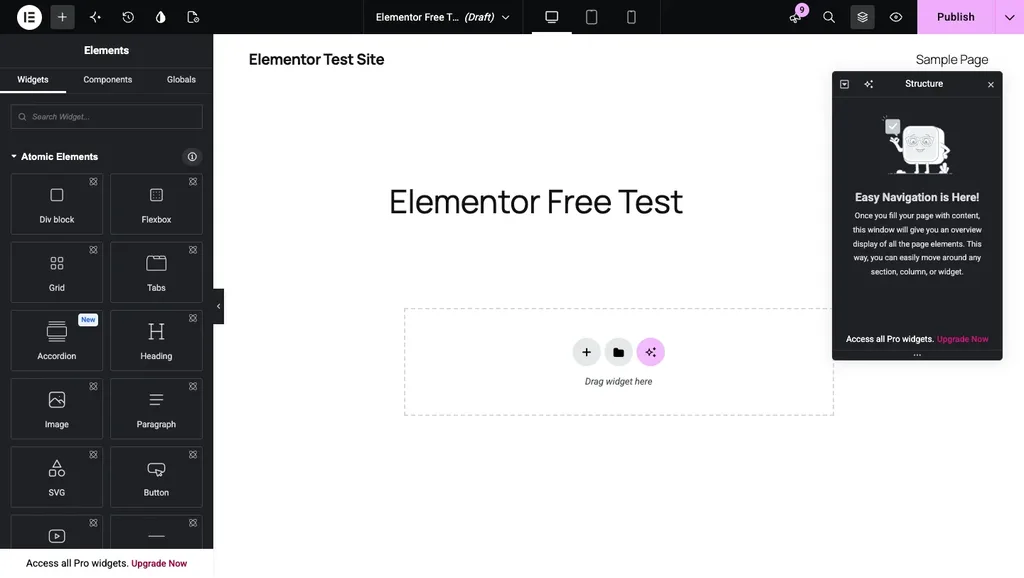
More than you'd think, actually. You get the whole drag-and-drop editor, mobile and tablet controls, a template library and, in the words of its WordPress.org page, "over 40 FREE widgets". Headings, images, text, video, buttons, galleries, carousels: the basics are all there. One new thing I noticed, too. Elementor now calls its editor the Atomic Editor, and when I opened it on my test site, the very top of the panel had Atomic Elements like Div block, Flexbox, Grid, Tabs and Accordion.
And it's not some small plugin, mind you. WordPress.org shows 10+ million active installs and a 4.5 rating from over 7,000 reviews. Got a personal blog, a portfolio or a small five-page business site? You can get surprisingly far without paying a thing.
What Elementor Pro Adds
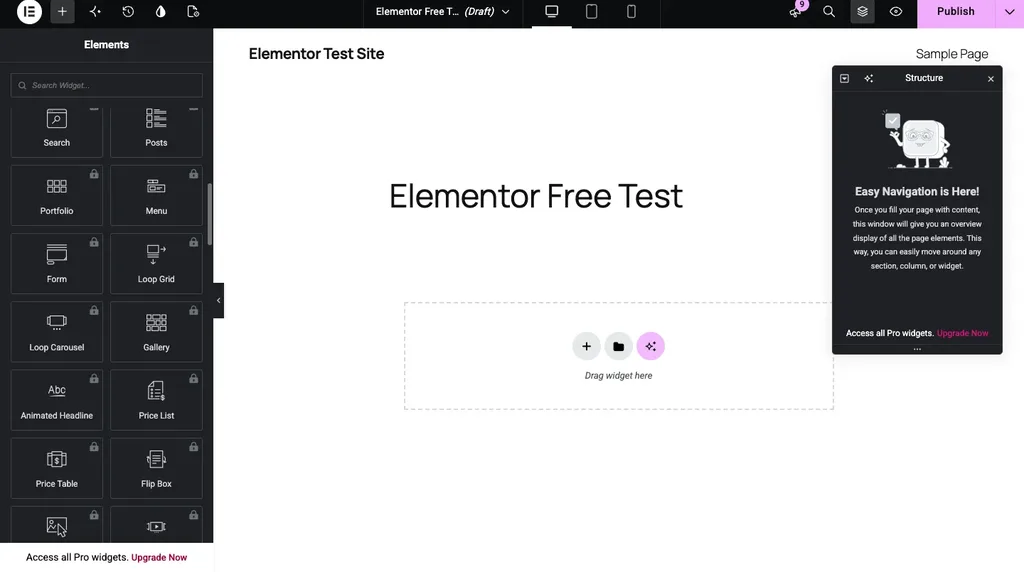
Here's where the "Upgrade Now" buttons come from. Scroll down the widget panel in the free version, and you'll reach a Pro section full of padlocks. On my test site, that section showed 37 locked widgets, including Posts, Portfolio, Menu, Form, Loop Grid, Price Table and Flip Box. According to Elementor's pricing page, the paid plans open up 57 or 85 Pro widgets, depending on which one you buy.
Widgets are only half the story, though. From what I saw, these are the Pro features you'd actually feel day to day:
- Theme Builder: header, footer, post layout, archives, search results, even your 404 page. You design them all.
- Form Builder: contact and lead forms right inside Elementor. One plugin less to look after.
- Popup Builder: sign-up boxes, festive offers, announcements, that sort of thing.
- Dynamic Content: your post titles, dates and custom fields fill into the design on their own.
- WooCommerce Builder: your own product page and shop page layouts, instead of whatever the theme hands you.
- Custom fonts, icons, CSS and code: useful when a brand has its own font, or when you just want to fix one small thing.
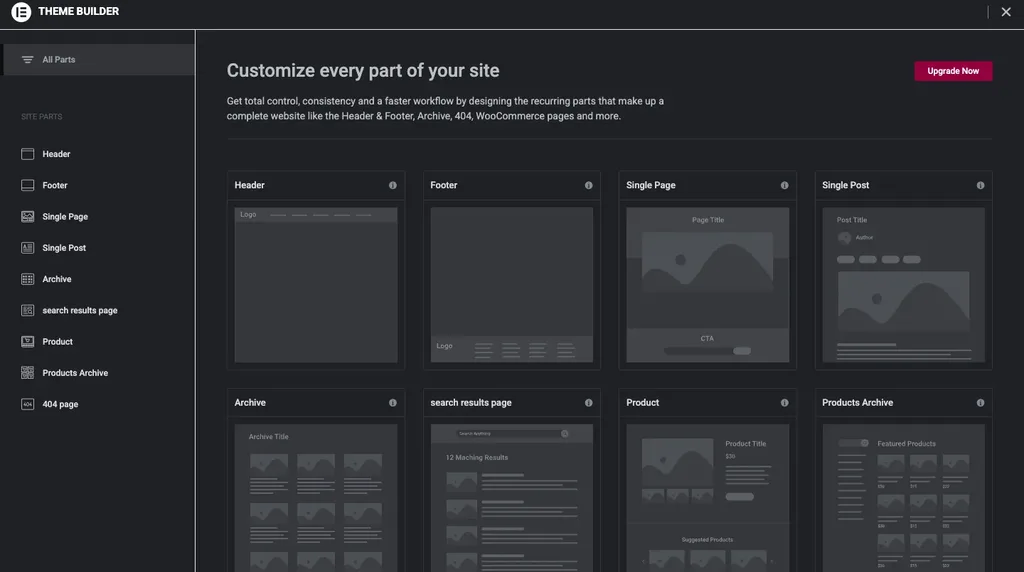
If I had to pick just one, it'd be Theme Builder. In the free version, it lists every site part (header, footer, single page, single post, archive, product and more), and every one of them has an "Upgrade Now" button.
Elementor Pro Pricing in 2026
Coming to the money. When I checked Elementor's pricing page on 28 October 2026, these were the yearly prices in US dollars:
- Essential, $60 a year: 1 site, 57 Pro widgets, Theme Builder, Dynamic Content and the Form Builder. No Popup Builder, though, and no custom code, custom CSS or eCommerce features.
- Advanced Solo, $84 a year: 1 site with all 85 Pro widgets, popups, custom code and CSS, built for "a single professional & eCommerce website".
- Advanced, $108 a year: the same features for 3 sites.
- Expert, $204 a year: the same again, for up to 25 sites.
Then there's Elementor One, which bundles Pro with extras like AI credits, image optimisation, email delivery, accessibility tools and cookie consent. One was $180 for the first year (renewing at $228) for 1 site with 25,000 credits a month, and One Agency was $432 for the first year (renewing at $540) for unlimited sites. All of these are yearly plans; I didn't see any lifetime deal on the page.
See the catch with Essential? It's the cheapest, but it leaves out popups and the eCommerce features. So if you run a WooCommerce store, Advanced Solo at $84 is the realistic starting point. I've done the full maths for running a store in how much WooCommerce costs.
Elementor Free vs Pro at a Glance
| Elementor Free | Elementor Pro | |
|---|---|---|
| Price | $0 | From $60 a year (1 site) |
| Widgets | Over 40 free widgets | Plus 57 to 85 Pro widgets |
| Theme Builder | Locked | Every plan |
| Forms and popups | Locked | Forms on every plan, popups from Advanced Solo |
| WooCommerce page design | Locked | From Advanced Solo |
| Sites per licence | Unlimited | 1, 3 or 25, or unlimited on One Agency |
So, Is Elementor Pro Worth It?
Run the mixer-grinder test on your own site. Pro earns its keep if you want a header and footer that look nothing like your theme's, custom templates for blog posts, forms and popups without extra plugins, or proper WooCommerce product pages. Building sites for clients? Then it's an easy yes, because Expert works out to roughly $8 per site a year if you use all 25 slots.
On the other hand, Pro is money you don't need to spend if you run a simple blog or a small brochure site. Free Elementor handles the pages, a free form plugin handles contact forms (see my picks of the best contact form plugins), and WordPress's own Site Editor already lets block themes change headers and footers for free. I walked through that in my guide on how to build a WordPress website.
Which Elementor Plan Should You Pick?
Let me make this simple, based on who you are.
You write a blog
Stay on the free version. Seriously. Your theme already designs the post pages, a free form plugin takes care of the contact page, and the Pro widgets won't bring you a single extra reader. Put that $60 towards better hosting instead; our hosting comparison shows what each host really costs over four years.
You run a small business site
Free first, again. Upgrade to Essential at $60 a year only when you want a custom header and footer, or templates that every service page can share. If all you need is a contact form, Essential is overkill.
You sell online with WooCommerce
This is where Pro starts to make real sense. Advanced Solo at $84 a year is the plan to look at, because Essential leaves out the eCommerce features. With it, you can design the product pages and the shop archive yourself instead of living with your theme's default layout. New to WooCommerce? Start with my guide on what WooCommerce is.
You build sites for clients
Advanced covers 3 sites for $108, and Expert covers 25 for $204, so the per-site cost drops fast as your client list grows. And if your clients also want AI help, image optimisation and email delivery bundled in, One Agency is the plan built for that, at $432 for the first year.
Try These Free Options Before You Pay
Before upgrading, spend one evening with what's already free. Pair Elementor Free with a lightweight theme from my list of the best WordPress themes for Elementor, use a free form plugin, and see how far you get. Still feel boxed in? Then compare a few other builders in my roundup of the best page builder plugins before you commit to a yearly plan.
What About Elementor's AI?
Elementor's AI now lives in a separate plugin called Angie, which builds pages, widgets and code from plain-English prompts. Its free plan gives you limited daily credits, and the bigger AI allowance comes with the Elementor One plans, not with the Pro plans. I covered Angie in more detail in my list of the best AI plugins for WordPress.
FAQs: Elementor Free vs Pro
Is Elementor Free good enough for a business website?
For a simple business site, yes, it really is. Home, about, services and contact pages all come together fine with the free widgets. The pinch starts only when you want your own header and footer, or one template to style dozens of posts.
Can I use one Elementor Pro licence on several websites?
That depends on the plan you buy. Essential and Advanced Solo cover 1 site each, Advanced covers 3, Expert covers 25, and One Agency covers as many as you like.
Is Elementor Pro a one-time payment?
No, it's a yearly subscription. Every plan on the pricing page was billed yearly when I looked, and there was no lifetime deal anywhere, sadly.
Is Elementor Pro a must for a WooCommerce store?
No, the store itself runs fine with any theme, Pro or not. You need Pro only if you want to design the product and shop pages yourself in Elementor, and for that, pick Advanced Solo or higher, since Essential leaves out the eCommerce features.
Can I move from Elementor Pro to Elementor One later?
Yes. According to Elementor's pricing page, upgrading from your account credits the remaining value of your Pro plan towards One. Just don't cancel Pro first, or you lose that credit.
Summing Up
So, Elementor Free vs Pro? Free Elementor is the knife and the kadai: perfectly good for a blog or a small business site. Elementor Pro is the mixer-grinder, a real time-saver if you'd use Theme Builder, forms, popups or the WooCommerce Builder every week. Start free, run the mixer-grinder test honestly, and upgrade only when the free version starts slowing you down.
That's all for now. Are you using Elementor Free or Pro on your site? Do let us know in the comment box below.