Every WordPress site runs on PHP, so when PHP ships a security fix, your host has to install it before your site is safe. On November 19, 2026, PHP shipped a PHP security release for every supported branch: 8.2.36, 8.3.37, 8.4.28 and 8.5.13, alongside the new PHP 8.6.0. SiteGround says it patched all its servers the same day, and DigitalOcean added the fixed versions to App Platform. If you are not sure whether your own host has done the same, this article will help you check it in two minutes.
We read both hosts' announcements, compared them with php.net, and tested a small check on our WordPress Playground site. Let us have a look at what each host did and what you should do next.
Related Articles:
- PHP 8.6 and WordPress: What's New and Should You Upgrade Yet?
- How To Know the PHP Version in WordPress
- How To Update PHP in WordPress
What the November 19 PHP Security Release Fixes
The php.net announcements for PHP 8.5.13, 8.4.28, 8.3.37 and 8.2.36 all say the same thing: "This is a security release." The PHP 8 changelog lists fixes such as a use-after-free bug that can lead to remote code execution (CVE-2026-129474) and an out-of-bounds read and write in PHP-CGI (CVE-2026-129538).
SiteGround's write-up counts eight fixed bugs and rates seven of them as critical. Two of them, CVE-2026-115560 and CVE-2026-126714, are in session handling. That matters for WordPress stores and membership sites, because many PHP apps use sessions for logins and carts.
SiteGround, citing PHP, adds that the critical bugs need uncommon setups to be exploited. Even so, once a fix is public, attackers can study it. So it is always advisable to patch quickly instead of guessing whether your server is exposed.
How SiteGround and DigitalOcean Responded
We compiled this table on November 21, 2026 from php.net, SiteGround's blog post and DigitalOcean's release notes.
| PHP branch | Fixed version (php.net) | SiteGround | DigitalOcean App Platform | Security support ends |
|---|---|---|---|---|
| 8.5 | 8.5.13 | Patched Nov 19 | Added Nov 19 (default runtime) | Dec 31, 2029 |
| 8.4 | 8.4.28 | Patched Nov 19 | Added Nov 19 | Dec 31, 2028 |
| 8.3 | 8.3.37 | Patched Nov 19 | Added Nov 19 | Dec 31, 2027 |
| 8.2 | 8.2.36 | Patched Nov 19 | Added Nov 19 | Dec 31, 2026 |
| 8.1 | No fix (end of life) | No backport stated | No new runtime | Ended |
| 7.4 | No fix (end of life) | Backported by SiteGround | Not offered | Ended |
The support dates come from PHP's supported versions page. Notice that PHP 8.2 loses security support on December 31, 2026, only six weeks away.
SiteGround: Patched Automatically
SiteGround says every PHP version on its shared and cloud servers was patched by 17:04 UTC on November 19, 2026. For PHP 8.2 and newer, it installed the official fixed releases. For PHP 7.4, which gets no official fixes, its engineers backported the patches themselves.
SiteGround customers do not need to do anything. The host still recommends moving off PHP 7.4, and points to its Managed PHP option, which now targets PHP 8.4. You can read more about the host in our SiteGround review.
DigitalOcean: You Have To Rebuild
DigitalOcean works differently. Its November 19 release note says App Platform's PHP buildpack moved from version 298 to 303 and added PHP 8.5.13, 8.4.28, 8.3.37 and 8.2.36. But your running app does not switch on its own. DigitalOcean says that to use a patched runtime, you must force a rebuild and deploy.
There are two more points in that note. First, builds now fail if your composer.json pins an exact PHP version affected by last month's PHP2Shell flaws (CVE-2026-109618 and CVE-2026-109619). Second, there is no new PHP 8.1 runtime, so PHP 8.1 apps stay unpatched.
If you run WordPress on a Droplet instead, App Platform's buildpack does not touch it. A Droplet is your own server, so the update steps in the VPS section below apply to you. Our DigitalOcean review explains the difference between the two products.
Our Test: Checking PHP Inside WordPress
The quickest place to see your PHP version is Tools → Site Health → Info → Server. We opened it on a fresh WordPress Playground site running PHP 8.3, and it showed PHP 8.3.36.
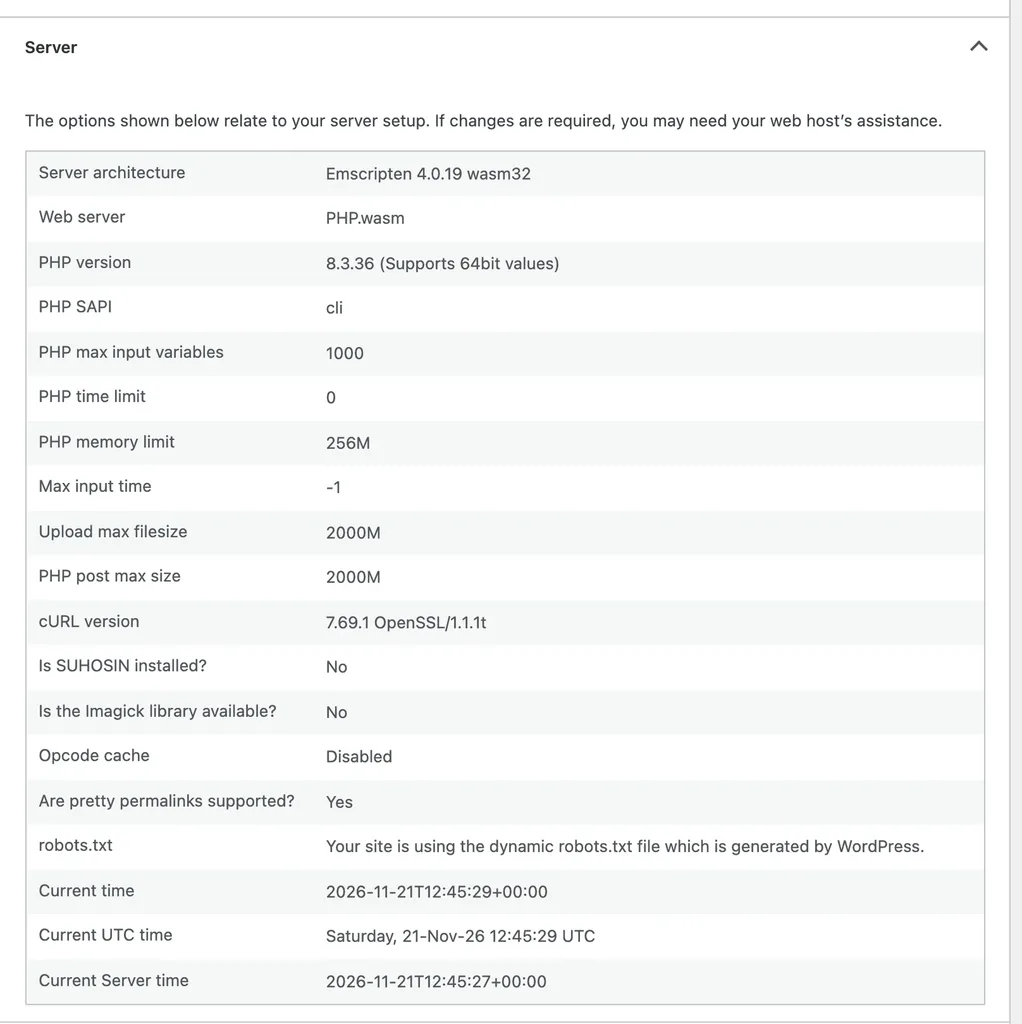
That surprised us. Playground's PHP 8.3 build was still one patch behind the fixed 8.3.37, two days after the release. Its PHP 8.5 option showed 8.5.12, also one behind. Playground runs in your browser as a test sandbox, so this is not a risk to anyone. It does show a useful point, though: runtimes take time to catch up, and you should never assume your host is current.
To make the check faster, we wrote a small must-use plugin that compares your PHP version with the November 19 fix for its branch. Save it as wp-content/mu-plugins/php-patch-check.php:
<?php
/**
 * Plugin Name: PHP Patch Check
 */
add_action( 'wp_dashboard_setup', function () {
	if ( ! current_user_can( 'manage_options' ) ) {
		return;
	}
	wp_add_dashboard_widget( 'wpt_php_patch', 'PHP Security Patch Check', function () {
		$fixed  = array( '8.2' => '8.2.36', '8.3' => '8.3.37', '8.4' => '8.4.28', '8.5' => '8.5.13', '8.6' => '8.6.0' );
		$branch = PHP_MAJOR_VERSION . '.' . PHP_MINOR_VERSION;
		echo '<p>This site runs PHP <strong>' . esc_html( PHP_VERSION ) . '</strong>.</p>';
		if ( ! isset( $fixed[ $branch ] ) ) {
			echo '<p>PHP ' . esc_html( $branch ) . ' gets no official fixes. Plan a move to PHP 8.2 or newer.</p>';
			return;
		}
		if ( version_compare( PHP_VERSION, $fixed[ $branch ], '>=' ) ) {
			echo '<p>At or above ' . esc_html( $fixed[ $branch ] ) . ', the November 19, 2026 fix.</p>';
		} else {
			echo '<p>Below ' . esc_html( $fixed[ $branch ] ) . '. Ask your host if it has backported the fixes, or update PHP.</p>';
		}
	} );
} );
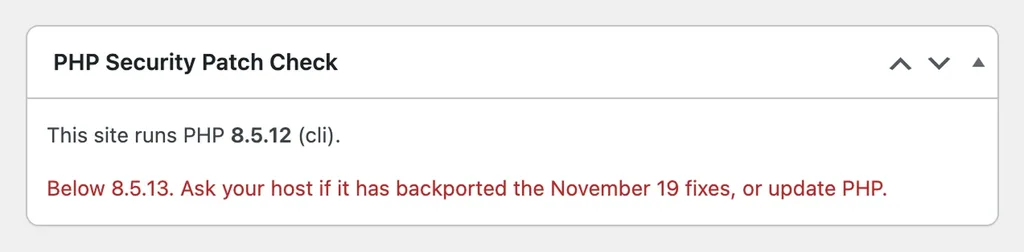
We loaded it on Playground with PHP 8.3 and PHP 8.5. In both cases, the widget appeared on the Dashboard straight away and flagged the version as one patch behind. The whole test took a few minutes. Only administrators see the widget, and you can delete the file once your host confirms the update. If you have never added code like this, our guide to a site-specific plugin explains the basics.
What To Do on Your Host
On Shared or Managed WordPress Hosting
- First, open Site Health → Info → Server and note your PHP version.
- Next, compare it with the table above.
- If it is lower, open a support ticket. Ask whether the host has installed the November 19 releases or backported the fixes.
- Now plan a move off PHP 8.2 or older before December 31.
On managed WordPress hosting, the host usually patches PHP for you, as SiteGround did. Still, a short ticket costs nothing and gives you a clear answer in writing.
On DigitalOcean App Platform
- First, go to the Apps page and select your app.
- Next, click the Actions menu and choose Force Rebuild and Deploy.
- If the build fails, open
composer.jsonand change an exact PHP version to a range such as^8.5.0. - After the deploy finishes, check the PHP version again.
On a VPS or Droplet
- First, update PHP from your distribution's security repository or php.net.
- Next, restart PHP-FPM, for example
sudo systemctl restart php8.3-fpmon Ubuntu. SiteGround notes that a reload may leave old workers running. - Now confirm the version in Site Health, not only with
php -von the command line. The web server can use a different PHP build.
Common Mistakes To Avoid
- Trusting the version number alone. Linux distributions often backport fixes without changing the version. If Site Health shows a lower number, ask your host or check the distribution's advisory before you panic.
- Forgetting the restart. New PHP files on disk do nothing until PHP-FPM restarts.
- Pinning exact versions. On App Platform, an exact version in
composer.jsonnow breaks the build. - Staying on PHP 8.1 or 7.4. These get no official fixes. Unless your host backports patches like SiteGround did, they stay exposed.
Our WordPress security checklist covers the other steps worth taking while you are at it.
Frequently Asked Questions
Do I Need To Update WordPress for This?
No. This is a fix for PHP itself, not WordPress. Your host or server admin installs it, and WordPress keeps working as before.
Is PHP 8.6 Safer Than 8.5.13?
Both include the November 19 fixes. PHP 8.6 is brand new, so we suggest testing it on staging first, as we explain in our PHP 8.6 guide.
Which Version Should I Pick?
For most WordPress sites today, PHP 8.4 or 8.5 is the sensible choice. Both get security fixes until at least the end of 2028.
Wrapping Up
SiteGround patched its servers on the same day, while DigitalOcean App Platform users need one rebuild to pick up the fix. Whichever host you use, check Site Health today and get a clear answer from your host about the November 19 PHP security release. Let us know in the comments which PHP version your host is running.
Sources
All checked on November 21, 2026.
- PHP 8.5.13 release announcement (php.net)
- PHP 8 ChangeLog (php.net)
- PHP supported versions (php.net)
- SiteGround: Critical PHP flaws patched (Nov 20, 2026)
- DigitalOcean release notes (Nov 19, 2026)
- DigitalOcean App Platform PHP buildpack
- DigitalOcean: Restart or force rebuild your app
We will update this page if SiteGround or DigitalOcean posts anything new about the November 19 PHP security release.