SiteGround is one of the most popular web hosting companies for WordPress, and it has a loyal fan base for good reasons: fast servers, excellent support and a smart set of tools. We first reviewed SiteGround back in 2016, when we hosted some of our websites on it. Our only complaint at that time was a rare 503 error on shared hosting. A lot has changed since then. SiteGround moved its servers to Google Cloud, replaced cPanel with its own Site Tools and changed its plans and prices. So, here is our fresh SiteGround web hosting review for 2026. Our original 2016 SiteGround review is still available if you want to see how things were back then.
For this update, we went through every plan, price and feature again in October 2026. Shared hosting starts at $3.99/mo and cloud hosting goes up to $400/mo. SiteGround is a good fit for beginners, WordPress users and agencies who are happy to pay a little more for speed and support.
Like any other web hosting provider, SiteGround also has some good and bad sides. Knowing them will help you find the best fit for your needs. So, let's have a look at them.
All prices in this review are in US dollars and were checked on SiteGround's website in October 2026. The introductory prices need a 12-month plan paid upfront, and SiteGround changes its offers often, so confirm the final price at checkout.
SiteGround at a Glance
| Best for | WordPress beginners, small businesses and agencies who value speed and support |
| Starting price | $3.99/mo (StartUp, 12-month term) |
| Renews at | $17.99/mo (StartUp) |
| Hosting types | Web (shared), WordPress, Cloud and Reseller hosting |
| Control panel | Site Tools (SiteGround's own panel) |
| Infrastructure | Google Cloud |
| Data centers | USA, Europe, Asia and Australia, including Iowa, London, Frankfurt, Eemshaven, Madrid, Singapore and Sydney |
| Free extras | SSL, CDN, daily backups, email and site migrations |
| Money-back guarantee | 30 days (shared hosting), 14 days (cloud hosting) |
| Support | 24/7, with priority support on GoGeek and Cloud |
| Our rating | 4.3 out of 5 |
SiteGround Web Hosting: The Goods
SiteGround web hosting comes with several useful features, even on the cheapest plan. We listed the good things, or plus points, of SiteGround that you should look at before choosing your hosting provider. So, take a look at them.
Fast Google Cloud Servers
SiteGround runs every plan on Google Cloud infrastructure, with what it calls Premium Google storage. On top of that, it uses multilevel caching, which means NGINX serves static files directly while dynamic caching and Memcached speed up the pages that change. The GrowBig and GoGeek plans also get a faster PHP setup that SiteGround says is 30% quicker.
We haven't hosted a website on SiteGround for this update, so we are not quoting our own speed numbers here. But the technology is as good as it gets in shared hosting, and it is the main reason SiteGround costs more than budget hosts.
User-Friendly Site Tools Dashboard
SiteGround replaced cPanel with its own control panel, called Site Tools. Everything is grouped by task: your site and files, security, speed, WordPress, domains, email, statistics and developer tools. Each website gets its own Site Tools, so the dashboard never feels crowded.
In short, almost every tool you need to maintain a website is in one place. You can install WordPress, switch PHP versions, manage caching, restore a backup or add an email account in a few clicks. Even a beginner can find their way around quickly.
Strong Security Features
Every SiteGround plan includes free SSL certificates, free daily backups and what SiteGround calls enhanced security. WordPress users also get the free Security Optimizer plugin, which adds login protection and other hardening options from your dashboard.
The GrowBig and GoGeek plans add on-demand backups, so you can take a backup before a big change. Cloud plans add a smart web application firewall. Of course, keep WordPress, your plugins and your themes updated, because no host can protect an outdated website.
Great Tools for WordPress
SiteGround is built with WordPress users in mind. Every plan includes managed automatic updates, WP-CLI and SSH access, free site migrations and the Speed Optimizer plugin, which handles caching and image optimization for you. There is also a new AI Agent for WordPress that helps you with tasks inside your site.
The GrowBig plan adds staging, so you can test changes on a copy of your website before they go live. GoGeek adds Git on top of staging, which developers will like.
Data Centers on Four Continents
SiteGround has data centers in the USA, Europe, Asia and Australia, including Iowa, London, Frankfurt, Eemshaven in the Netherlands, Madrid, Singapore and Sydney. You pick the location when you sign up, so choose the one closest to most of your visitors. A closer server means faster page loads for your audience.
On the GrowBig and GoGeek plans, you can even choose a different data center for each website. That is very handy if you run one site for readers in the USA and another for readers in Europe or Asia.
Free Website Migrations
Moving a website to a new host is the part most beginners worry about. SiteGround includes free site migrations on every plan, and WordPress users can also move their site with SiteGround's own migrator plugin in a few steps. So, switching from your current host is pretty simple, and you don't need any technical knowledge.
30-Day Money-Back Guarantee
SiteGround offers a 30-day money-back guarantee on its shared hosting plans. If you are not happy with the service, you can cancel within 30 days and ask for a refund. Cloud hosting has a shorter 14-day guarantee, so test it quickly if you go that route.
Excellent User Support
SiteGround's support has always been its strongest point. It offers 24/7 expert support, and the GoGeek and Cloud plans get priority support, which puts your requests at the front of the queue.
When we were SiteGround customers, we contacted support several times, including for the 503 errors we mentioned earlier, and they resolved our problems quickly. SiteGround still advertises support by real people, not bots, which is a big plus today.
SiteGround Web Hosting: The Bads
Like any other service available on the planet, SiteGround also has some weak points. We listed them here so that you can be aware of them before you buy. So, take a look at them.
Very High Renewal Prices
SiteGround's low prices are only for your first term. When your plan renews, the monthly price goes up a lot:
- StartUp: $3.99/mo, renews at $17.99/mo
- GrowBig: $6.69/mo, renews at $29.99/mo
- GoGeek: $10.69/mo, renews at $44.99/mo
That is about four and a half times the first price, which is one of the steepest jumps among popular hosts. Always budget for the renewal price, not just the first bill.
The StartUp Plan Is Very Limited
The StartUp plan hosts only one website and gives you 10 GB of storage. It also misses staging, on-demand backups and the faster PHP setup. For most people, GrowBig is the real starting point.
The Best Features Are Kept for Higher Plans
Staging and on-demand backups start from GrowBig. Priority support, Git, private DNS and white-label access are only on GoGeek and the cloud plans.
Cloud Hosting Is Expensive
SiteGround's cloud plans start at $100/mo. They are fully managed and very capable, but there is no cheaper VPS or dedicated server option in between, so the jump from GoGeek to cloud is a big one.
Now, you got a basic idea about the good and bad sides of SiteGround web hosting. Now, you have to choose the right plan for your budget and needs. So, let's have a look at the complete details of the SiteGround hosting plans.
SiteGround Web Hosting Plans
SiteGround currently offers web hosting, WordPress hosting, cloud hosting and reseller hosting. If you are new to this, our guide on the different types of web hosting explains how they differ. Here are the complete details of every SiteGround plan.
SiteGround Shared Web Hosting
SiteGround's shared web hosting plans start at $3.99/mo for the first year and renew at $17.99/mo. Shared hosting means your website shares a server with other customers' websites. It is the most affordable way to get online, and it suits blogs, portfolios and small business websites.
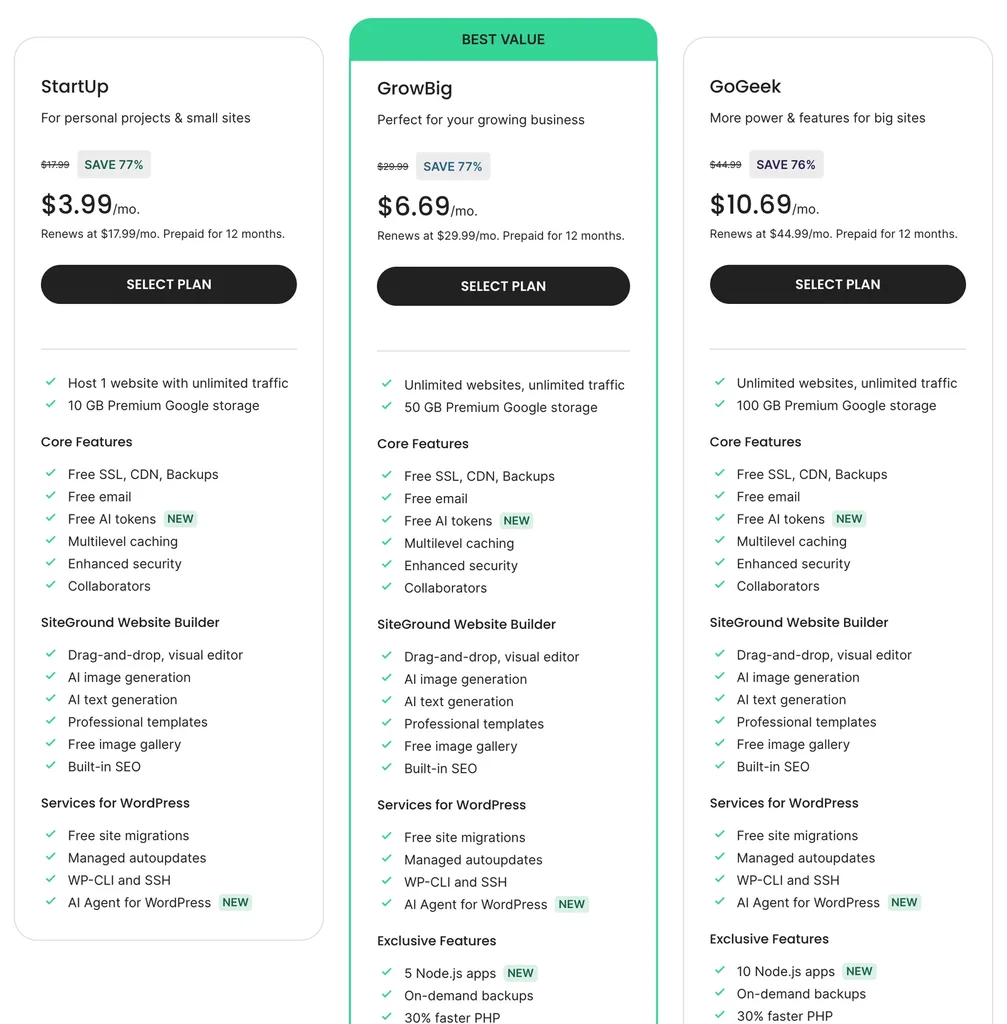
As you can see in the pricing table above, there are three shared hosting plans: StartUp, GrowBig and GoGeek.
- StartUp: As the name itself suggests, this plan is for beginners. It hosts one website with 10 GB of storage and suits small websites with around 10,000 visits each month.
- GrowBig: The GrowBig plan is for growing websites and anyone who runs several sites. You get unlimited websites, 50 GB of storage, staging, on-demand backups and faster PHP. It suits websites with around 100,000 visits a month.
- GoGeek: GoGeek is for busy websites, online stores and agencies. It adds 100 GB of storage, Git, private DNS, white-label access and priority support, and it is made for 400,000 or more visits a month.
Now, we have a look at the comparison of those three plans with all the details listed.
Shared Hosting Plans Comparison
| Features | StartUp | GrowBig | GoGeek |
|---|---|---|---|
| Price (12-month term) | $3.99/mo | $6.69/mo | $10.69/mo |
| Renews at | $17.99/mo | $29.99/mo | $44.99/mo |
| Paid upfront | $47.88 | $80.28 | $128.28 |
| Buy plan | ORDER | ORDER | ORDER |
| Websites and storage | |||
| Websites | 1 | Unlimited | Unlimited |
| Storage | 10 GB | 50 GB | 100 GB |
| Suitable monthly visits | ~10,000 | ~100,000 | 400,000+ |
| Included on every plan | |||
| Free SSL, CDN and daily backups | Yes | Yes | Yes |
| Free email | Yes | Yes | Yes |
| Free site migrations | Yes | Yes | Yes |
| Managed WordPress updates | Yes | Yes | Yes |
| WP-CLI and SSH | Yes | Yes | Yes |
| AI Agent for WordPress | Yes | Yes | Yes |
| Extra features | |||
| Staging | No | Yes | Yes, with Git |
| On-demand backups | No | Yes | Yes |
| 30% faster PHP | No | Yes | Yes |
| Node.js apps | No | 5 | 10 |
| Private DNS and white-label | No | No | Yes |
| Priority support | No | No | Yes |
| 30-day money-back | Yes | Yes | Yes |
This table tells all the details regarding SiteGround's shared hosting plans. If you opt for one of them, analyze the features completely and pick the one that fits your needs.
SiteGround WordPress Hosting
SiteGround's WordPress hosting uses the same three plans and the same prices: StartUp at $3.99/mo, GrowBig at $6.69/mo and GoGeek at $10.69/mo. The difference is that everything comes set up for WordPress from the first click. If you are new to the platform, here is what WordPress is.
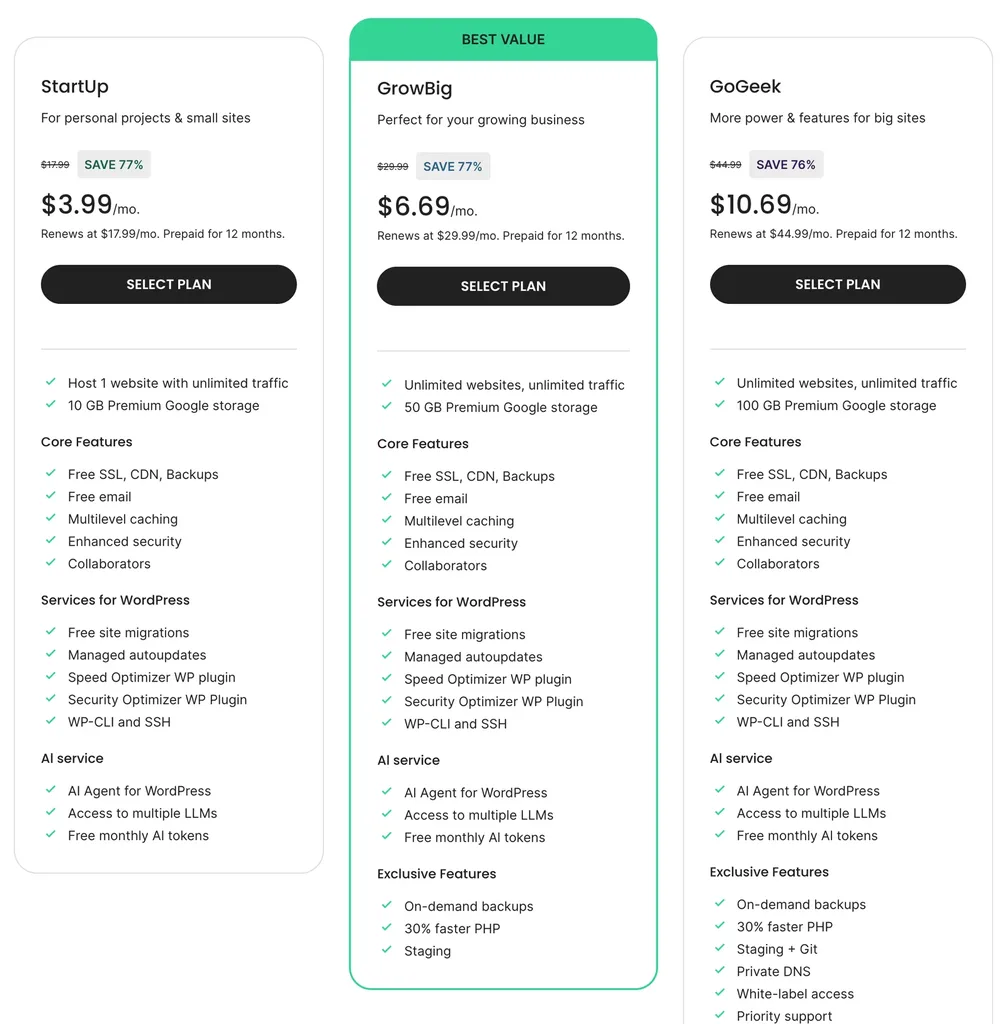
As with the shared plans, StartUp suits a single small WordPress site, GrowBig suits growing blogs and business websites, and GoGeek suits busy websites, stores and agencies.
SiteGround WordPress Hosting Features
- WordPress installed and set up for you
- Managed automatic WordPress updates
- Speed Optimizer plugin for caching and image optimization
- Security Optimizer plugin for login protection
- Free site migrations
- Staging (GrowBig and GoGeek) and Git (GoGeek)
- WP-CLI and SSH access
- AI Agent for WordPress
- Free SSL, CDN and daily backups
SiteGround Cloud Hosting
SiteGround Cloud Hosting gives your websites their own dedicated resources, fully managed by SiteGround. Prices start at $100/mo and go up to $400/mo, billed monthly with no setup fees. Cloud hosting suits large online stores, busy business websites and agencies that need guaranteed resources.
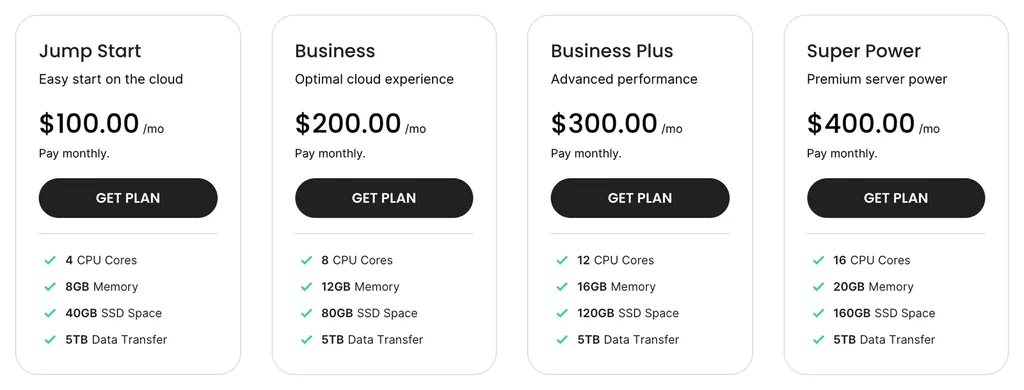
- Jump Start: $100/mo for 4 CPU cores, 8 GB of memory and 40 GB of SSD storage. As the name suggests, it is the easiest way to start on the cloud.
- Business: $200/mo for 8 CPU cores, 12 GB of memory and 80 GB of SSD storage, for growing businesses with steady traffic.
- Business Plus: $300/mo for 12 CPU cores, 16 GB of memory and 120 GB of SSD storage.
- Super Power: $400/mo for 16 CPU cores, 20 GB of memory and 160 GB of SSD storage, for the biggest projects.
Every cloud plan includes 5 TB of data transfer. If none of them fits, you can also build a custom cloud with your own mix of CPU, memory and storage.
Features of SiteGround Cloud Hosting
- Fully managed servers
- Automatic scaling of CPU and RAM
- Dedicated resources and a dedicated IP address
- Unlimited websites
- Daily and on-demand backups with one-click restore
- Free SSL, CDN and email
- Staging, Git, WP-CLI and SSH
- Smart web application firewall
- Private DNS and white-label client management
- 24/7 priority support
- 14-day money-back guarantee
SiteGround Reseller Hosting
If you are a web developer or an agency, SiteGround reseller hosting lets you host and manage your clients' websites under your own brand. The reseller plans use the same prices as the shared plans: GrowBig at $6.69/mo and GoGeek at $10.69/mo for the first year, with Cloud from $100/mo.
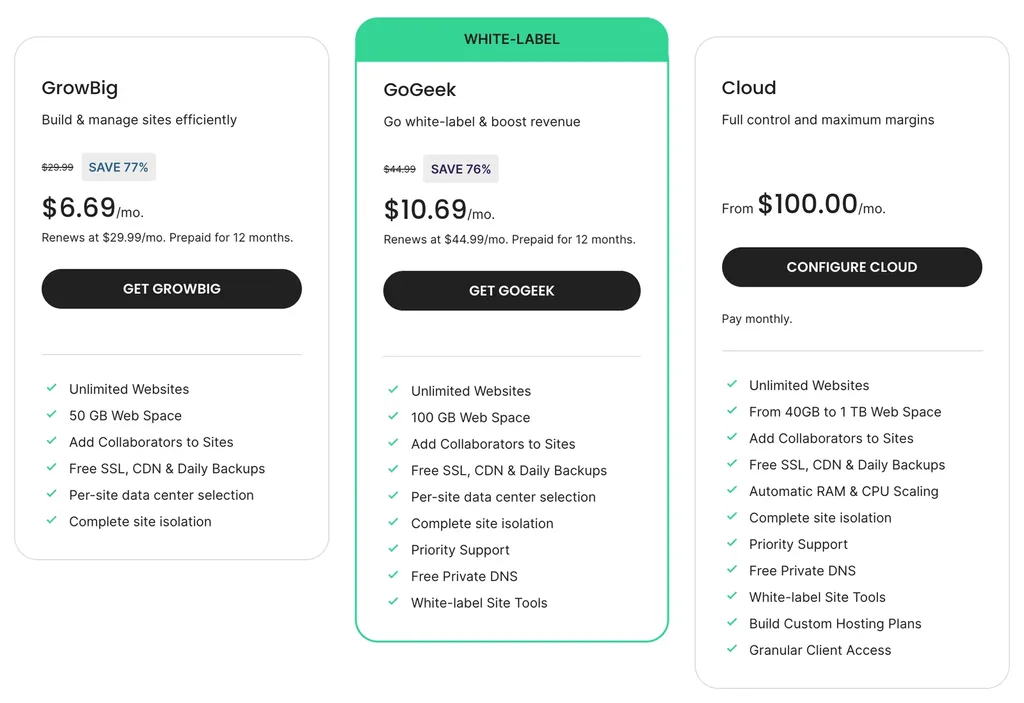
Features of SiteGround Reseller Hosting
- Unlimited websites
- Collaborators and client access on every site
- Choice of data center for each website
- Complete site isolation
- White-label Site Tools (GoGeek and Cloud)
- Free private DNS (GoGeek and Cloud)
- Priority support (GoGeek and Cloud)
- Custom hosting plans for your clients (Cloud)
Overall Advantages of SiteGround Web Hosting
- Fast Google Cloud infrastructure with multilevel caching
- Clean, beginner-friendly Site Tools dashboard
- Free SSL, CDN, daily backups and email on every plan
- Free site migrations and managed WordPress updates
- Speed Optimizer and Security Optimizer plugins for WordPress
- Staging and on-demand backups from GrowBig
- Data centers in the USA, Europe, Asia and Australia
- Excellent 24/7 support by real people
- Fully managed, auto-scaling cloud plans
- 30-day money-back guarantee on shared hosting
Overall Disadvantages of SiteGround Web Hosting
- Renewal prices are about four and a half times the first price
- The StartUp plan allows only 1 website and 10 GB of storage
- Staging, priority support and white-label access need higher plans
- Cloud hosting starts at $100/mo, with no cheaper VPS option
SiteGround vs Hostinger
Many of our readers choose between SiteGround and Hostinger, so here is a quick comparison of the starting plans:
| SiteGround StartUp | Hostinger Premium | |
|---|---|---|
| First price | $3.99/mo (12 months) | $2.49/mo (48 months) |
| Renews at | $17.99/mo | $10.99/mo |
| Websites | 1 | 3 |
| Storage | 10 GB | 20 GB |
| Backups | Daily | Weekly |
| Control panel | Site Tools | hPanel |
SiteGround needs a shorter commitment and gives you daily backups and stronger support, while Hostinger is much cheaper, especially after renewal. You can read the full details in our Hostinger review.
Who Should Choose SiteGround?
SiteGround is not the cheapest host, but it is one of the most polished. Here is who we think it suits best:
- WordPress beginners who want a fast, secure site and friendly support without touching a server.
- Small businesses that would rather pay a little more than lose sales to downtime or slow pages.
- Agencies and freelancers who manage many client sites and need staging, collaborators and white-label tools.
- Growing online stores that may move to managed cloud hosting later without changing hosts.
If the lowest possible price matters most, or you are comfortable managing your own server, a budget host or a VPS will give you more for your money.
Conclusion
SiteGround is still one of our favorite hosts for WordPress websites. If you have read our Hostinger review or our Bluehost review, you can compare them and choose the right one. As per our analysis, SiteGround offers excellent speed technology, very good WordPress tools and some of the best support in the industry.
Despite the high renewal prices, it is a good option to prefer if you value quality over the lowest price. For most websites, we recommend the GrowBig plan, because it unlocks unlimited websites, staging and on-demand backups. Choose StartUp only for a single small website, GoGeek for agencies and busy stores, and Cloud when you need dedicated resources.
We think this SiteGround web hosting review helped you explore more about SiteGround's hosting services. If so, don't forget to leave your feedback in the comment area below. We are always happy to see your valuable words there.
Our verdict
SiteGround
Fast Google Cloud hosting with excellent WordPress tools and support. Great quality, but renewal prices are among the highest of popular hosts.
- Performance4.5
- Ease of use4.5
- Features4.5
- Support5
- Value for money3.5
Pros
- Fast Google Cloud infrastructure
- Excellent 24/7 support
- Great WordPress tools and free migrations
- Daily backups on every plan
- Staging from GrowBig
Cons
- Very high renewal prices
- StartUp allows only 1 website
- Cloud starts at $100/mo