Hostinger is one of the most popular web hosting companies in the world today, and it is easy to see why. It offers fast servers, a beginner-friendly control panel and some of the lowest prices in the industry. We are not writing this review from a spec sheet, though. wpthinker.com itself runs on a Hostinger VPS in Mumbai, along with around twenty other websites we manage, and the old WordPress version of this site lived on Hostinger's web hosting before that. So, we can present an honest Hostinger web hosting review based on our own day-to-day use.
For newbies, Hostinger is one of the easiest ways to get a website online. Shared hosting starts at $2.49/mo, VPS servers start at $6.49/mo, and the biggest cloud plan costs $29.99/mo. You can start with a small shared plan and move up to cloud or VPS hosting as your traffic grows, all from the same dashboard.
Like any other web hosting provider, Hostinger also has some good and bad sides. Knowing them will help you find the best fit for your needs. So, let's have a look at them.
All prices in this review are in US dollars and were checked on Hostinger's website in October 2026, during its Black Friday sale. Hostinger changes its offers often, so confirm the final price at checkout.
Hostinger at a Glance
| Best for | Beginners, bloggers, small businesses, and developers who want an affordable VPS |
| Starting price | $2.49/mo (Premium, 48-month term) |
| Renews at | $10.99/mo (Premium) |
| Hosting types | Shared, WordPress, Cloud, VPS and Agency hosting |
| Control panel | hPanel (on VPS you can also pick cPanel, Plesk, CyberPanel, DirectAdmin or CloudPanel) |
| Storage | SSD on Premium, NVMe on every other plan |
| Data centers | Mumbai, Boston, Phoenix, Vilnius, Düsseldorf, Manchester, Jakarta, Kuala Lumpur, Campinas and more |
| Free extras | Domain for 1 year, SSL, email, CDN and backups |
| Money-back guarantee | 30 days (some conditions apply) |
| Support | 24/7 live chat with an AI assistant |
| Our rating | 4.5 out of 5 |
Hostinger Web Hosting: The Goods
Hostinger packs a lot of useful features into even its cheapest plans. We listed the good things, or plus points, of Hostinger that you should look at before choosing your hosting provider. So, take a look at them.
Fast LiteSpeed and NVMe Servers
Hostinger runs its shared, WordPress and cloud plans on LiteSpeed web servers, which work hand in hand with LiteSpeed Cache, a free caching plugin for WordPress. Every plan above Premium stores your files on NVMe drives, which are much faster than the older SSDs most budget hosts still use.
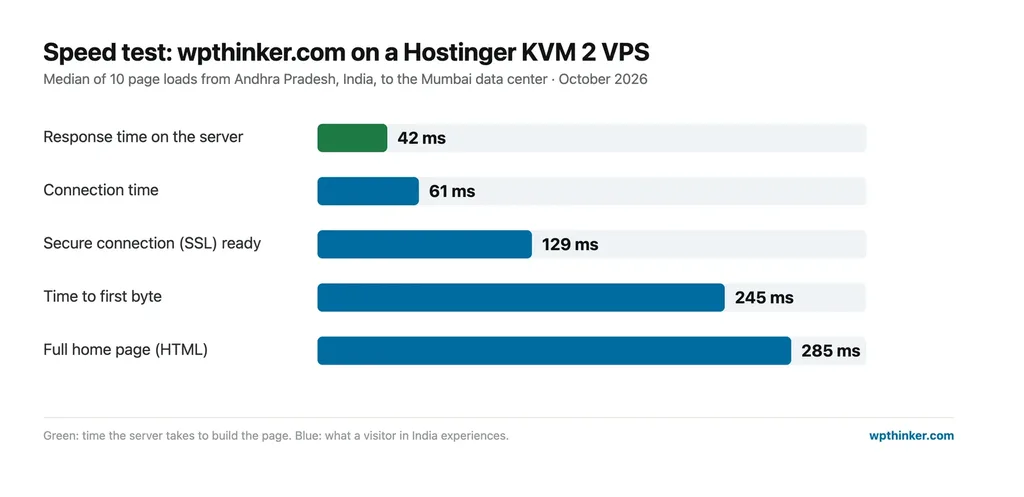
The VPS plans use AMD EPYC processors with NVMe storage. Our own server runs on an AMD EPYC 7543P, and the application behind wpthinker.com answers a page request in about 42 milliseconds on the server itself. Tested from Andhra Pradesh, India, the full home page arrives in under 300 milliseconds. You will find the complete numbers in the speed test section below.
Reliable Uptime
The uptime of a website matters for keeping the trust of your visitors as well as the search engines. Rather than repeat a marketing number, here is what our own server recorded. Hostinger's metrics for our VPS cover the last 30 days in 30-minute samples, and they show the server running the whole time with no gaps. There was a single restart on 17 October, and that was it.
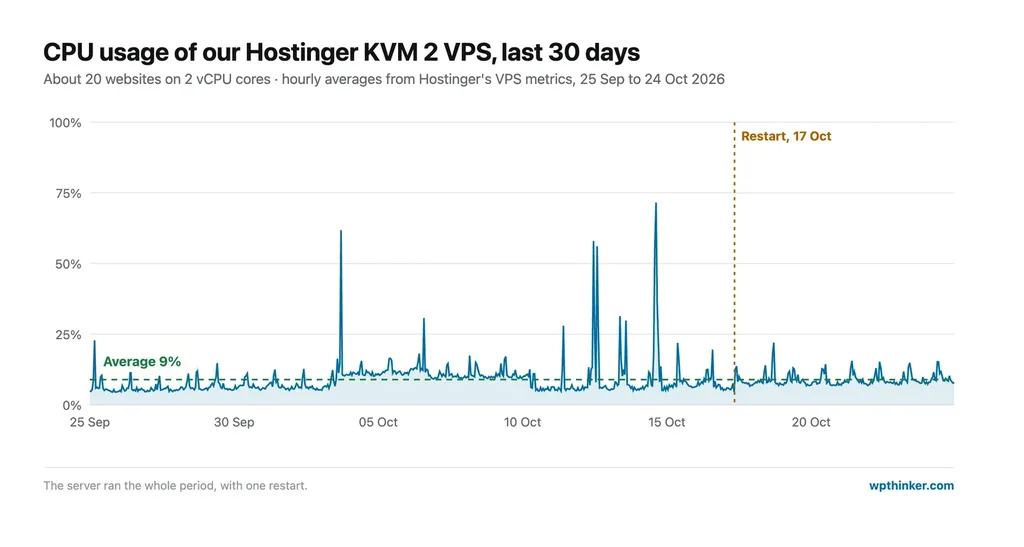
For a server that hosts around twenty busy websites, that is a solid record. CPU usage averaged just 9% over the month, so there is plenty of room left for traffic spikes.
User-Friendly hPanel Dashboard
Hostinger uses its own control panel called hPanel instead of cPanel. It is clean, fast and sorted by what you need most. Your websites, domains, emails and billing are all in the left-hand menu, and every website has its own page with the file manager, databases, DNS settings, SSL, backups and WordPress tools.
In short, almost every tool you need to maintain a website is in one place. WordPress users get extra buttons to update WordPress, clear the cache, turn on staging or switch the PHP version with one click. On the VPS side, hPanel shows CPU, memory, disk and bandwidth graphs, a browser terminal, the firewall, snapshots and backups. Even a beginner can find their way around within a few minutes.
Strong Security Features
Every Hostinger plan includes free SSL certificates for all your websites, along with a malware scanner and automatic backups. Premium gets weekly backups, Unlimited gets daily backups, and Cloud Startup adds on-demand backups that you can take before a risky change.
The VPS plans add a firewall you can manage from hPanel, DDoS protection, free weekly backups and manual snapshots. We take a snapshot before every major update on our server, so we can roll back if anything goes wrong.
Of course, security is still a shared job. Keep WordPress, your plugins and your themes updated, and turn on two-factor authentication for your logins.
Developer-Friendly VPS and API
This is the part we like the most. The Hostinger VPS gives you full root access, a choice of Linux templates and control panels, a built-in Docker manager and a public API. Our server runs Ubuntu 24.04 with CloudPanel, which Hostinger set up from a ready-made template.
Hostinger also publishes an official API connector that works with AI assistants. We manage our VPS and DNS records that way: listing servers, checking the metrics you saw above, taking a snapshot before an update and adding SSH keys, all without opening hPanel. Very few budget hosts offer anything like it.
30-Day Money-Back Guarantee
Hostinger offers a 30-day money-back guarantee on its hosting plans. If you are not happy with the performance or anything else in your package, you can cancel within 30 days and ask for a refund.
There is some fine print, though. VPS plans are refundable only if you haven't had a VPS refund in the last 180 days, and the cost of a free domain can be deducted from your refund. Domain registrations themselves can only be refunded within 96 hours.
Effective User Support
Hostinger offers 24/7 support through live chat. An AI assistant answers first and handles simple questions within seconds, such as DNS records, SSL setup or email settings. For anything it can't solve, you can ask to be connected to a human agent.
In our experience, the AI assistant is great for quick answers, but it can be confidently wrong on unusual problems. When we moved this site, it blamed our own application's firewall for a 403 error, while the real cause was that the domain still pointed to our old hosting. So, for tricky issues, ask for a human and share as many details as you can.
Hostinger Web Hosting: The Bads
Like any other service available on the planet, Hostinger also has some weak points. We listed them here so that you can be aware of them before you buy. So, take a look at them.
Renewal Prices Are Much Higher
Hostinger's low prices are introductory offers. When your plan renews, the monthly price goes up quite a lot:
- Premium: $2.49/mo, renews at $10.99/mo
- Unlimited: $3.49/mo, renews at $16.99/mo
- Cloud Startup: $7.99/mo, renews at $25.99/mo
- VPS KVM 2: $8.79/mo, renews at $14.99/mo
This is common in the hosting industry, but the jump is bigger than with some competitors. Always budget for the renewal price, not just the first bill.
The Lowest Price Needs a 48-Month Plan
The advertised prices on the shared, WordPress and cloud plans need a 48-month term, paid upfront. For example, the $2.49/mo Premium price means paying $119.52 on the first day. Shorter terms are available, but they cost more per month.
The Cheapest Plan Cuts Some Corners
The Premium plan is good value, but it uses SSD storage instead of NVMe, hosts only 3 websites and keeps weekly backups instead of daily ones. For a few dollars more, the Unlimited plan fixes all three.
VPS Hosting Is Self-Managed
Hostinger's VPS plans give you full control, which also means you are the server administrator. Updates, security and backups beyond the weekly ones are your job. Each VPS also has a single snapshot slot, so a new snapshot replaces the old one. If you don't want to manage a server, the cloud plans are the better choice.
Now, you got a basic idea about the good and bad sides of Hostinger web hosting. Now, you have to choose the right plan for your budget and needs. So, let's have a look at the complete details of the Hostinger hosting plans.
Hostinger Web Hosting Plans
Hostinger has several types of hosting to choose from: shared web hosting, WordPress hosting, cloud hosting, VPS hosting and agency hosting. If you are new to this, our guide on the different types of web hosting explains how they differ. Here are the complete details of every Hostinger plan.
Hostinger Shared Web Hosting
Hostinger's shared web hosting plans start at $2.49/mo for the first term and renew at $10.99/mo. Shared hosting means your website shares a server with other customers' websites. It is the most affordable way to get online, and it works well for blogs, portfolios and small business websites.
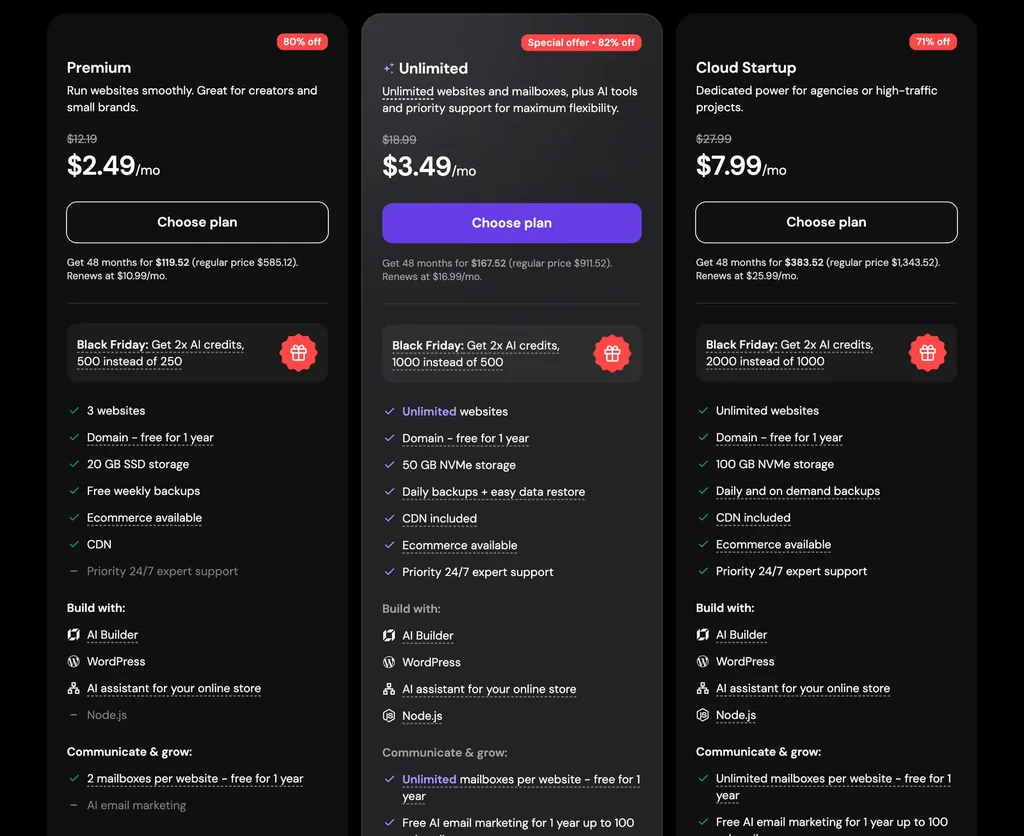
As you can see in the pricing table above, there are three shared hosting plans: Premium, Unlimited and Cloud Startup.
- Premium: As the name itself suggests, this is the starter plan. It hosts up to 3 websites with 20 GB of SSD storage and weekly backups, which is enough for a personal blog or a small business website.
- Unlimited: The Unlimited plan is for growing websites and anyone who runs several sites. You get unlimited websites, 50 GB of NVMe storage, daily backups and unlimited email accounts. It is the plan we recommend for most beginners.
- Cloud Startup: Although it is listed with the shared plans, Cloud Startup runs on cloud resources of its own: 4 CPU cores, 4 GB of RAM, 100 GB of NVMe storage and a dedicated IP address. It suits online stores and busy websites that have outgrown shared hosting.
Now, we have a look at the comparison of those three plans with all the details listed.
Shared Hosting Plans Comparison
| Features | Premium | Unlimited | Cloud Startup |
|---|---|---|---|
| Price (48-month term) | $2.49/mo | $3.49/mo | $7.99/mo |
| Renews at | $10.99/mo | $16.99/mo | $25.99/mo |
| Paid upfront | $119.52 | $167.52 | $383.52 |
| Buy plan | ORDER | ORDER | ORDER |
| Websites and storage | |||
| Websites | 3 | Unlimited | Unlimited |
| Storage | 20 GB SSD | 50 GB NVMe | 100 GB NVMe |
| CPU and RAM | Shared | Shared | 4 cores, 4 GB |
| Dedicated IP | No | No | Yes |
| Free extras | |||
| Free domain (1 year) | Yes | Yes | Yes |
| Free SSL | Yes | Yes | Yes |
| Free email (1 year) | 2 mailboxes per site | Unlimited | Unlimited |
| CDN | Yes | Yes | Yes |
| AI email marketing (1 year) | No | Up to 100 subscribers | Up to 100 subscribers |
| Backups and support | |||
| Backups | Weekly | Daily | Daily and on-demand |
| Priority 24/7 support | No | Yes | Yes |
| Node.js apps | No | Yes | Yes |
| Ecommerce | Yes | Yes | Yes |
| 30-day money-back | Yes | Yes | Yes |
This table tells all the details regarding Hostinger's shared hosting plans. If you opt for one of them, analyze the features completely and pick the one that fits your needs.
Hostinger WordPress Hosting
Hostinger also offers WordPress hosting, built for fast and secure WordPress websites. If you are new to the platform, here is what WordPress is. The WordPress plans use the same names and prices as the shared plans, Premium at $2.49/mo, Unlimited at $3.49/mo and Cloud Startup at $7.99/mo, but they come set up for WordPress from the first click.
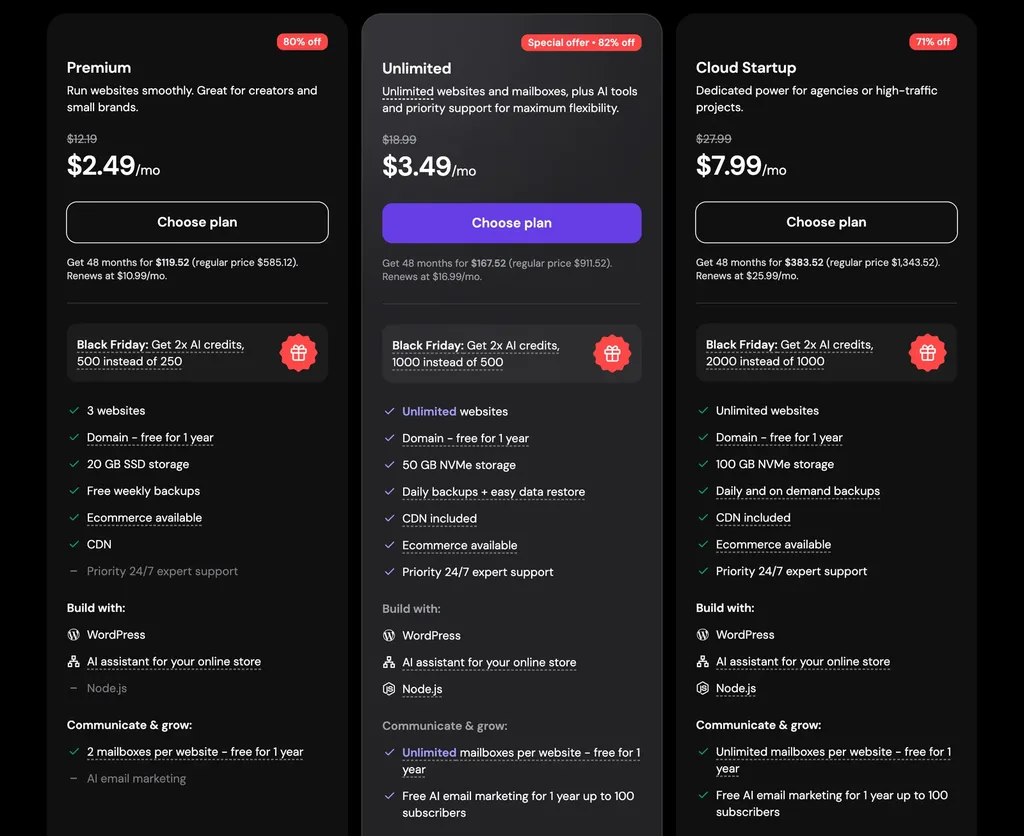
As with the shared plans, Premium suits one to three small WordPress sites, Unlimited suits growing blogs and business sites, and Cloud Startup suits WooCommerce stores and busy websites.
Hostinger WordPress Hosting Features
- One-click WordPress installation
- LiteSpeed web server with the LiteSpeed Cache plugin
- Automatic WordPress updates
- One-click staging to test changes safely
- WP-CLI and SSH access for developers
- AI tools for writing and building pages
- Ecommerce support for WooCommerce stores
- Free SSL, CDN and malware scanner
- Free domain for 1 year
Hostinger Cloud Hosting
Hostinger's cloud hosting gives your websites their own dedicated resources and a dedicated IP address, while Hostinger still manages the server for you. It sits between shared hosting and a VPS, and it is the best choice if you want more power without becoming a server administrator.
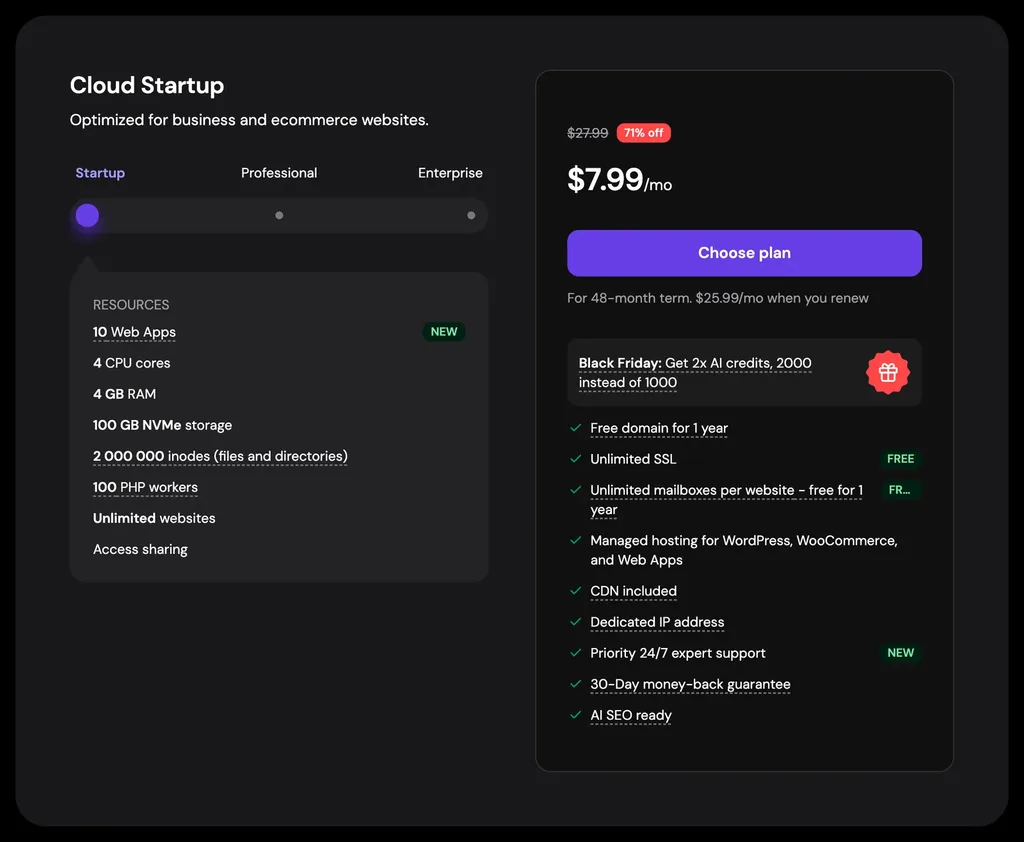
- Cloud Startup: $7.99/mo, renewing at $25.99/mo. You get 4 CPU cores, 4 GB of RAM, 100 GB of NVMe storage, 100 PHP workers and 2 million inodes for unlimited websites.
- Cloud Professional: $15.99/mo on the 48-month term, renewing at $44.99/mo, with more CPU, RAM and storage for growing businesses.
- Cloud Enterprise: $29.99/mo on the 48-month term, renewing at $64.99/mo. This is the biggest cloud plan, for large stores and high-traffic websites.
Features of Hostinger Cloud Hosting
- Dedicated resources and a dedicated IP address
- Fully managed servers
- NVMe storage on every plan
- Daily and on-demand backups
- Unlimited free SSL certificates
- Free domain and email for 1 year
- CDN included
- Managed WordPress, WooCommerce and web app hosting
- 24/7 priority support
Hostinger VPS Hosting
If you need full control over your server, Hostinger's VPS hosting is excellent value. There are four KVM plans, starting at $6.49/mo, and all of them use AMD EPYC processors, NVMe storage and a 1 Gbps network. You pay for the whole term upfront.
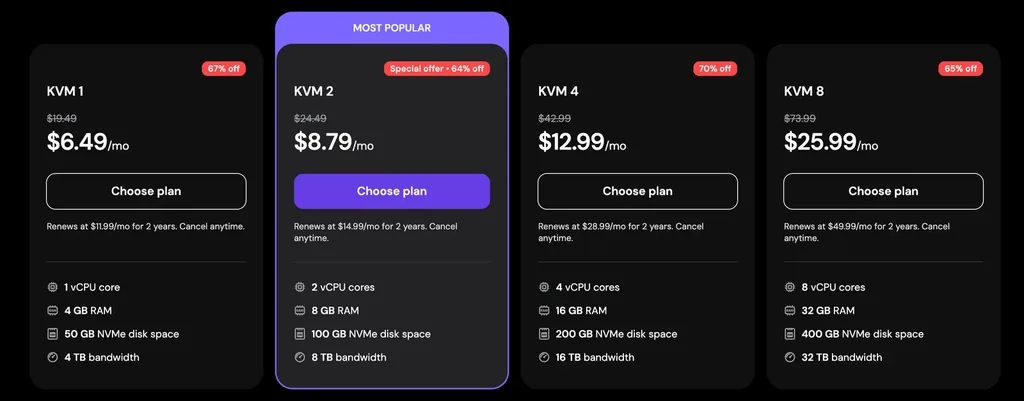
| Plan | vCPU | RAM | NVMe storage | Bandwidth | Price | Renews at |
|---|---|---|---|---|---|---|
| KVM 1 | 1 | 4 GB | 50 GB | 4 TB | $6.49/mo | $11.99/mo |
| KVM 2 | 2 | 8 GB | 100 GB | 8 TB | $8.79/mo | $14.99/mo |
| KVM 4 | 4 | 16 GB | 200 GB | 16 TB | $12.99/mo | $28.99/mo |
| KVM 8 | 8 | 32 GB | 400 GB | 32 TB | $25.99/mo | $49.99/mo |
- KVM 1: The entry-level VPS for a single website, a small app or learning how servers work.
- KVM 2: As the "Most Popular" label suggests, this is the sweet spot. We run wpthinker.com and around twenty other websites on a KVM 2, and it still has room to spare.
- KVM 4: For busy online stores, agencies and apps that need more memory.
- KVM 8: For large projects, heavy databases and high-traffic websites.
Features of Hostinger VPS Hosting
- Full root access
- AMD EPYC processors and NVMe storage
- Dedicated IP address
- Choice of Linux templates and control panels, including cPanel, Plesk, CyberPanel, DirectAdmin and CloudPanel
- Docker manager
- Firewall management and DDoS protection
- Free weekly backups and manual snapshots
- Malware scanner
- Browser terminal and AI assistant
- Public API
- Free domain for 1 year
- Option to move your VPS to another data center
Hostinger Agency Hosting
If you build websites for clients, Hostinger also has agency hosting. The Agency Startup plan costs $29/mo on a 24-month term and renews at $49/mo. It is made for managing many client websites from one place.
Speed Test: Our Hostinger VPS
We tested wpthinker.com, which runs on a Hostinger KVM 2 VPS in Mumbai, in October 2026. Each page was loaded 10 times from Andhra Pradesh, India, and we took the middle result. The server numbers come from Hostinger's own metrics for our VPS.
| Test | Result |
|---|---|
| Server location | Mumbai, India (Hostinger KVM 2) |
| Connection time | 61 ms |
| Secure connection (SSL) ready | 129 ms |
| Time to first byte | 245 ms |
| Full home page (HTML) | 285 ms |
| Response time on the server | 42 ms |
| Average CPU usage (30 days) | 9% |
| Restarts (30 days) | 1 |
These are excellent numbers for a server hosting around twenty websites. Your own results will depend on where your visitors are and how heavy your website is, so pick the data center closest to your audience.
Overall Advantages of Hostinger
- Very low introductory prices across all hosting types
- LiteSpeed servers and NVMe storage on most plans
- Clean, beginner-friendly hPanel dashboard
- Free domain, SSL, email and CDN
- Daily backups from the Unlimited plan up
- Affordable, powerful VPS plans on AMD EPYC servers
- Docker manager, public API and an official AI assistant connector
- Data centers on four continents, including Mumbai
- 24/7 live chat support
- 30-day money-back guarantee
Overall Disadvantages of Hostinger
- Renewal prices are much higher than the first term
- The best prices need a 48-month plan paid upfront
- The Premium plan uses SSD storage and weekly backups
- VPS plans are self-managed, with a single snapshot slot
- The AI support assistant can be wrong on unusual problems
Conclusion
Hostinger is one of my favorite hosting companies right now, and not just on paper: the website you are reading runs on it. If you have read our SiteGround review or our Bluehost review, you can compare them and choose the right one. As per our use and testing, Hostinger offers more value for money than most of its competitors, especially on its VPS plans.
Despite the high renewal prices and the long terms needed for the best deals, it is a good option to prefer. For most beginners, we recommend the Unlimited plan. If you are comfortable managing a server, the KVM 2 VPS is one of the best deals in hosting today. If you want more power without the server work, go with Cloud Startup.
We think this Hostinger web hosting review helped you explore more about Hostinger's hosting services. If so, don't forget to leave your feedback in the comment area below. We are always happy to see your valuable words there.
Our verdict
Hostinger
Fast LiteSpeed and NVMe servers, an easy hPanel dashboard and some of the best-value VPS plans around. Budget for the much higher renewal prices.
- Performance4.5
- Ease of use5
- Features4.5
- Support4
- Value for money4.5
Pros
- Very low introductory prices
- LiteSpeed servers and NVMe storage on most plans
- Beginner-friendly hPanel dashboard
- Free domain, SSL, email and CDN
- Powerful, affordable VPS with API access
Cons
- Renewal prices are much higher
- Best prices need a 48-month plan
- VPS plans are self-managed