Anyone who visits linode.com/pricing today will be taken to a page titled "Akamai Cloud Pricing". Akamai, which is better known for its content delivery network, agreed to buy Linode in February 2022 for about $900 million and completed the purchase on March 21 of that year. The servers are now sold under the Akamai Cloud name, although the plans still use the old Nanode and Linode labels. This Linode review for 2026 is based on Akamai's pricing, region, support and service level pages, which we went through on 11 November 2026.
We did not open an account or run speed tests for this review, so the uptime figures below are taken from Akamai's own documents. The smallest server, the Nanode, costs $5/mo, and the 2 GB server costs $12/mo.
I have been using WordPress since 2014 and run several eCommerce sites of my own on it, so for me, the support options and the real monthly bill matter more than the hardware specifications.
Prices are taken from the North American price lists on akamai.com and are shown in US dollars. Akamai notes that some plans cost a different amount in other regions, and taxes are added to the invoice.
Linode (Akamai Cloud) at a Glance
| Best for | developers and site owners who can manage their own server and want phone support |
| Starting price | $5/mo for the Nanode with 1 GB of RAM |
| Billing | Hourly, rounded up to the nearest hour, without a contract |
| Products | Shared, dedicated and high-memory servers, GPUs, Kubernetes, databases and storage |
| Data centers | 26 cities, 9 of them in the US (8 open to new customers) |
| Uptime guarantee | 99.99% per month in regions with full availability |
| Backups | Optional add-on from $2/mo |
| Support | Around the clock by ticket and phone |
| Our rating | 4.1 out of 5 |
Linode Review: The Goods
A large part of the original Linode service is still in place under the Akamai name, and a few parts of it compare well with other cloud providers in the same price range.
Support Over the Phone
One of the main advantages of Akamai Cloud is its support. Vultr handles support through tickets, and the free support at DigitalOcean also works through tickets. Akamai, on the other hand, lists phone numbers for its cloud support team, including a toll-free number in the United States (855-454-6633), and states that the team is available day and night. According to the support page, there are no tiers, no bots and no handoffs. For a business website that goes down in the middle of the night, being able to speak to someone directly is very useful.
Lower Cost for Extra Bandwidth
Every shared plan includes a monthly bandwidth allowance, starting with 1 TB on the Nanode and 2 TB on the 2 GB plan. Any usage above that allowance is charged at $0.005 per GB, which is half of the $0.01 per GB that both Vultr and DigitalOcean charge.
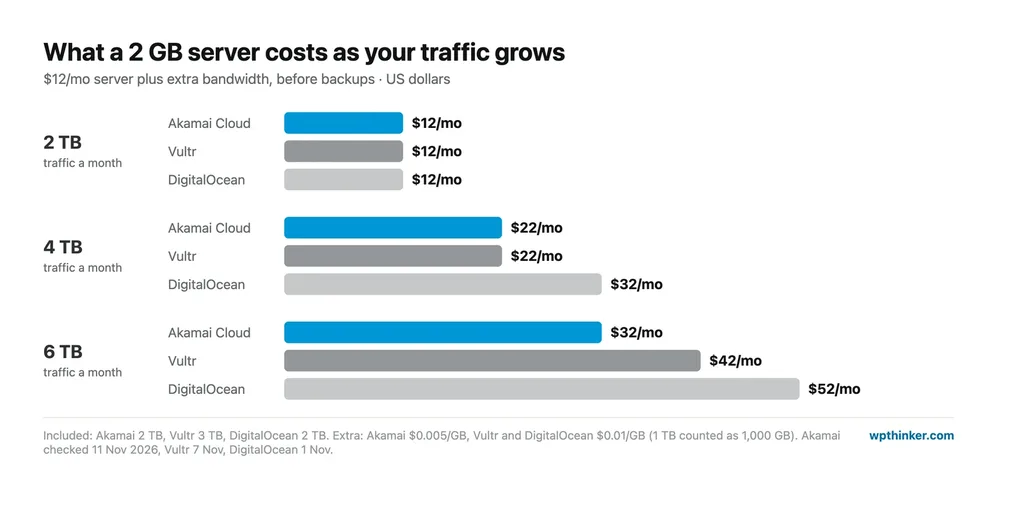
As a result, the gap widens as traffic grows. With 6 TB of traffic in a month, a 2 GB server would cost around $32 at Akamai, compared with $42 at Vultr and $52 at DigitalOcean.
Uptime Guarantee
Akamai guarantees 99.99% monthly uptime for compute instances in regions with full availability and 99% in regions with limited availability. When the guarantee is not met, customers can request a pro-rata credit by opening a support ticket within 30 days from the end of that month, along with the date, time and duration of the downtime. Since we did not monitor an Akamai server ourselves, these figures are the company's guarantee and not the result of our own testing.
Several US Locations
For new customers in the United States, Akamai lists eight cities with full availability: Atlanta, Chicago, Dallas, Fremont, Los Angeles, Miami, Newark and Seattle. Toronto is also open in Canada. A ninth US region, Washington, D.C., no longer accepts new customers.
Hourly Billing
Shared plans have one monthly price and are billed by the hour, with partial hours rounded up. In Akamai's own example, a 1 GB server that runs for 24 hours costs $0.18, which is 24 hours at $0.0075. Invoices are issued on the first day of the following month, and since the prices are not introductory offers, there is no separate renewal price.
WordPress Installation
Akamai has a one-click WordPress app, called a Quick Deploy App, which installs WordPress on Ubuntu 24.04 and takes about two to five minutes according to the documentation. Apps are also available for WooCommerce, OpenLiteSpeed WordPress, cPanel and Plesk. The same documentation recommends at least a 4 GB dedicated CPU server for a production website.
Linode Review: The Bads
The drawbacks below come from the same pricing, region and documentation pages.
Self-Managed Servers
As with Vultr and DigitalOcean, Akamai Cloud is not a managed hosting service. Keeping the server updated, secure and working is left to the customer. Akamai does offer a Managed Service for those who need help, although it costs $100 per compute instance per month, which is considerably more than the $12 price of the 2 GB server itself.
Backups Are Charged Separately
Backups are an optional add-on and are not included in the server price. They start at $2 per month for the Nanode, which adds 40% to its $5 cost, while the 2 GB and 4 GB servers cost an extra $2.50 and $5 per month respectively. The amounts are small, but they should be part of the budget from the first day.
No Included Bandwidth on G8 Plans
The newest G8 dedicated plans do not include any bandwidth, so every GB of outbound traffic is billed at $0.005. Shared plans and older dedicated plans, by contrast, still come with a monthly allowance, so the plan family is worth checking before ordering.
Shared Plans on Older Hardware
On its backups pricing page, Akamai describes the shared CPU plans as running on legacy hardware. This is unlikely to be a problem for a small WordPress blog, although the dedicated plans are the better choice where performance matters.
Region Restrictions
Three regions, namely Washington, D.C., one of the two London regions and Jakarta, are no longer open to new customers, and Paris, Madrid and Melbourne have limited capacity. Checking the region list before planning around a particular city will save time later.
Billing for Powered-Off Servers
A server that has been powered off is still billed, because Akamai keeps its data and resources reserved. Charges only stop once the server is deleted from the account.
Linode (Akamai Cloud) Plans
Akamai sells a wide range of cloud products, but only a handful of them are relevant for hosting a website.
Shared CPU
These are the original Linode servers, and they still use the old names, starting with the Nanode and continuing with Linode 2 GB, Linode 4 GB and larger sizes. The processor cores are shared with other customers, which keeps the prices low.
Shared CPU Plans Compared
| Plan | Price | RAM / CPUs | Storage | Bandwidth |
|---|---|---|---|---|
| Nanode 1 GB | $5/mo | 1 GB / 1 | 25 GB | 1 TB |
| Linode 2 GB | $12/mo | 2 GB / 1 | 50 GB | 2 TB |
| Linode 4 GB | $24/mo | 4 GB / 2 | 80 GB | 4 TB |
| Linode 8 GB | $48/mo | 8 GB / 4 | 160 GB | 5 TB |
For a single small WordPress blog, the 2 GB server is a reasonable starting point, and with backups added, it comes to $14.50 per month. The full list of sizes is available on Akamai's CPU pricing page.
Dedicated CPU
With dedicated plans, the processor cores are reserved for one customer. The new G8 dedicated plans run on 5th Gen AMD EPYC processors, and the smallest of them, with 2 vCPUs, 4 GB of RAM and 40 GB of storage, costs $0.07 per hour. If the server runs for a whole month, that comes to roughly $50, plus $0.005 for every GB of outbound traffic.
High Memory
High-memory plans offer a large amount of RAM relative to the number of processor cores, which suits large databases and caching layers. They start at $60 per month for 24 GB of RAM and 2 CPUs.
Kubernetes, Databases and Storage
For developers, Akamai also provides managed Kubernetes without a per-cluster fee, managed MySQL, PostgreSQL and Valkey databases, Block Storage, Object Storage and load balancers. Most WordPress sites will not need these services at the beginning.
Features of Linode (Akamai Cloud)
- Shared, dedicated and high-memory servers
- Hourly billing without a contract
- Extra bandwidth at $0.005 per GB
- 99.99% uptime guarantee in full-availability regions
- Support by ticket and phone
- One-click WordPress and WooCommerce apps
- Backups from $2 per month
- Managed Kubernetes with no cluster fee
- Card payments, with PayPal top-ups
Overall Advantages of Linode (Akamai Cloud)
- Phone support around the clock
- Extra bandwidth at half the usual price
- 99.99% uptime guarantee with credits
- Eight US cities for new customers
- Flat prices on the shared plans
Overall Disadvantages of Linode (Akamai Cloud)
- Management costs $100 per server per month
- Backups are charged separately
- No included bandwidth on G8 dedicated plans
- Shared plans run on older hardware
- Some regions are closed to new customers
Linode (Akamai Cloud) vs Vultr
Akamai Cloud and Vultr are often compared with each other, so the main differences are listed below, based on our Vultr review:
- Price: both charge $12 and $24 for their 2 GB and 4 GB servers, and both have a $5 entry server, although Vultr's $5 option also runs on older hardware.
- Included bandwidth: Vultr includes more on its NVMe servers, for example 3 TB against 2 TB on the $12 server.
- Extra bandwidth: Akamai charges $0.005 per GB, which is half of Vultr's $0.01.
- Support: Akamai offers phone support, while Vultr's support works through tickets.
- Uptime guarantee: 99.99% at Akamai, compared with 100% at Vultr.
- Backups: $2.50 on Akamai's 2 GB server, compared with an extra 20% ($2.40) at Vultr.
For a small blog, the two services are very close. Akamai is the stronger option for anyone who wants phone support or expects a lot of outbound traffic, while Vultr suits those who need more locations and a larger included allowance. For those who would rather not manage a server at all, Cloudways can run and maintain one on Linode, Vultr or DigitalOcean. Our guide to shared vs VPS vs cloud hosting explains the difference between these types of hosting.
Who Should Choose Linode (Akamai Cloud)?
- I would choose Akamai Cloud for a site I was willing to manage myself, as long as I wanted the option of calling support when something went wrong.
- High-traffic sites that send out several TB per month will benefit from the lower bandwidth price.
- Existing Linode users will find the same Nanode and Linode plans under the new name.
- I would not choose it for fully managed WordPress hosting, since that requires the $100 Managed Service on top of the server.
Linode (Akamai Cloud) FAQs
Is Linode the same as Akamai Cloud?
Yes. Akamai completed its acquisition of Linode on March 21, 2022, in a deal worth about $900 million. The servers are now sold as Akamai Cloud, although the plans still carry the Nanode and Linode names.
Is Linode good for WordPress?
Linode is a good fit for WordPress if the site owner is comfortable managing a server. The one-click WordPress app installs everything in a few minutes, and a 2 GB server is enough for a small blog, while Akamai recommends a 4 GB dedicated server for busier production sites.
How much does Linode cost?
The Nanode costs $5 per month, the 2 GB server $12 and the 4 GB server $24. Backups add between $2 and $5 per month on those plans, and extra bandwidth costs $0.005 per GB.
Does Linode have phone support?
Yes. Akamai lists phone numbers for its cloud support, including a toll-free number in the United States, and states that the team is available day and night in English.
Where are Linode's data centers?
New customers in the United States can choose Atlanta, Chicago, Dallas, Fremont, Los Angeles, Miami, Newark or Seattle. Further regions are available in Canada, Europe, Asia, Australia and Brazil.
Conclusion: Our Linode Review Verdict
Linode remains a solid cloud provider in 2026, even under the Akamai name. It offers simple pricing, low-cost extra bandwidth, a 99.99% uptime guarantee and, most notably, phone support. As our Vultr review shows, the two services are very close on price, but Akamai has the advantage on support and bandwidth costs. The main points to keep in mind are the separate charge for backups, the bandwidth rules on the new G8 plans and the fact that the server has to be managed by the customer.
We hope this Linode review has helped you understand what Akamai Cloud offers and what it costs. If you are using Linode or thinking about it, please share your experience in the comment section below.
Our verdict
Akamai Cloud (Linode)
Unmanaged cloud servers from $5 a month with simple hourly pricing, extra bandwidth at half the usual price, a 99.99% uptime SLA and 24/7 phone support. Backups cost extra, the new G8 dedicated plans include no bandwidth, and some regions are closed to new customers.
- Performance4
- Ease of use3.5
- Features4
- Support4.5
- Value for money4.5
Pros
- 24/7 phone support
- Extra bandwidth at $0.005 per GB
- 99.99% uptime SLA with credits
- Eight US cities for new customers
- Simple, flat shared-plan prices
Cons
- Not managed unless you pay $100 per server
- Backups cost extra
- No included bandwidth on G8 dedicated plans
- Shared plans on older hardware
- Some regions closed to new customers