WordPress folks who've outgrown cheap shared hosting tend to ask some version of the same thing: "I want a real cloud server, but I really don't want to become a Linux expert. So, now what?" More often than not, the answer people get is Cloudways, and that promise is exactly what this Cloudways review checks, plan by plan. We went through every price, server size and support promise on its website for this 2026 Cloudways hosting review.
Think of Cloudways as a property manager. The landlords, the folks who actually own the buildings, are DigitalOcean, Vultr, Linode, AWS and Google Cloud. You rent an apartment from them (that's your server), and Cloudways deals with the leaky faucet, the locks and those 2 a.m. phone calls. Its managed cloud servers start at $11/mo, and the price doesn't jump after a teaser period. At the far end, a huge Google Cloud machine runs $1,218.24/mo. One thing upfront, though: we didn't rent a paid Cloudways server for this update, so any speed claim below is Cloudways' own, and we'll point that out each time.
What we do know well is the other side of the deal. This very site, wpthinker.com, runs on a VPS that we manage ourselves, so we know exactly which chores Cloudways would take off your plate. Like every host, Cloudways has good sides and bad ones, and knowing both will help you pick the right server. So, let's have a look at them.
All prices in this review are in US dollars, as shown on cloudways.com on 1 November 2026. They exclude tax. And since Cloudways bills by the hour, what you actually pay depends on how many hours your server is switched on.
Cloudways at a Glance
| Best for | developers, agencies and growing stores that want cloud speed without babysitting a server |
| Starting price | $11/mo (DigitalOcean, 1 GB, standard SSD) or $14/mo with NVMe storage |
| Renews at | The same price, because there's no intro discount |
| Billing | Hourly, invoiced at the start of each month, with no contract |
| Cloud providers | DigitalOcean, Vultr, Linode (Akamai), AWS and Google Cloud |
| Products | Flexible (managed cloud servers), Autonomous (autoscaling WordPress), Velocity (Node.js) and AI Agents |
| Free extras | SSL, staging, a Redis object cache, the Object Cache Pro plugin on 4 GB servers and up, and one free site migration |
| Backups | Automated, with offsite storage billed at $0.033/GB |
| Support | 24/7 live chat and tickets; phone only with the Premium Support add-on |
| Free trial | 5 days on Flexible (no credit card) and 3 days on Autonomous |
| Money-back guarantee | None listed |
| Our rating | 4.1 out of 5 |
Cloudways Hosting: The Goods
Cloudways does several things really well, and a couple of them you won't find at a regular shared host at any price. Here's what stood out.
Pick Your Cloud, Let Cloudways Run It
This is the whole idea behind Cloudways, and honestly, it's a clever one. You choose one of five cloud companies, pick a server size and a city, and a few minutes later you've got a tuned server ready for WordPress, WooCommerce or a custom PHP application. Want your store close to shoppers in Dallas? Vultr has a data center there, and several providers also cover Chicago, Atlanta, Miami and Seattle. Cloudways says it offers 50+ locations in total, and each server on your account can sit on a different cloud.
Who owns Cloudways? DigitalOcean does. According to its Wikipedia entry, Cloudways started in Malta in 2012, and DigitalOcean bought it for $350 million in cash in 2022. Nowadays the logo even reads "Cloudways by DigitalOcean", and its legal pages point to DigitalOcean's terms.
The Price You See Is the Price You Keep Paying
Coming to the matter, this one's a breath of fresh air, because most hosts lure you in with $2.99 and then double or triple the bill at renewal. Cloudways doesn't play that game, so the $14 Micro server costs $14 in month one and the same $14 in month thirty-six.
Billing works by the hour, too: for DigitalOcean, Vultr and Linode, Cloudways divides the monthly price by 672 hours (28 days) and caps your bill at the monthly price. So, a 31-day month costs exactly the same as a 28-day one, and those extra days are effectively free. Need a test server for a long weekend? Spin one up, use it for 72 hours, delete it, and you'll pay about $1.50. It's a bit like renting a U-Haul by the hour instead of buying a truck. Prefer to pay ahead? You can load your Cloudways wallet with roughly a year of credit.
Host as Many Sites as Your Server Can Carry
Here's something shared hosts rarely allow. There's no cap on websites at all: launch WordPress, WooCommerce or PHP apps until the server says "enough", and nobody counts your visits either. How do you know you've hit the limit? Cloudways' own tip is to watch CPU and RAM, and once either one keeps hovering above 80%, it's time to go up a size. For agencies juggling ten small client sites, this is nothing but a money saver, since one server's bill covers all of them.
A Quick Stack Without Any Tuning
Every server ships with what Cloudways calls the Lightning Stack, which runs NGINX with PHP-FPM. Cloudways claims it is up to 65% faster for dynamic pages such as carts and logged-in dashboards. We haven't tested that figure ourselves, so treat it as the company's number. Varnish, Memcached and Redis come built in, plus the Breeze cache plugin on every WordPress install.
Here's the bit we liked most: Object Cache Pro, a premium caching plugin that Cloudways values at $95 a month, is free on servers with 4 GB of RAM or more. For WooCommerce stores, where logged-in shoppers skip the page cache, that's a real win. Oh, and if an old plugin still needs PHP 7.4, no problem, because anything from 7.4 up to 8.4 is on the menu, along with MariaDB 10.11 or 11.4.
Try It on a Copy First, Then Scale Up
Want to test a plugin update before it breaks your live checkout? Golden rule: never test on the live site. With Cloudways you make a free staging copy, break things there to your heart's content, and push the good version live with a single click. Got a new client who needs the exact same setup as an old one? Clone the whole server and skip the setup work. Then, when the holiday rush shows up, you can give the server more RAM and CPU on the spot (Cloudways calls it vertical scaling), and your sites stay right where they are. On AWS and Google Cloud you can even scale back down later.
Solid Security Basics
Every server gets a dedicated firewall powered by Imunify360, along with bot protection, brute-force protection and the option to block IPs or whole countries. Free Let's Encrypt SSL certificates take one click, and a WordPress vulnerability scanner is included. Automatic malware removal, though, is a paid add-on from $4 per app a month.
Free Trial, No Credit Card, Free First Move
You can try Flexible free for five days without entering a card. Just know that AWS and Google Cloud are left out of the trial; you get to play with DigitalOcean, Vultr and Linode only. Once the five days are up, the server gets deleted. Add a card, though, and it springs back to life with your apps and data intact. On top of that, Cloudways engineers will move your first website over from any host for free.
Copilot Watches the Server for You
Copilot is Cloudways' AI helper, which keeps an eye on your servers and applications, explains what went wrong and, through its SmartFix feature, can apply fixes like a service restart or a disk cleanup. Each insight or fix uses one credit. The Starter level gives 4 credits a month for $3.99, and Cloudways says it's free with qualifying accounts. The pricing page shows those 4 free credits on its larger servers. Growth costs $9.99 for 12 credits.
Cloudways Hosting: The Bads
Like any other hosting provider, Cloudways has some rough edges. None of them is a deal-breaker, believe me, but you should know about them before you sign up.
You Pay a Management Premium
You're paying for convenience, and the markup is real. We call it the management premium: the gap between Cloudways' price and the bare server it runs on. Here's what I mean. Go straight to DigitalOcean and a 1 GB droplet with 25 GB of SSD is $6 a month, yet the very same box through Cloudways costs $11. Jump to 8 GB and it's $48 against $88. So, you're paying somewhere around 1.8 to 2 times what the bare server costs. We break this down in the section after this one.
Add-Ons Pile Up Fast
The base price looks clean, but a few extras sit outside it. Offsite backups are mandatory and cost $0.033 per GB, which is about $0.66 a month for 20 GB of backups. It's not much, but it shows up on every invoice, and then there's the menu of add-ons:
- Cloudflare Enterprise CDN from $4.99 per domain a month
- Malware Protection from $4 per app a month
- Site Manager from $3 per app a month
- Rackspace email at $1.50 per mailbox a month
- DNS Made Easy at $0.50 per domain a month
Say you run three client sites with Cloudflare Enterprise and malware protection on each. That's $26.97 a month on top of the server, so budget for these extras from day one.
Standard Support Has Clear Limits
Good news first: chat and tickets are open 24/7 on every plan. The not-so-good news hides in Cloudways' support agreement, so we went through it line by line. On the standard level, your chat gets 15 minutes, max. After that it becomes a ticket, and a normal ticket's target is 12 hours (high priority gets 3). And mind you, that's the time until someone starts working on it, not the time until it's fixed. Faster help costs extra: Advanced Support is $100 a month, and phone support only comes with the Premium Support add-on.
AWS and Google Cloud Cost a Lot More
The cheapest AWS server starts at $20.56 a month, and Google Cloud starts at $37.33. Pick a different region and the price moves, too. Worse, the included bandwidth is almost nothing (2 GB on AWS, 1 GB on Google Cloud), and every extra GB on AWS costs $0.12. DigitalOcean, by contrast, throws in 1 TB even on the little Micro server and asks just $0.02 per GB after that. My take? Unless your company insists on AWS or Google, stick with the other three and keep the savings.
No Money-Back Guarantee
Cloudways doesn't list any refund window. The free trial and hourly billing play that role instead, since you only pay for the hours you use. Fair enough, but be careful with unpaid invoices. According to its billing FAQ, servers are stopped on day 10 and deleted on day 13, and backups go on day 28.
Not Built for Total Beginners
There's no cPanel here; Cloudways has its own dashboard, and while it's tidy, it talks in servers and applications, not "my website". You won't get a free domain or free mailboxes either. If you're starting your first blog, a beginner host will feel friendlier. Our Bluehost review for 2026 covers one good option.
Is Cloudways Worth the Markup Over DigitalOcean?
Short answer: yes, for most site owners who'd rather not run a server themselves. That extra $5 to $40 a month pays for a tuned stack, a firewall, backups, staging, updates and somebody awake at 3 a.m. when things go sideways. Sure, if Linux doesn't scare you, a bare droplet saves money. But your time isn't free, is it?
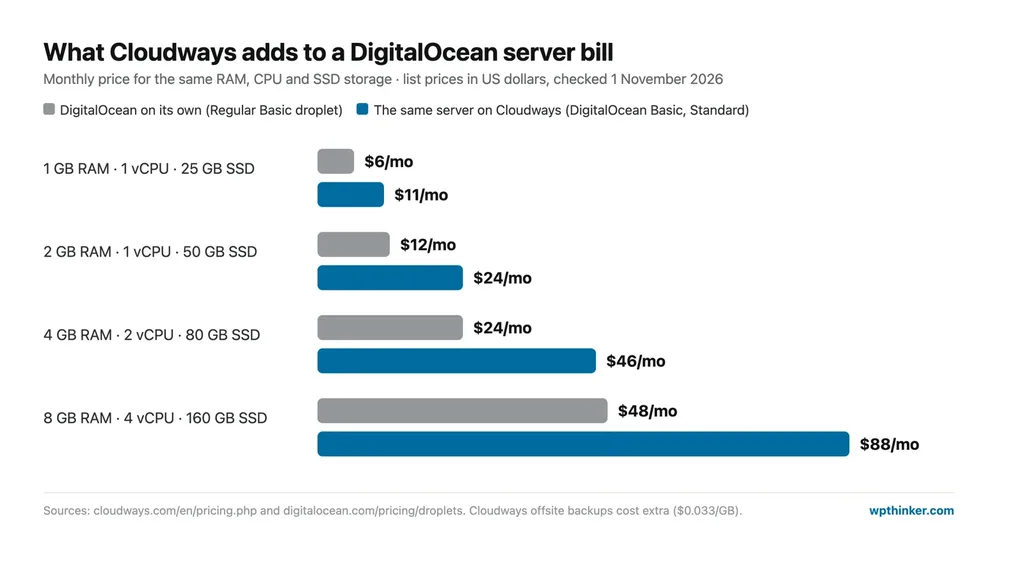
Let's do the three-year math for the smallest server: a $6 DigitalOcean droplet costs $216 over 36 months, while the same server on Cloudways costs $396. That $180 difference works out to just $5 a month. Now ask yourself one honest question: would you patch the server, set up the firewall, renew SSL and restore a crashed site for $5 a month? We run our own VPS for wpthinker.com, and trust me, those chores take hours. For a developer who enjoys the work, the raw droplet wins. For everyone else, the management premium is usually money well spent. We go deeper on this trade-off in our guide to shared vs VPS vs cloud hosting.
Cloudways Hosting Plans
Cloudways now sells four products. Flexible is the classic managed cloud server, and it's what most WordPress users pick. Autonomous is a newer, autoscaling WordPress platform. Velocity handles Node.js apps, and AI Agents runs AI assistants. Now, let's have a look at each one.
Cloudways Flexible: Managed Cloud Servers
Prices kick off at $11/mo, and that number doesn't creep up later. As the name itself suggests, Flexible is the mix-and-match option. Pick any of five clouds, choose a server type, and pile on as many sites as the box can take. I'd say it fits anyone from a lone blogger with a busy site to an agency with dozens of client sites. The default DigitalOcean servers come in four sizes:
- Micro ($14/mo): 1 GB of RAM and 1 vCPU. Cloudways pitches it at personal sites and simple blogs, and it's a sensible, economical place to start.
- Small ($28/mo): doubles the RAM to 2 GB. It comfortably suits a small business website or a couple of client sites with moderate traffic.
- Medium ($54/mo): the most popular size, with 4 GB of RAM and 2 vCPUs. This is where Object Cache Pro becomes free, so it's my pick for a WooCommerce store.
- Large ($99/mo): 8 GB of RAM and 4 vCPUs for big stores and resource-hungry applications, and the free Copilot credits show up here.
Flexible Plans Comparison (DigitalOcean)
| Features | Micro | Small | Medium | Large |
|---|---|---|---|---|
| Price per month | $14 | $28 | $54 | $99 |
| Hourly rate | $0.0208 | $0.0417 | $0.0804 | $0.1473 |
| Buy plan | ORDER | ORDER | ORDER | ORDER |
| Server resources | ||||
| RAM | 1 GB | 2 GB | 4 GB | 8 GB |
| vCPU | 1 | 1 | 2 | 4 |
| NVMe storage | 25 GB | 50 GB | 80 GB | 160 GB |
| Bandwidth | 1 TB | 2 TB | 4 TB | 5 TB |
| Sites and caching | ||||
| Websites and visits | Unlimited | Unlimited | Unlimited | Unlimited |
| Redis and Varnish | Yes | Yes | Yes | Yes |
| Free Object Cache Pro | No | No | Yes | Yes |
| Tools and support | ||||
| Staging and cloning | Yes | Yes | Yes | Yes |
| Free Copilot credits | No | No | No | 4 |
| 24/7 chat and tickets | Yes | Yes | Yes | Yes |
Before you choose, compare the Small and Medium columns. For $26 more you get double the RAM and CPU, plus Object Cache Pro, and a store will feel that difference.
Other Clouds and Server Types
Click over to the other tabs on Cloudways' pricing page and the numbers shift. Here's what we found:
- DigitalOcean on standard SSD is the cheapest option of all: $11, $24, $46 and $88 for the same four sizes.
- Vultr matches DigitalOcean at $14 to $99 on its standard servers, while High Frequency (faster NVMe, more storage) runs $16 to $118.
- Linode costs $14, $28, $59 and $105 for its four standard sizes.
- AWS starts at $20.56 for 1 GB and reaches $183.22 for 8 GB on its standard line.
- Google Cloud begins at $37.33 for a 1.7 GB shared-CPU server, and its 120 GB monster costs $1,218.24.
Need more muscle? DigitalOcean's General Purpose servers run from $106 to $699 a month, and its CPU Optimized line goes from $164 to $967.
Features of Cloudways Flexible
- Five cloud providers and 50+ locations
- Lightning Stack (NGINX and PHP-FPM)
- Unlimited sites and unmetered visits
- Free SSL and a dedicated firewall
- Free staging and server cloning
- Redis, Varnish and Memcached built in
- Object Cache Pro free from 4 GB
- Automated and on-demand backups
- Vertical scaling
- One free site migration
- 5-day free trial, no card
Cloudways Autonomous: Autoscaling WordPress
Autonomous starts at $99/mo. What makes it different? Here, your WordPress site doesn't live on one fixed box. When traffic jumps, more servers join in. Think Black Friday at noon, or a post that suddenly blows up on social media. Extra servers pop up to handle the crowd and quietly disappear once everyone goes home. A 3-day free trial is available.
- Growth ($99/mo): 1 website, 1 baseline server, 20 GB of disk and 150 GB of bandwidth. Extra servers cost $0.07 an hour each.
- Scale ($199/mo): 2 baseline servers, 50 GB of disk and 250 GB of bandwidth, with extra servers at $0.10 an hour.
- Plus ($399/mo): 3 baseline servers, 100 GB of disk and 1,000 GB of bandwidth, with extra servers at $0.12 an hour.
- Enterprise: custom pricing for very large sites.
Every Autonomous plan includes the Cloudflare Enterprise network, Object Cache Pro with Relay, malware protection, unlimited offsite backups and a managed migration. Extra disk costs $1 per GB and extra bandwidth $0.04 per GB. It's built for one big, spiky site, not for a pile of small ones.
Velocity and AI Agents
These two are outside WordPress, so we'll keep it short. Velocity is managed Node.js hosting from $20 to $400 a month, for apps and APIs. AI Agents runs AI agent tools such as OpenClaw and Hermes on managed servers, from $9.99 to $79.99 a month. Interesting, certainly, but probably not the reason you'd choose Cloudways for a WordPress website.
Add-Ons and Extra Charges
Here's the full list of extras we found on the pricing page, so nothing surprises you on the first invoice:
- Offsite backup storage: $0.033 per GB, and it can't be switched off
- Extra bandwidth: $0.01 to $0.05 per GB on Vultr, $0.02 on DigitalOcean and Linode, $0.12 on AWS, $0.10 to $0.17 on Google Cloud
- Cloudflare Enterprise: from $4.99 per domain a month
- Malware Protection: from $4 per app a month
- Site Manager: from $3 per app a month
- Rackspace email: $1.50 per mailbox a month
- Advanced Support: $100 a month
- Copilot: from $3.99 a month
Overall Advantages of Cloudways
- No teaser prices, so the renewal bill is no shock
- Hourly billing with no long-term contract
- A choice of five clouds and 50+ locations
- Unlimited sites on every server
- A pre-optimized NGINX and PHP-FPM stack
- Object Cache Pro free from 4 GB
- Free staging, cloning and vertical scaling
- Free trial without a credit card
- One free site migration
- An autoscaling option for unpredictable traffic spikes
Overall Disadvantages of Cloudways
- Nearly double the price of the raw server
- Offsite backups and many extras cost more
- No email hosting or free domain included
- Standard support has 15-minute chats and 12-hour ticket targets
- Phone support only with a paid add-on
- AWS and Google Cloud plans are pricey
- No money-back guarantee
- No cPanel, so there's a small learning curve
Cloudways vs Kinsta vs Hostinger Cloud
How does Cloudways' entry server compare with a premium managed host and a budget cloud plan? Here are the numbers from our hosting comparison:
| Cloudways Micro | Kinsta Single 35k | Hostinger Cloud Startup | |
|---|---|---|---|
| Price | $14/mo (monthly) | $35/mo (monthly) | $7.99/mo (48 months) |
| Renews at | $14/mo | $35/mo | $25.99/mo |
| Websites | Unlimited | 1 | Unlimited |
| Storage | 25 GB NVMe | 10 GB | 100 GB |
| Backups | Automated (storage billed) | Daily | Daily |
| Pick it if… | you want cloud control and fair monthly pricing | you want hands-off hosting for one important site | you'll commit for years and want the lowest start |
Want to see how it plays out over several years? Our true cost calculator does the math for you, and you can also open the full Cloudways vs Kinsta comparison.
Who Should Choose Cloudways?
- Go for Cloudways if your site has outgrown shared hosting and you'd like cloud speed without learning to be a sysadmin.
- It's a great fit for freelancers and agencies who want all their client sites on one server and one bill.
- Running a WooCommerce store? Then the free Object Cache Pro on 4 GB servers alone makes it worth a look.
- Skip it if this is your very first blog, if you want email and a domain bundled in, or if phone support on a tight budget matters to you.
Cloudways FAQs
Is Cloudways good for WordPress?
Yes. Cloudways is one of the better picks for WordPress sites that need more power than shared hosting. You get a tuned NGINX stack, built-in caching, free staging and unlimited sites per server. It's a little technical for complete beginners, though.
Does Cloudways have a free trial?
Yes. Flexible comes with a 5-day free trial with no credit card needed, on DigitalOcean, Vultr or Linode. Autonomous has a 3-day trial. At the end of a Flexible trial, the server is deleted unless you add a payment method.
Who owns Cloudways?
DigitalOcean owns Cloudways. The deal, worth $350 million in cash, was announced in August 2022 and wrapped up a month later. Cloudways itself got its start in Malta back in 2012.
Does Cloudways include email hosting?
No, email isn't included in any plan. You can add Rackspace mailboxes for $1.50 each per month, or use a separate email service you already pay for.
Conclusion: Our Cloudways Hosting Review Verdict
I've used WordPress since 2014, and several of my own eCommerce sites still run on it, so hosting decisions like this one aren't abstract for me. And if your site has outgrown shared hosting, Cloudways makes the move to a real cloud server about as painless as it gets. There's no renewal trap, billing runs by the hour, the stack is tuned on day one, and Object Cache Pro comes free on mid-size servers. That's genuinely good value. Weighing it against a premium managed host? Read our Kinsta review too. My two cents: Cloudways hands you more control for less money, and Kinsta does more of the hand-holding. But let's not pretend there are no catches. You'll pay nearly double the raw server price, the add-ons creep up, and standard support has its limits. Budget for those, start on a Medium server if you sell online, and Cloudways is an easy recommendation.
We think this Cloudways hosting review helped you understand what you get and what you pay. Are you using Cloudways, or thinking about it? Don't forget to leave your feedback in the comment area below.
Our verdict
Cloudways
Managed cloud servers with no renewal trap, hourly billing and a fast, pre-tuned stack. You pay roughly double the raw server price, and backups, email and CDN extras cost more.
- Performance4.5
- Ease of use4
- Features4.5
- Support3.5
- Value for money4
Pros
- Monthly price never jumps at renewal
- Hourly billing with no contract
- Five clouds and 50+ locations
- Unlimited sites and free staging on every server
- Object Cache Pro free from 4 GB
Cons
- About double the raw server price
- Backups, email and CDN cost extra
- Standard support caps chats at 15 minutes
- No money-back guarantee