Kinsta is one of those names that keeps coming up whenever people talk about premium WordPress hosting. We first reviewed it way back in January 2018, and a lot has changed since then. So, here is our fresh Kinsta web hosting review for 2026. If you're curious how things looked back then, our original Kinsta review is still there.
For this update, we went through every plan, price, limit and fee on Kinsta's website on 4 November 2026. Plans start at $35/mo, and the biggest standard single-site plan costs $375/mo, with custom Enterprise plans above that. One thing upfront, though. We didn't buy a Kinsta plan and run our own speed tests for this update, so any performance claim below is Kinsta's, and I'll say so each time.
I've used WordPress since 2014, and several of my own eCommerce sites run on it. This site, wpthinker.com, runs on a VPS we look after ourselves, so I know exactly what a managed host like Kinsta takes off your plate. Like every host, Kinsta has good sides and bad sides. So, let's have a look at them.
All prices in this review are in US dollars and exclude tax, as shown on kinsta.com in November 2026. Kinsta was testing two different plan lists on its pricing page when we checked, so you may see slightly different plans. We cover both below.
Kinsta at a Glance
| Best for | business sites, busy blogs and stores that want fully managed WordPress and are okay paying more for it |
| Starting price | $35/mo (first month free on the entry plans) |
| Renews at | The same price; pay yearly and you get two months free |
| Hosting type | Managed WordPress only (plus separate app and database hosting) |
| Data centers | 30, plus a CDN with 300+ edge locations |
| Free extras | Cloudflare security, CDN, SSL, daily backups, staging, malware removal, unlimited migrations |
| Backups | Daily, kept for 14 to 30 days depending on the plan |
| Uptime promise | 99.9% (99.99% as a paid upgrade) |
| Support | 24/7 human chat support in 8 languages |
| Money-back guarantee | 30 days, for first-time customers |
| Our rating | 4.3 out of 5 |
Kinsta Web Hosting: The Goods
Kinsta does a lot of things right, and most of them are about one idea: you write, sell or build, and Kinsta worries about the server. Here's what stood out.
Fully Managed, So You Don't Babysit a Server
This is the main reason people pay Kinsta's prices. You don't install a firewall, you don't patch PHP, and you don't set up caching. Kinsta handles the server side and gives you a clean dashboard called MyKinsta to manage your sites. From there you can change PHP versions, clear the cache, set up redirects, check backups and look at debugging tools, all without touching a command line.
I run my own VPS for this site, and believe me, those chores add up. Kinsta basically sells you your weekends back.
Cloudflare Protection and a Big CDN Built In
Every Kinsta plan comes with Cloudflare's enterprise-level security in front of your site, including DDoS protection and a firewall, plus bot protection. Kinsta says it would cost $250 or more a month to buy that kind of protection separately. Your pages are also served through a CDN with more than 300 edge locations, and Kinsta runs 30 data centers around the world. So, a reader in Texas and a reader in New York both get your site from somewhere close.
Backups, Staging and Migrations Are All Free
Kinsta takes automatic daily backups and keeps them for at least 14 days, and up to 30 days on bigger plans. Every site also gets a free staging copy, so you can test a plugin update before it breaks your live checkout. Moving from another host? Migrations are free and unlimited on every plan, and Kinsta's engineers do the work.
Here's a nice one I didn't expect. If your site ever gets hacked, Kinsta's malware removal team cleans it up at no extra cost, for as long as you host with them.
A Built-In Tool to Find What's Slowing You Down
Kinsta includes its own APM tool, which stands for application performance monitoring. In plain English, it watches what your site does behind the scenes, like slow database queries, heavy plugins and outside calls, and shows you where the slowdown is coming from. Kinsta includes it on every plan, at no extra cost.
Real Humans on Chat, Day and Night
Kinsta's support runs 24/7 through chat in 8 languages, and Kinsta describes it as one-tier support from experts. That means you don't get passed from a script reader to a senior engineer. We didn't open a support ticket for this review, so I can't share our own response times, but the promise of a single expert tier is a good sign.
A Free First Month and a 30-Day Refund
The entry plans (Single 35k, Single 20GB, WP 2 and Launch) give new customers the first month free. After any free period, you're covered by a 30-day money-back guarantee. Just know the guarantee is only for first-time customers, and switching plans doesn't restart the 30 days.
Kinsta Web Hosting: The Bads
Like any other host, Kinsta has some rough edges. None of them is a deal-breaker, but you should know them before you sign up.
You Pay a Lot for a Small Amount of Space
This is the big one. The $35 Single plan gives you one WordPress site and 10 GB of storage. Compare that with Cloudways, where $14 gets you a whole server with 25 GB and room for as many sites as it can handle. Kinsta's price pays for the management, the support and the included tools, not raw hardware. If you only look at specs, Kinsta will always look expensive.
One Site per Plan at the Low End
The Single plans are exactly what the name says: one WordPress install. Need a second site? That's $30 more a month, or you move to a multi-site plan starting at $70. Also, the cheapest Single 35k plan is marked as not recommended for online stores or membership sites, and it doesn't support WordPress Multisite. For a WooCommerce store, Kinsta points you to Single 65k at $50 or higher.
Overage Fees Can Sneak Up on You
If your site goes over its limits, Kinsta keeps it online, which is good, but it charges for the extra. Here's what that costs, as listed in Kinsta's docs:
- Visits: $0.50 per 1,000 extra visits
- Server bandwidth: $0.50 per extra GB
- CDN bandwidth: $0.05 per extra GB
- Disk space: $2 per extra GB a month
Kinsta notifies you at 80% and 100% of your limit, so it won't be a total surprise. Still, a post that suddenly goes viral on the Single 35k plan could add a few dollars to your bill.
Some Add-Ons Are Pricey
The base plans include a lot, but a few upgrades cost real money. Redis caching is $100 per site a month. Backups every six hours are $20 per site a month, and hourly backups are $100. Extra disk space is $20 for each 20 GB. For a small business, those numbers add up quickly.
Two Price Lists at the Same Time
When we checked Kinsta's pricing page, it was running a test that shows different visitors different plans. Some people see the classic Single and WP plans; others see a newer set called Launch, Build, Expand, Scale and Lead. Both are real, but it does make comparing prices confusing, so double-check which plan you're actually buying.
No Email Hosting
None of Kinsta's plans or add-ons list email hosting. You'll need a separate email service for an address like you@yourbusiness.com.
Kinsta Then and Now: 2018 vs 2026
Since we reviewed Kinsta years ago, here's how a few things have changed, based on our original review and Kinsta's site today.
| Our original review | November 2026 | |
|---|---|---|
| Cheapest plan | $30/mo (Starter) | $35/mo (Single 35k or Launch) |
| Free migrations | Pro plan and up only | Unlimited, on every plan |
| Data centers | 13 | 30 |
| Money-back guarantee | 30 days | 30 days |
So, the starting price went up by $5, but you get a lot more for it now, especially the free migrations on every plan and more than twice the data centers.
Kinsta Web Hosting Plans
Kinsta only sells managed WordPress hosting on these plans, split into single-site plans, multi-site plans and, for some visitors, the newer "resources" plans. Now, let's have a look at each one.
Single-Site Plans
Prices start at $35/mo and stay the same after the first term. As the name itself suggests, each Single plan hosts one WordPress site. You can choose to be billed by monthly visits or by server bandwidth; the price for each step is the same either way. Here are the visit-based plans:
- Single 35k ($35/mo): about 35,000 visits a month and 10 GB of storage. Good for a personal blog or a small business site, but not for stores.
- Single 65k ($50/mo): 65,000 visits and 10 GB. This is the first plan Kinsta recommends for WooCommerce and membership sites.
- Single 125k ($90/mo): 125,000 visits, for a growing store or a busy blog.
- Single 315k ($170/mo): 315,000 visits, and this is where you get account managers too.
- Single 500k ($290/mo): 500,000 visits and 15 GB of storage.
- Single 750k ($375/mo): 750,000 visits and 15 GB. Bigger than this, and you're into custom Enterprise plans.
Single-Site Plans Comparison
| Features | Single 35k | Single 65k | Single 125k | Single 315k |
|---|---|---|---|---|
| Price per month | $35 | $50 | $90 | $170 |
| Paid yearly | $350/yr | $500/yr | $900/yr | $1,700/yr |
| Buy plan | ORDER | ORDER | ORDER | ORDER |
| Limits | ||||
| Monthly visits | 35,000 | 65,000 | 125,000 | 315,000 |
| Storage | 10 GB | 10 GB | 10 GB | 10 GB |
| CDN bandwidth | 125 GB | 250 GB | 500 GB | 750 GB |
| Good to know | ||||
| Recommended for stores | No | Yes | Yes | Yes |
| WordPress Multisite | No | Yes | Yes | Yes |
| First month free | Yes | No | No | No |
Before you choose, look at the jump from Single 35k to Single 65k. For $15 more a month, you nearly double your visits and get a plan Kinsta actually recommends for selling online.
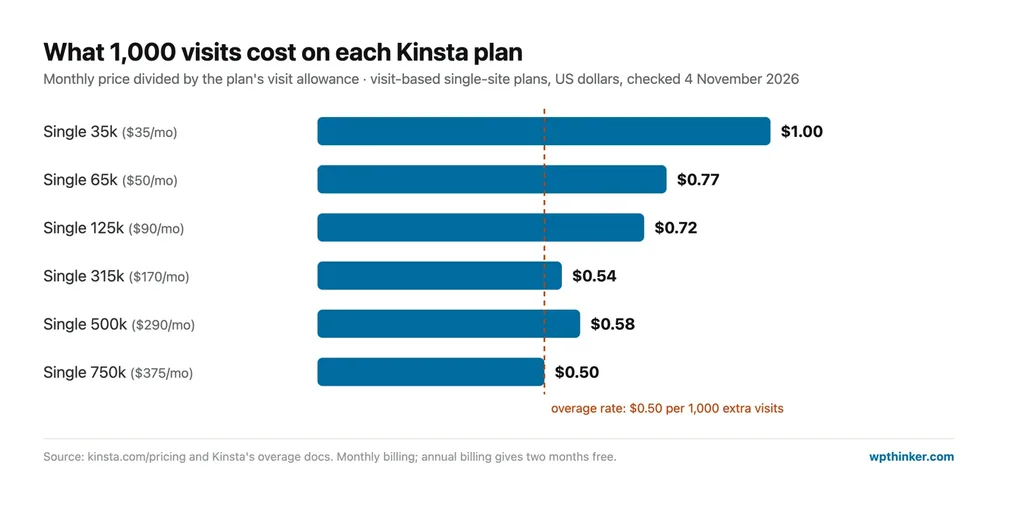
Here's something I noticed while doing the math. The bigger plans get cheaper per visit, which you'd expect, but Single 315k ($0.54 per 1,000 visits) is actually a better deal than Single 500k ($0.58). And the overage rate of $0.50 per 1,000 visits means a site that only goes a little over its limit now and then may be better off paying overages than upgrading.
Multi-Site Plans
These start at $70/mo. If you run several sites, Kinsta's WP plans put them all under one bill:
- WP 2 ($70/mo): 2 sites and 20 GB of storage, with the first month free.
- WP 5 ($115/mo): 5 sites and 30 GB.
- WP 10 ($225/mo): 10 sites and 40 GB, with account managers.
- WP 20 ($340/mo): 20 sites and 50 GB.
- WP 40 ($450/mo): 40 sites and 60 GB, which works out to about $11 a site.
The Newer "Resources" Plans
Some visitors to Kinsta's pricing page see a different lineup. These plans bundle sites, storage and bandwidth together, with an estimated visit count:
- Launch ($35/mo): 1 site, about 75,000 visits and 15 GB of storage, first month free.
- Launch Plus ($59/mo): 1 site, about 125,000 visits and 25 GB.
- Build ($69/mo): 2 sites, about 200,000 visits and 30 GB.
- Expand ($99/mo): 5 sites, about 350,000 visits and 40 GB.
- Scale ($169/mo): 10 sites, about 650,000 visits and 50 GB.
- Lead ($299/mo): 20 sites, about 1.5 million visits and 60 GB.
Honestly, if you see these, they look like the better deal. Launch gives you more storage than Single 35k for the same $35, and Build fits two sites for $69. Kinsta says the visit numbers are a guide, not a hard limit.
Features of Kinsta Hosting
- Fully managed WordPress
- Cloudflare DDoS protection and firewall
- CDN with 300+ edge locations
- 30 data centers
- Free SSL
- Automatic daily backups
- Free staging for every site
- Unlimited free migrations
- Free malware removal
- Built-in APM tool
- MyKinsta dashboard and Kinsta API
- 24/7 chat support in 8 languages
- 99.9% uptime SLA
Add-Ons and Extra Charges
Here's what costs extra, from Kinsta's pricing page:
- Extra WordPress site: $30 a month
- Extra disk space: $20 per 20 GB a month
- Redis caching: $100 per site a month
- Backups every 6 hours: $20 per site a month (hourly: $100)
- Premium staging (up to five staging sites): $20 per site a month
- Kinsta Automatic Updates: from $3 per site a month
- Dedicated virtual server: from $300 a month
Overall Advantages of Kinsta
- Fully managed, with nothing to patch
- Cloudflare security and a 300+ location CDN included
- Free daily backups and staging
- Unlimited free migrations
- Free malware cleanup
- Built-in APM tool
- 24/7 human chat support
- No renewal price jump
- First month free on entry plans
- 30-day money-back guarantee
Overall Disadvantages of Kinsta
- Expensive next to cloud and shared hosts
- Only 10 GB of storage on most Single plans
- One site on the Single plans
- Entry plan not recommended for stores
- Overage fees for visits, bandwidth and disk
- Pricey add-ons like Redis
- No email hosting
- Two different plan lists during the pricing test
Kinsta vs Cloudways vs WP Engine
How does Kinsta's entry plan stack up against two other popular managed options? Here are the numbers, using Kinsta's page today and our hosting comparison for the others:
| Kinsta Single 35k | Cloudways Micro | WP Engine Essential | |
|---|---|---|---|
| Price | $35/mo | $14/mo | $35/mo |
| Renews at | $35/mo | $14/mo | $35/mo |
| Websites | 1 | Unlimited | 1 |
| Storage | 10 GB | 25 GB NVMe | 10 GB |
| Monthly visits | 35,000 | Unlimited | 25,000 |
| Backups | Daily, included | Automated (storage billed) | Daily |
| Pick it if… | you want the most hands-off setup and 24/7 experts | you want cloud power for less and don't mind a little tinkering | you're already in the WP Engine world |
Want to see how they add up over a few years? Our true cost calculator does the math for you.
Who Should Choose Kinsta?
- I'd pick Kinsta for a business site or store that makes money, where downtime or a hack costs more than the hosting bill.
- Agencies will like the multi-site plans, the Kinsta API and free migrations for every client.
- Busy blogs that hate dealing with caching and security will feel right at home.
- I'd skip it if I was starting my first blog on a tight budget, needed lots of storage, or wanted email in the same package.
Kinsta FAQs
Is Kinsta worth the money?
For a site that earns money, yes, it usually is. You pay more than you would at a shared or cloud host, but backups, staging, Cloudflare security, malware cleanup and 24/7 expert support are all included. For a small hobby blog, it's probably more than you need.
Does Kinsta have a free trial?
Not a trial exactly, but the entry plans give new customers the first month free. After that, there's a 30-day money-back guarantee for first-time customers.
How many websites can I host on Kinsta?
The Single plans host one site, the WP plans host 2 to 40 sites, and the newer Resources plans host 1 to 20. You can also add a site to most plans for $30 a month.
Does Kinsta include email hosting?
No. Kinsta doesn't list email hosting in its plans or add-ons, so you'll need a separate email service.
Conclusion: Our Kinsta Web Hosting Review Verdict
Kinsta is one of the strongest managed WordPress hosts I've looked at in 2026, and going through every number for this review mostly showed why. You get a fully managed setup with Cloudflare security, daily backups, staging, free migrations and malware cleanup, all included, plus real experts on chat at any hour. If you read our Cloudways review and our DigitalOcean review, you'll see you can get more raw server for less money elsewhere. But with Kinsta, you're paying for peace of mind, not hardware. Watch the storage limits and the overage fees, start on Single 65k or higher if you run a store, and Kinsta is an easy recommendation.
We think this Kinsta web hosting review helped you understand what you get and what you pay. Are you using Kinsta, or thinking about it? Don't forget to leave your feedback in the comment area below.
Our verdict
Kinsta
Fully managed WordPress with Cloudflare security, daily backups, staging, free migrations and 24/7 expert chat included. It costs more than cloud hosts, storage is small, and overage fees apply.
- Performance4.5
- Ease of use4.5
- Features4.5
- Support4.5
- Value for money3.5
Pros
- Fully managed, with nothing to patch
- Cloudflare security and a 300+ location CDN included
- Free daily backups, staging and malware removal
- Unlimited free migrations
- 24/7 human chat support
Cons
- Expensive next to cloud and shared hosts
- Only 10 GB on most Single plans
- Overage fees for visits, bandwidth and disk
- Entry plan not recommended for stores