
Let me start with a small confession. My very first website, thetechhacker.com? It's sitting on DigitalOcean right now, with Cloudflare out front doing the bouncer job. So, I do have some skin in the game here. Well, in this DigitalOcean review for 2026, I'll walk you through the droplet sizes, the extra costs that come later, and whether you should really put your WordPress site there or not.
Now, what exactly is DigitalOcean? Basically, they rent you a server of your own, which they call a droplet, and you pay for every second it's running. The smallest droplet with 512 MB of memory is just $4/mo, and the really big dedicated ones go above $1,000/mo. There's no teaser rate and no renewal jump. The catch? Nobody manages the server for you. You're the landlord, the plumber and the night guard, all at once.
I've used WordPress since 2014, and this very site, wpthinker.com, runs on a VPS that we manage ourselves, so we know exactly what that job feels like on a Tuesday night. Like every host, DigitalOcean has good sides and bad ones. So, let's dig in, good parts first.
Quick note: every price here is in US dollars, and we pulled them from digitalocean.com and its docs on 1 November 2026. We checked every number ourselves and didn't run paid speed tests for this review.
DigitalOcean at a Glance
| Best for | developers, tinkerers and growing sites that want a cheap, fast server and don't mind running it |
| Starting price | $4/mo (512 MB) or $6/mo for a 1 GB droplet that fits a small WordPress site |
| Renews at | The same price; there's no intro discount |
| Billing | Per second, capped at 672 hours (28 days) a month |
| Server types | Basic (shared CPU), General Purpose, CPU-Optimized, Memory-Optimized and Storage-Optimized droplets |
| Data centers | 16 (13 cities, 6 of them in the US) |
| Uptime promise | 99.99% (that's their SLA for droplets) |
| Backups | Not free: weekly adds 20%, daily adds 30% |
| Support | Free tickets (answered within a day); chat starts at $99/mo |
| Managed? | No, you run the server yourself |
| Our rating | 4.0 out of 5 |
DigitalOcean Review: The Goods
DigitalOcean gets a lot right, and most of it comes down to honest pricing and solid hardware. Here's what stood out.
Pricing That Doesn't Play Games
Coming to the matter, this is the reason people fall for DigitalOcean. Take the 1 GB droplet: $6 in your first month, and guess what, still $6 three years later. Anyone who's watched a $2.99 shared plan turn into $10.99 at renewal knows why that matters. Here, the price on the page is simply the price.
Billing is fair, too. They charge by the second (minimum one minute or one cent), but the bill stops growing after 28 days. So in a 31-day month, the last three days are actually free. Say you want to try a new plugin on a test server for one afternoon. You'll pay a few cents, then destroy it. Just remember the word "destroy", because I'll come back to it.
A Size for Every Stage
Here's what I like about the lineup. Start small on a $6 shared-CPU droplet; when the traffic shows up, bump it to 4 GB or 8 GB and your site stays put. Busy WooCommerce store that needs its own CPU? General Purpose droplets begin at $63 a month. Running a memory-hungry app? Memory-Optimized starts at $84. Big databases or search indexes? Storage-Optimized has NVMe drives from $131. It's like a car dealer that sells everything from a compact to a moving truck, all under one roof.
Generous, Pooled Bandwidth
I was honestly surprised here: the little $6 droplet comes with 1 TB of outbound data every month, and the 4 GB one gets 4 TB. And it's pooled, which means a sleepy droplet's unused data can cover a busy neighbor on the same account. Go over, and extra data costs just $0.01 per GB. Incoming traffic is free. For a typical WordPress blog, you'll probably never touch the limit.
Six US Cities to Choose From
DigitalOcean runs 16 data centers in 13 cities. In the US, you can pick New York, San Francisco, Atlanta, Richmond, Kansas City or Memphis, which is handy when most of your readers sit on one coast. Outside the US, there's Toronto, London, Amsterdam, Frankfurt, Singapore, Bangalore and Sydney. But one thing, the newer locations don't have every CPU type yet. So check DigitalOcean's region table once before picking.
A 99.99% Uptime SLA
DigitalOcean gives a 99.99% uptime SLA for droplets. If you do the math, that means only around four minutes of downtime is allowed in a 30-day month. We haven't monitored a DigitalOcean droplet ourselves for this review, so take it as DigitalOcean's commitment, not our measurement.
WordPress in One Click
Good news if the command line makes you nervous: there's a shortcut. I checked the WordPress 1-Click page in their Marketplace. It sets up Ubuntu 24.04, the Caddy web server, PHP 8.3, MySQL 8.0 and WordPress 7.1 for you. There's fail2ban too, so bots that keep trying wrong passwords get blocked. You just pick the size and wait for it to boot, that's all. After that? Updates are on you, every single one.
Room to Grow Beyond One Server
When one droplet stops being enough, you don't need a new provider. DigitalOcean also sells managed MySQL databases from $15 a month, Spaces object storage (with a built-in CDN) from $5, block storage volumes from $10, and load balancers from $12. App Platform even hosts up to three static sites for free. So, a site can grow from a single $6 droplet into a proper setup without packing up and moving.
DigitalOcean Review: The Bads
Like any other provider, DigitalOcean has some rough edges. Most of them come from the same place: it's a do-it-yourself cloud.
You Are the Server Admin
This is the big one, and I won't sugarcoat it. DigitalOcean gives you a server and walks away. Security updates, the firewall, PHP upgrades, SSL renewals, a crashed MySQL at midnight? All yours. If that sounds fun, great. If it sounds scary, a managed host will save you a lot of stress. Funnily enough, DigitalOcean owns one: Cloudways, which runs managed WordPress servers on top of these same droplets.
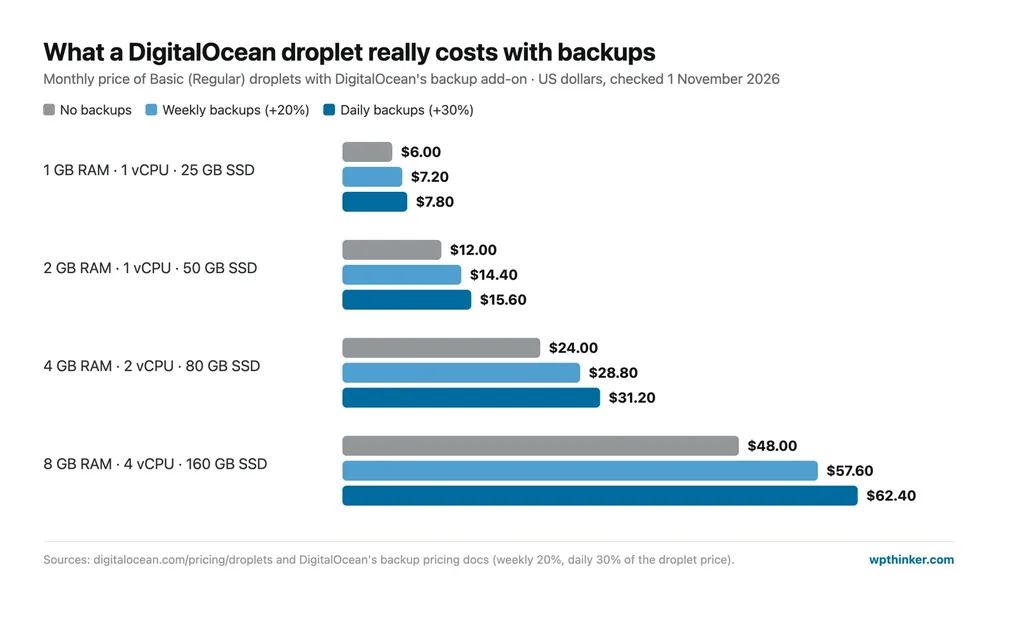
Backups Cost Extra
Backups aren't included. Weekly backups add 20% to the droplet price, and daily backups add 30%. On a $24 droplet, that's $4.80 or $7.20 more each month. Snapshots, the manual kind, cost $0.06 per GB a month. My advice? Turn backups on anyway, because one bad plugin update can wipe out years of work.
Free Support Is Slow
Every account gets free support, but it's tickets only, with a response target under 24 hours. Want faster help? The Developer plan costs $24 a month for responses within 8 hours, and live chat only starts with the Standard plan at $99 a month (under 2 hours). Premium, at $999 a month, gets you answers in under 30 minutes, a Slack channel and video calls. For a small blog owner, that means the docs and community tutorials are your real support team.
A Powered-Off Droplet Still Costs Money
Here's the trap I warned you about. If you switch a droplet off, DigitalOcean keeps billing you, because the CPU and memory stay reserved for you. To stop the charges, you have to destroy the droplet. It's an easy mistake to make, so check your droplet list before every month ends.
No Email, No cPanel
There's no email hosting here, and no cPanel either. So for an address like you@yourdomain.com, you have to sign up with some other email service. Files, databases and DNS? You handle them from DigitalOcean's own panel or from the command line.
The Free Credit Isn't Guaranteed
On its pricing FAQ, DigitalOcean only says it "often provides promotional credits for new users". The amount and how long it lasts keep changing, so don't plan around a number you saw somewhere. Just check the sign-up page on the day you join.
Is DigitalOcean Good for WordPress?
Yes, it is, but only if you're okay with the command line, or at least ready to learn it. For a small site, a $6 or $12 droplet with the 1-Click app is enough, and you'll pay that same amount every month. And if you never want to touch a server? Then honestly, a managed host is the better deal for you.
Let me put it this way. You and your neighbor both buy the same lawn mower. You like mowing on Saturday mornings, but your neighbor hates it and pays a lawn service instead. Both get a nice lawn. DigitalOcean is the mower, and Cloudways is the lawn service, for about double the price: the same 1 GB server is $6 on DigitalOcean and $11 through Cloudways. Neither choice is wrong. It all comes down to what you'd rather do with your Saturday.
DigitalOcean Plans and Pricing
DigitalOcean's core product is the droplet, sold in two families: Basic droplets that share CPU time, and dedicated-CPU droplets for heavier work. Now, let's have a look at each.
Basic Droplets (Shared CPU)
Basic droplets start at $4/mo, and that's also what they cost later. As the name itself suggests, these are the everyday droplets, and they suit blogs, portfolios, small business sites and test servers. Here's how the Regular (SSD) sizes line up:
- $4/mo: 512 MB of RAM and 10 GB of disk. It's fine for a tiny static site, but too small for WordPress, believe me.
- $6/mo: 1 GB of RAM, 1 vCPU and 25 GB of SSD. This is the smallest size I'd put a WordPress blog on.
- $12/mo: 2 GB of RAM and 50 GB of SSD, a comfortable home for a small business site with steady traffic.
- $24/mo: 4 GB of RAM and 2 vCPUs, which gives a small WooCommerce store some breathing room.
- $48/mo: 8 GB of RAM and 4 vCPUs, for busy sites or several sites on one server.
Basic Droplets Comparison
| Features | 1 GB | 2 GB | 4 GB | 8 GB |
|---|---|---|---|---|
| Price per month | $6 | $12 | $24 | $48 |
| Buy plan | ORDER | ORDER | ORDER | ORDER |
| Server resources | ||||
| RAM | 1 GB | 2 GB | 4 GB | 8 GB |
| vCPU | 1 | 1 | 2 | 4 |
| SSD storage | 25 GB | 50 GB | 80 GB | 160 GB |
| Outbound transfer | 1 TB | 2 TB | 4 TB | 5 TB |
| Included | ||||
| 99.99% uptime SLA | Yes | Yes | Yes | Yes |
| WordPress 1-Click | Yes | Yes | Yes | Yes |
Before you choose, look at the 2 GB column. For $6 more than the smallest droplet, WordPress gets twice the memory, and that alone fixes a lot of "error establishing a database connection" headaches.
Want faster disks and newer processors? Premium Intel and Premium AMD droplets use NVMe storage and start at $7 for 1 GB, $14 for 2 GB and $28 for 4 GB.
Dedicated-CPU Droplets
These start at $42/mo. Basic droplets share CPU time with neighbors, while these give you CPU threads that are yours alone, so performance stays steady under load. Here's where each family starts on DigitalOcean's pricing page:
- CPU-Optimized: from $42 for 4 GB and 2 vCPUs, up to $1,008 for 96 GB and 48 vCPUs. Good for busy stores and heavy PHP work.
- General Purpose: starts at $63 (8 GB, 2 vCPUs) and goes all the way to $1,260 for 160 GB and 40 vCPUs. Memory and CPU are kept in balance here.
- Memory-Optimized: you get 8 GB of RAM for every vCPU, starting at $84 for 16 GB and topping out at $1,344.
- Storage-Optimized: from $131 for 16 GB of RAM and 300 GB of fast NVMe, for big databases.
Features of DigitalOcean Droplets
- Per-second billing, capped at 28 days
- Same price every month
- 99.99% uptime SLA
- Pooled bandwidth, $0.01/GB overage
- 16 data centers, 6 in the US
- WordPress 1-Click app
- Resize as you grow
- Optional weekly or daily backups
- Snapshots at $0.06/GB
- Free cloud firewall and monitoring tools
Support Plans
And here's what you pay for support, plus how fast they try to reply:
- Starter (free): email tickets, answered within 24 hours.
- Developer ($24/mo): same tickets, but they aim to reply within 8 hours.
- Standard ($99/mo): this is where live chat finally shows up, with replies in under 2 hours from more experienced engineers.
- Premium ($999/mo): under 30 minutes, and you also get a Slack channel and video calls. That's really meant for big companies.
Overall Advantages of DigitalOcean
- No intro prices, so no renewal shock
- Per-second billing with a monthly cap
- Droplets from $4 a month
- Generous bandwidth pooled across droplets
- Six US data center cities
- 99.99% uptime SLA
- WordPress 1-Click setup
- Managed databases, storage and load balancers when you grow
- Free static-site hosting on App Platform
Overall Disadvantages of DigitalOcean
- Unmanaged: you maintain the server
- Backups cost 20% to 30% extra
- Free support is tickets only, within 24 hours
- Live chat starts at $99 a month
- Powered-off droplets still bill
- No email hosting or cPanel
- New-user credit varies
DigitalOcean vs Cloudways vs Hostinger VPS
How does a 4 GB DigitalOcean droplet compare with the same server on Cloudways and with Hostinger's cheapest VPS? Here are the numbers from our own reviews:
| DigitalOcean 4 GB | Cloudways 4 GB (on DigitalOcean) | Hostinger KVM 1 | |
|---|---|---|---|
| Price | $24/mo | $46/mo | $6.49/mo (intro) |
| Renews at | $24/mo | $46/mo | $11.99/mo |
| RAM and CPU | 4 GB, 2 vCPU | 4 GB, 2 vCPU | 4 GB, 1 vCPU |
| Storage | 80 GB SSD | 80 GB SSD | 50 GB NVMe |
| Who runs the server | You | Cloudways | You |
| Pick it if… | you want fair monthly pricing and room to grow | you'd rather pay someone to babysit the server | you'll prepay for a long term and want the most RAM per dollar |
Want the full picture over a few years? Read our Cloudways review and Hostinger review, or see our guide to shared vs VPS vs cloud hosting.
Who Should Choose DigitalOcean?
- I'd pick DigitalOcean if I knew a bit of Linux (or wanted to learn) and hated surprise bills.
- Developers will like keeping WordPress, their apps, APIs and databases all with one company.
- Growing sites can add dedicated CPUs, a managed database or a load balancer later, and nobody has to move house.
- I'd skip it if I wanted someone else doing the updates, backups and security, or needed quick help without paying for it.
DigitalOcean FAQs
Is DigitalOcean good for beginners?
Not really, unless you want to learn server work. Signing up is easy, and the 1-Click app makes day one pretty painless. But from day two, updates, security and backups are all your headache. Want a site that just runs while you do other stuff? A managed host suits you better.
Does DigitalOcean offer managed WordPress hosting?
Not on droplets. The WordPress 1-Click droplet is self-managed. For managed WordPress on DigitalOcean's servers, look at Cloudways, which DigitalOcean owns.
How much does DigitalOcean cost per month for WordPress?
For a small site, plan on $6 to $12 a month for a Basic droplet. With weekly backups switched on, that becomes $7.20 to $15.60. Busy stores usually need the $24 droplet or bigger.
Does DigitalOcean have a free trial?
There's no fixed free trial. DigitalOcean says it often gives new users promotional credit, but the amount changes, so check the sign-up page when you join.
Conclusion: Our DigitalOcean Review Verdict
DigitalOcean is where my first website lives today, and after going through every number for this review, I can see why it still earns that spot. I like that the pricing is honest and the bill stops the moment you destroy a droplet. The bandwidth is generous too, and you can go from one $6 server to a whole bunch of them without ever changing companies. But yes, the catch is always the same. You run the server, you pay extra for backups, and free support takes its time. If you're happy wearing the sysadmin hat (and switching on backups from day one), DigitalOcean is one of the best-value homes for a WordPress site. If not, Cloudways gives you the same droplets with someone else holding the wrench.
We think this DigitalOcean review helped you understand what you get and what you pay. Are you hosting on DigitalOcean, or thinking about it? Don't forget to leave your feedback in the comment area below.
Our verdict
DigitalOcean
Flat, honest pricing with per-second billing, a 99.99% uptime SLA and generous pooled bandwidth. You run the server yourself, backups cost 20% to 30% extra, and free support is slow.
- Performance4.5
- Ease of use3.5
- Features4.5
- Support3
- Value for money4.5
Pros
- Same price every month, billed per second
- Droplets from $4 a month
- Generous bandwidth pooled across droplets
- 99.99% uptime SLA
- WordPress 1-Click app
Cons
- Unmanaged: you run the server
- Backups add 20% to 30%
- Free support is tickets only (24 hours)
- Powered-off droplets still bill