
If you've ever shopped around for a cloud server, you've probably seen the name Vultr. The company was started in 2014 and has its office in West Palm Beach, Florida. Since then, Vultr says, more than 80 million cloud servers have been launched on it. So, here is our honest Vultr review for 2026, written after going through its pricing, its uptime terms and its WordPress app.
Now, what exactly is Vultr? Basically, it rents you a server in the cloud, by the hour, in 34 cities around the world. You can get a small server for $5/mo, or $6/mo for the faster NVMe kind, and there's an IPv6-only one for just $2.50. But one thing upfront. We didn't open an account or spin up a server for this review, so we haven't run our own speed tests. Any speed or uptime claim below is Vultr's, and I'll say so.
I've been using WordPress since 2014, and I run several eCommerce sites of my own on it. So, with a cloud host like this, I only really want to know two things. What will it cost me each month, and how much of the work will be mine? Let's have a look.
All prices in this review are in US dollars, as shown on vultr.com on 7 November 2026. Vultr says prices can be different in some locations, and taxes are added on top.
Vultr at a Glance
| Best for | developers and site owners who are fine running their own server and want lots of locations |
| Starting price | $5/mo for a basic server, or $6/mo with NVMe storage |
| How you pay | By the hour, with a monthly cap on most plans and no contract |
| What it sells | Lots of stuff: cloud servers, bare metal, GPUs, Kubernetes, databases, storage |
| Data centers | 34 regions (9 in the US) |
| Uptime promise | 100%, with credits if your server goes down |
| Backups | Not free, they add 20% to the server price |
| Support | Tickets from the control panel |
| Managed? | No, you look after the server yourself |
| Our rating | 4.1 out of 5 |
Vultr Review: The Goods
Vultr gets a lot right for the price. Here's what stood out when we went through it.
34 Locations, Nine of Them in the US
This is the first thing I noticed. Vultr has 34 data center regions, and in the US alone, you can pick Atlanta, Chicago, Dallas, Honolulu, Los Angeles, Miami, the New York area, Seattle or Silicon Valley. There's also Toronto and Mexico City nearby, plus cities across Europe, Asia, Australia, South America and Africa.
Why does that matter? If most of your readers are in Texas, you can put your site in Dallas. If they're on the West Coast, pick Los Angeles or Seattle. A server close to your visitors means less waiting for every page.
More Bandwidth for the Same Money
Here's something I really like. The $6 High Performance server comes with 2 TB of bandwidth a month. At DigitalOcean, the $6 server gets 1 TB. Same story higher up: Vultr's $24 server gets 5 TB, and DigitalOcean's $24 one gets 4 TB.
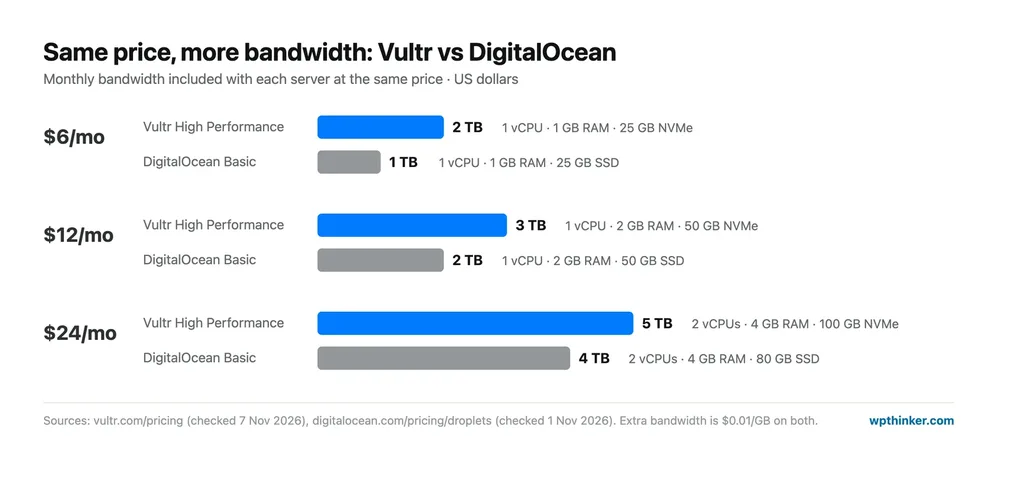
If you go over, extra bandwidth costs $0.01 per GB, so 100 GB more is just $1. For a normal WordPress blog, honestly, you'll probably never hit the limit.
You Pay by the Hour
There's no contract here, so you only pay for the hours your server exists, with one hour as the minimum. And on most plans, Vultr stops counting at 672 hours a month, which is 28 days. So, a 31-day month costs the same as a 28-day one. Your bill comes on the 1st of each month.
This is handy if you want to test something. Spin up a server, try your idea for a couple of hours, delete it, and you pay a few cents. The newer VX1 plans and the GPU servers are different, though. Those are billed for every hour in the month.
A 100% Uptime Promise, With Credits
Vultr says your server will be up 100% of the time, as far as its network and its machines go. And its SLA page spells out the credits. A short outage of under 9 minutes gets you 12 hours of credit. An hour or two down gets you 48 hours. If your server is down for 420 minutes or more, you get a full month.
But you have to ask for it. You open a support ticket and request the credit yourself. It also doesn't cover problems with your own software or settings, or a DDoS attack aimed at your server. We didn't monitor a Vultr server ourselves, so this is what Vultr promises, not what we measured.
WordPress in One Click
Good news if you don't want to set everything up by hand. Vultr's Marketplace has a one-click WordPress app, made by Vultr's own team, that runs on Ubuntu 24.04. You pick it when you create a server, and WordPress is waiting for you when it's ready. You can also pick from Linux, Windows or BSD, or upload your own ISO.
A Free Tier You Can Apply For
Vultr has a free tier, but it's not automatic. You apply, tell them who you are and what you'll use it for, and they decide. If you get in, you get a tiny server with 1 vCPU, 512 MB of RAM and 10 GB of storage. Vultr says it's rolling out in phases, only in some locations, in limited numbers. So, don't count on it, but it's worth a try if you just want to learn.
Vultr Review: The Bads
Now, Vultr isn't for everyone. Here's what you should know before you sign up.
You're the One Running the Server
This is the big one, because Vultr is not managed hosting at all. It gives you the server and full root access, and after that, updates, security, backups and fixes are your job. We run wpthinker.com on a VPS we manage ourselves, so I know it's doable. But if the word "SSH" makes you nervous, a managed host will be a much happier place for your site.
Backups Cost Extra
Backups aren't included, and if you turn on automatic backups, your server costs 20% more, so the $6 server becomes $7.20. Snapshots, the copies you take by hand, cost $0.05 per GB each month. My advice? Pay for the backups anyway, because one bad plugin update can wipe out a lot of work.
Support Is Tickets Only
You get help by opening a ticket in the control panel, or by email if you can't log in. Vultr says its team answers more than 35,000 requests a month. But we didn't find a phone number for support, and for a lot of WordPress questions, you'll be reading the docs yourself.
A Switched-Off Server Still Costs Money
This one catches people. If you power off a server, Vultr still charges you for it. You only stop paying when you destroy it. So, if you're done testing, delete the server, don't just turn it off.
Lots of Plan Types to Pick From
Regular Performance, High Performance (AMD or Intel), High Frequency, Optimized Cloud Compute, VX1 and more, which is a lot to take in. For a WordPress site, you can mostly ignore everything except the High Performance plans, but a beginner could easily get lost here.
The $2.50 Server Is IPv6 Only
That cheap $2.50 price looks nice, but the server has no IPv4 address. Some networks and services still only work over IPv4, so for a real website, you'll want the $3.50 version or better.
Vultr Hosting Plans
Vultr sells a lot of things, from tiny servers to big GPU machines. For a website, these are the ones that matter.
Cloud Compute (Shared CPU)
These are the everyday servers, and they suit blogs, small business sites and test setups. The CPU is shared with other users, which keeps the price low. There are three kinds:
- Regular Performance runs on older Intel CPUs and plain SSD. It starts at $2.50 (IPv6 only), then $3.50, and $5 gets you 1 GB of RAM and 25 GB.
- High Performance uses newer AMD EPYC or Intel Xeon CPUs with NVMe storage, and it's the one I'd pick for WordPress. It starts at $6.
- High Frequency runs on 3 GHz+ Intel CPUs, also with NVMe. It starts at $6 too, with more storage but less bandwidth than High Performance.
High Performance Plans Compared
| Monthly price | vCPUs | RAM | NVMe storage | Bandwidth |
|---|---|---|---|---|
| $6/mo | 1 | 1 GB | 25 GB | 2 TB |
| $12/mo | 1 | 2 GB | 50 GB | 3 TB |
| $18/mo | 2 | 2 GB | 60 GB | 4 TB |
| $24/mo | 2 | 4 GB | 100 GB | 5 TB |
| $48/mo | 4 | 8 GB | 180 GB | 6 TB |
For one small WordPress blog, the $6 server can work, but I'd start at $12. That extra 1 GB of RAM gives WordPress and MySQL some room to breathe. Add backups, and that's $14.40 a month. See all plans on Vultr's pricing page.
Optimized Cloud Compute (Dedicated CPU)
Here, the CPU is yours alone, so your speed doesn't depend on what your neighbors are doing. The General Purpose plans start at $30 a month for 1 vCPU, 4 GB of RAM and 30 GB of NVMe, and $60 gets you 2 vCPUs and 8 GB. This makes sense for a busy WooCommerce store, not a starter blog.
VX1
VX1 is Vultr's newest line, with dedicated CPUs, and you can run it on block storage or with local NVMe. The smallest General Purpose size (2 vCPUs, 8 GB of RAM, on block storage) costs $0.060 an hour. Vultr bills VX1 for the actual hours in each month, so it comes to about $44 in a 730-hour month, plus the storage.
Bare Metal and Cloud GPU
Bare metal means a whole physical server just for you, with nobody else on it. The cheapest one costs $120 a month and comes with a 4-core Intel CPU, 32 GB of RAM and two 240 GB SSDs. The GPU machines are a different world, starting from $0.848 per GPU per hour on a prepaid contract. Unless you're training AI models, you can skip those.
Features of Vultr Hosting
- 34 data center regions, 9 in the US
- Hourly billing, capped at 672 hours on most plans
- NVMe storage on High Performance and High Frequency plans
- Full root and console access
- One-click WordPress and other Marketplace apps
- Linux, Windows and BSD, or your own ISO
- 100% uptime SLA with credits
- Paid automatic backups and snapshots
- DDoS protection for $10/mo per server
- Free Kubernetes control plane
- Pay by card, PayPal or crypto
Overall Advantages of Vultr
- 34 locations around the world
- More bandwidth than DigitalOcean at the same price
- Hourly billing with no contract
- 100% uptime SLA with clear credits
- One-click WordPress app
- Free tier you can apply for
Overall Disadvantages of Vultr
- Not managed: updates and security are on you
- Backups cost 20% extra
- Support through tickets only
- Switched-off servers still cost money
- Lots of confusing plan types
Vultr vs DigitalOcean
These two get compared all the time, and I have a bit of a stake here: my first website, thetechhacker.com, is hosted on DigitalOcean today. So, how do they line up? Here's what we found, using our own DigitalOcean review:
- Price: the same at the small sizes. Both charge $6, $12 and $24 for 1, 2 and 4 GB of RAM.
- Bandwidth: Vultr gives you more, for example 2 TB vs 1 TB on the $6 server.
- Locations: Vultr has 34 regions, while DigitalOcean has 16 data centers in 13 cities, 6 of them in the US.
- Uptime promise: 100% at Vultr vs 99.99% at DigitalOcean.
- Backups: both cost extra, with Vultr adding 20% and DigitalOcean adding 20% for weekly or 30% for daily.
- Support: tickets at both. DigitalOcean also sells faster paid support plans.
Honestly, for a WordPress site, either one works. If you want a US city DigitalOcean doesn't have, like Dallas, Chicago or Miami, Vultr is the easy pick. And if you'd rather not run a server at all, Cloudways can set up and manage one for you on Vultr or DigitalOcean, for a higher monthly price. Not sure which kind of hosting you need? Our guide to shared vs VPS vs cloud hosting explains the difference.
Who Should Choose Vultr?
- I'd pick Vultr if I was happy running my own server and wanted it in a specific US city, like Dallas or Miami.
- Developers who spin up test servers for a few hours will like the hourly billing.
- Bloggers who already know a bit of Linux will get a lot of server for $12 a month.
- I'd skip it if I wanted someone else to handle updates, backups and security, or needed help on the phone.
Vultr FAQs
Is Vultr good for WordPress?
Yes, if you're comfortable managing a server. The one-click WordPress app gets you started fast, and a $12 High Performance server is enough for a small site. But updates, security and backups are your job, so beginners may be happier on a managed host.
How much does Vultr cost?
A basic server starts at $5 a month, and the faster High Performance servers start at $6. You pay by the hour, and most plans stop counting at 672 hours, so you never pay more than the monthly price. Backups add 20%.
Does Vultr have a free plan?
Kind of. Vultr has a free tier you can apply for, with a small server (1 vCPU, 512 MB of RAM, 10 GB of storage). Not everyone gets in, and it's only in some locations.
Where are Vultr's data centers?
Vultr has 34 regions, and in the US, they're in Atlanta, Chicago, Dallas, Honolulu, Los Angeles, Miami, the New York area, Seattle and Silicon Valley. There are more in Canada, Mexico, Europe, Asia, Australia, South America and Africa.
Who owns Vultr?
Vultr is a registered trademark of The Constant Company, LLC. Vultr was founded in 2014 and lists its office in West Palm Beach, Florida.
Conclusion: Our Vultr Review Verdict
Vultr is a great pick in 2026 if you're okay with running your own server. You get the same prices as DigitalOcean with more bandwidth, nine US cities to choose from, hourly billing and a 100% uptime promise with real credits. If you read our DigitalOcean review, you'll see they're very close, and Vultr wins on locations and bandwidth. Just remember to pay for backups, delete servers you don't need, and be ready to do your own updates.
We think this Vultr review helped you understand what you get and what you pay. Are you using Vultr, or thinking about it? Don't forget to leave your feedback in the comment area below.
Our verdict
Vultr
Unmanaged cloud servers in 34 regions, 9 of them in the US, with hourly billing, a 100% uptime SLA with credits and more bandwidth than DigitalOcean at the same price. You run the server yourself, backups cost 20% extra and support is tickets only.
- Performance4.5
- Ease of use3.5
- Features4.5
- Support3
- Value for money5
Pros
- 34 regions, 9 in the US
- More bandwidth than DigitalOcean at the same price
- Hourly billing with a monthly cap
- 100% uptime SLA with clear credits
- One-click WordPress app
Cons
- Not managed
- Backups cost 20% extra
- Support through tickets only
- Switched-off servers still cost money
- Lots of confusing plan types