Every hosting company seems to slap the word "managed" on its WordPress plans these days. One host sells it for $3 a month, another for $35, and both call it managed WordPress hosting. So what are you actually paying for? And is the expensive kind worth it for a small blog or a growing online store? Let's clear the fog, without the marketing vocabulary.
Some background information first. I'm on WordPress since 2014, and several of my own online stores run on WordPress and WooCommerce, so hosting bills and slow checkouts are not abstract topics for me. For this guide, I went through the pricing data we collected on 26 October 2026 for our hosting comparison, which covers 18 hosts and lists every plan's intro price, renewal price, backups, staging and visit limits. I also read WP Engine's own documentation on the plugins it doesn't allow, because that's the part most "best host" lists conveniently skip.
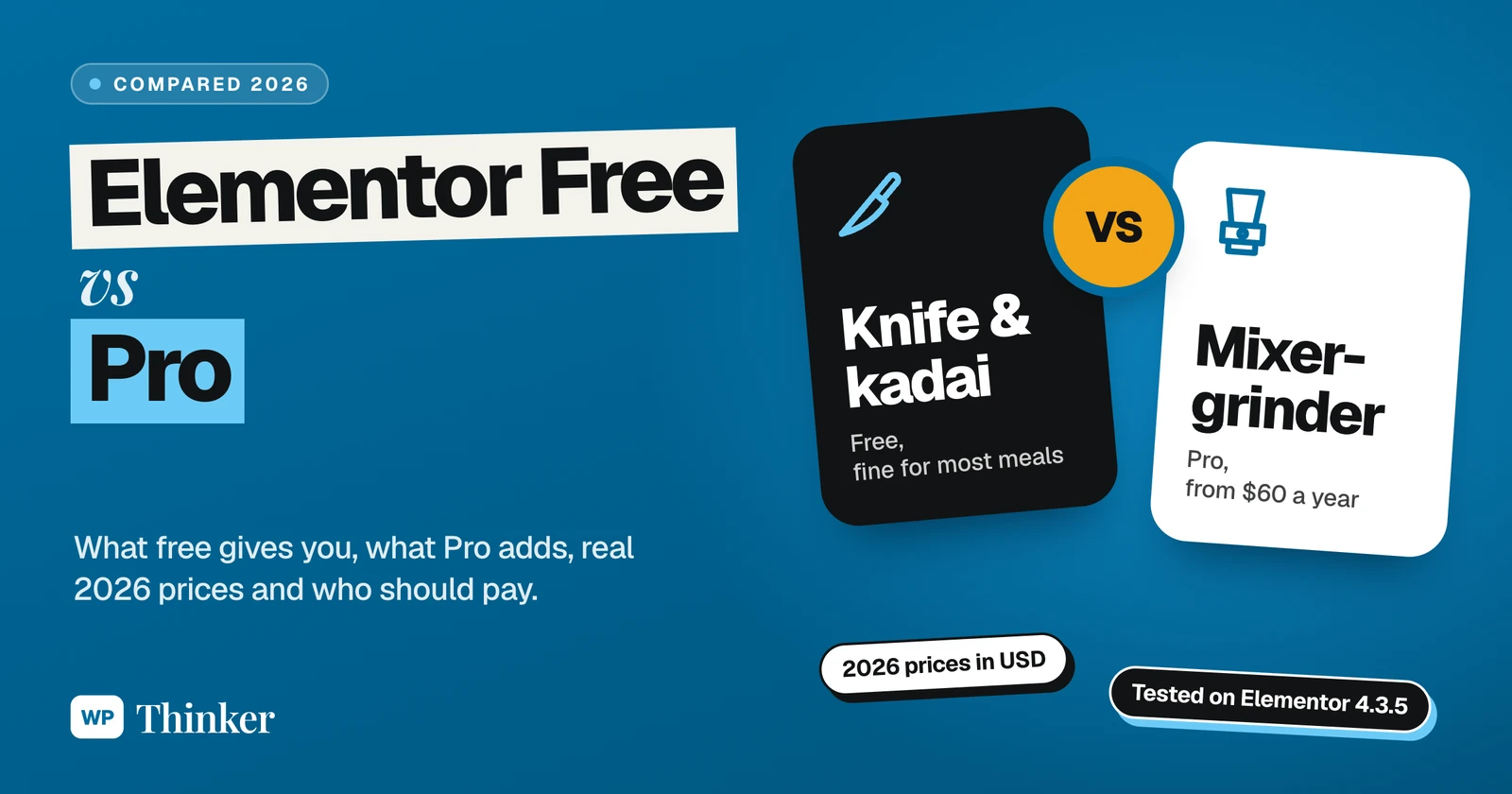
In plain words? Managed WordPress hosting means the hosting company looks after the technical side of WordPress for you, from server tuning and caching to backups, updates, security and support from people who actually know WordPress. In our data, the premium names like Kinsta, WP Engine and Rocket.net started at $30 to $35 a month, and the price didn't jump at renewal. For a store or a busy business site that loses money when it slows down, I'd say it's worth it. For a small hobby blog, honestly, it's usually overkill.
What Is Managed WordPress Hosting?
Simply put, managed WordPress hosting is a plan made only for WordPress, where the host looks after the server and all the boring WordPress chores while you get on with your content and your business. Normal shared hosting is different. There you rent a corner of a server and get a control panel, and whatever happens after that is, well, your headache.
Let me put it in a way everyone in India will understand. When you go on a long family trip, you can rent a self-drive car, or you can book a car with a driver. Self-drive is cheaper, and you go anywhere you like, but the fuel, the route, the parking and the puncture at midnight are all yours to handle. With a driver, you pay more, and you simply relax. But you also can't take that car off-road or let your cousin drive it.
That's managed hosting in one picture. I call it the Driver Test: are you happy to pay extra so someone else handles the road, and can you live with their rules? We'll come back to that question in the conclusion.
What a Managed Host Actually Does for You
Every host's list is a little different, of course. Still, here's roughly what a proper managed host takes off your plate:
- Server-level caching, which means fast pages without you sitting up late fiddling with caching plugins.
- Daily backups that come back with one click when something breaks. Kinsta, WP Engine, Rocket.net and Liquid Web all included them even on their cheapest plans in our data.
- A staging site, a private copy where you test updates before they touch the live site. Again, all four of those hosts included staging on the entry plan.
- Updates and security, so core updates, malware scans and a firewall are handled for you, though what's included depends on the host.
- A CDN, so your images and files reach each visitor from somewhere nearby, whether they're in Pune or Paris.
- Support people who know WordPress, instead of someone reading out "please clear your browser cache" from a script.
Compare that with typical shared hosting, where backups may be weekly, staging may be missing on the cheapest plan, and speed tuning is mostly your job. Hostinger's Premium plan in our data, for example, listed weekly backups.
Managed vs Shared WordPress Hosting: The Real Difference
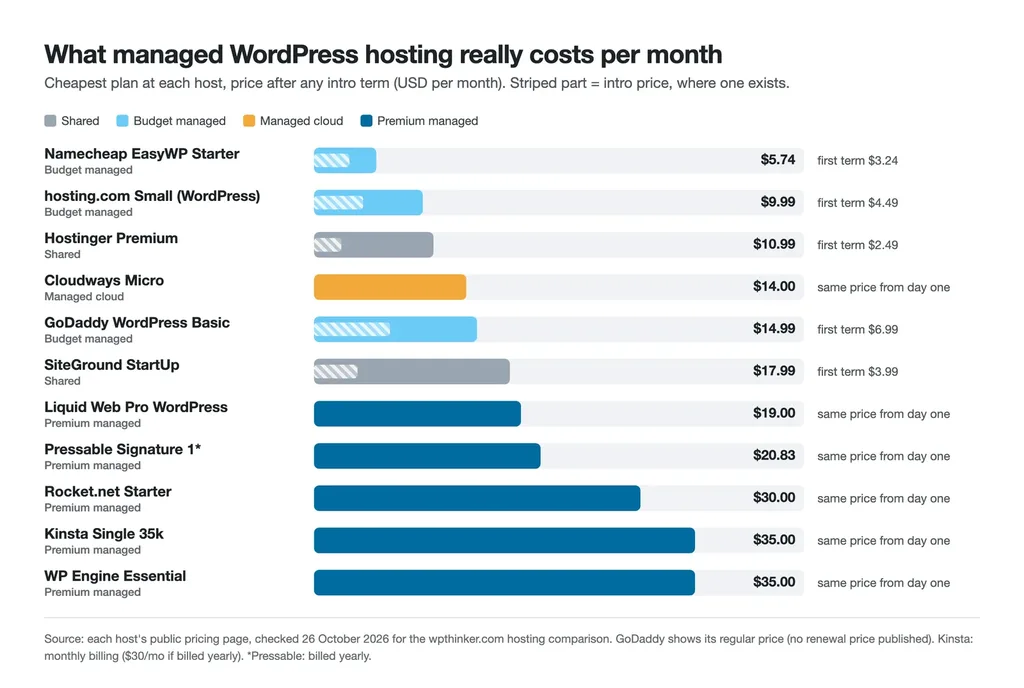
The biggest surprise in our data wasn't the features but the pricing model. Shared hosts lure you in with a tiny intro price, then renew at four times that or more. The premium managed hosts mostly charge the same price from day one, with no renewal jump.
| Shared WordPress hosting | Premium managed WordPress hosting | |
|---|---|---|
| What you pay at first | $2.49 to $3.99 a month at Hostinger and SiteGround, but only for the intro term | $30 to $35 a month at Rocket.net, Kinsta and WP Engine, from day one |
| What you pay later | jumps to $10.99 (Hostinger Premium) or $17.99 (SiteGround StartUp) | stays the same, no surprise at renewal |
| Backups on the cheapest plan | weekly on some hosts, daily on others | daily |
| Staging on the cheapest plan | sometimes you don't get it | you get it |
| Email accounts | usually there (SiteGround and Hostinger include them) | check first (Rocket.net lists none) |
| Who looks after the server | mostly you | the host |
See that last-but-one row, the one everybody forgets? Some managed hosts simply don't do email, so you end up paying for Google Workspace or Zoho Mail on the side. One more monthly bill to remember.
The Pros of Managed WordPress Hosting
- Speed without the homework. Caching, a CDN and WordPress-tuned servers come set up. You don't need to become a server administrator.
- Honest pricing. At Kinsta, WP Engine, Rocket.net and Liquid Web, the monthly price in our data stayed the same at renewal. What you see is what you keep paying, month after month.
- Safety nets everywhere. Say a plugin update goes wrong on Saturday night. With daily backups and one-click staging, you roll back and go to bed, instead of losing the whole weekend.
- Better support. When the person on chat understands WordPress, problems get solved instead of transferred around.
- Room to grow. Running a Diwali sale, or did a post suddenly go viral? These hosts are built for busy sites, so a spike like that is far less likely to knock you over.
The Cons Nobody Puts on the Sales Page
- The price. Do the maths on a $35-a-month plan and you get $420 a year, which is a lot for a hobby blog that isn't earning a single rupee yet.
- Visit limits. Many managed plans are sized by monthly visits. WP Engine's Essential plan for one site listed about 25,000 visits a month, and Kinsta sells a "Single 35k" plan with 35,000. Grow past that, and you move up a tier.
- Plugin rules. Managed hosts can block plugins that clash with their setup. According to WP Engine's list of disallowed plugins, caching plugins like W3 Total Cache and WP Super Cache aren't allowed, because they conflict with its built-in caching, and some backup plugins are discouraged too. WP Engine itself says these aren't "bad" plugins, just a poor fit for its platform.
- Less control. You usually can't tweak every server setting the way you could on a VPS. That's the whole deal: they drive, you don't.
- No email, sometimes. As mentioned above, check this and plan for a separate email service if needed.
Best Managed WordPress Hosting Providers in 2026
A quick honesty note before the list. I haven't run speed tests on every one of these hosts for this article. The picks below are based on what each plan includes and costs in our comparison data, checked on 26 October 2026, so you can judge for yourself. Prices are in US dollars per month for the cheapest managed plan.
1. Kinsta: Best for Busy Business Sites
Kinsta's Single 35k plan cost $35 a month on monthly billing, or $30 a month billed yearly ($350 a year), for one site and 35,000 visits a month. New customers got the first month free on the Single 20GB and Single 35k plans when we checked. Daily backups, staging and a CDN are included, and it offers a 30-day money-back guarantee. It also had a Mumbai data center in our list, which matters if your visitors are in India. Read our Kinsta review or see its plans and true cost.
2. WP Engine: Best for Agencies and Bigger Teams
WP Engine's Essential plan cost $35 a month for one site and about 25,000 visits, with tiers for 3 and 10 sites at $65 and $130. Daily backups and staging are included on the cheapest tier. Two things to know: its pricing page didn't state a money-back guarantee, and the plugin rules above apply. See its plans and true cost.
3. Rocket.net: Best for Speed-Focused Sites
Rocket.net's Starter plan cost $30 a month for one site with 10 GB of storage, daily backups, staging and a CDN, plus a 30-day money-back guarantee. Its plan listing showed no email hosting, so budget for that separately. Read our Rocket.net review or see its plans and true cost.
4. Liquid Web: Best Value for a Premium Managed Host
Liquid Web's Pro WordPress plan cost $19 a month for one site with 50,000 visits, 15 GB of storage, daily backups and staging, which is the most visits per dollar among the premium managed plans in our data that publish a visit limit. Its pricing page didn't state a money-back guarantee, though. See its plans and true cost.
5. Pressable: A Simple Managed Option
Pressable's Signature 1 plan worked out to $20.83 a month, billed yearly, for one site and 20 GB of storage, with a 30-day money-back guarantee. It didn't publish a separate renewal price, so we assumed it stays the same. See its plans and true cost.
6. Cloudways: Managed Cloud for Tinkerers
Cloudways is a slightly different animal: managed cloud servers rather than WordPress-only hosting. Its Micro plan cost $14 a month, pay as you go, with 25 GB of storage, staging, automated backups and room for unlimited websites. Offsite backup storage costs extra, at $0.033 per GB in our data, and its pricing page offered a free trial but stated no money-back guarantee. See its plans and true cost.
Budget "Managed" Plans: Read the Fine Print
Some cheaper plans also carry the managed label. Namecheap's EasyWP Starter cost $3.24 a month for the first year, renewing at $5.74. hosting.com's Small plan for WordPress cost $4.49 a month for the first year, renewing at $9.99, with daily backups and staging. GoDaddy's WordPress Basic cost $6.99 a month for the first year, with a regular price of $14.99, and its plan also listed free email and a free domain. Are they any good? For small sites, sure. Just don't expect Kinsta-level muscle at a tenth of the price.
So, Is Managed WordPress Hosting Worth It?
Run the Driver Test on your own site. Ask yourself two questions. First, does an hour of downtime or a slow checkout cost you real money? Second, are you okay with the host's rules, like visit limits and banned plugins?
- Yes to both? Then go managed. For a WooCommerce store, a business site that brings in leads or a blog with serious traffic, the saved hours and the fewer midnight emergencies are worth the bill.
- Just starting out? A good shared host is perfectly fine, so put the savings into content and upgrade later. My guide on how to migrate a WordPress site to a new host shows how to switch with no downtime when the day comes.
- Love tinkering? A managed cloud host like Cloudways, or a VPS, gives you more control for the money.
Still unsure? Our true cost calculator shows what each host really costs over several years, renewals included, which is usually where shared hosting's cheap price stops looking cheap.
FAQs: Managed WordPress Hosting
Is managed WordPress hosting the same as shared hosting?
No. Shared hosting gives you space on a server and leaves most of the WordPress work to you. Managed WordPress hosting, on the other hand, is set up only for WordPress, and it comes with server caching, daily backups, staging and support folks trained on WordPress.
How much does managed WordPress hosting cost?
In our data from 26 October 2026, premium managed plans started at $19 a month (Liquid Web) to $35 a month (Kinsta and WP Engine). Budget plans with the managed label started from $3.24 a month for the first year.
Do I still need a backup plugin on managed hosting?
Usually not for daily safety, since the host takes backups for you. Some managed hosts even discourage backup plugins; WP Engine does, for example. Still, keep an occasional copy somewhere off the host, as I explain in my guide on how to back up and restore a WordPress site.
Does managed hosting include email?
Not always. Rocket.net's plans, for instance, listed no email at all, whereas SiteGround and Hostinger threw in email accounts. So look before you buy, and keep some budget aside for an email service in case.
Can a beginner use managed WordPress hosting?
Absolutely, and in some ways it's easier, because the host handles the technical work. The only real barrier is the price, which is hard to justify before your site earns anything.
Summing Up
So, what is managed WordPress hosting, in the end? It's the car with a driver. You pay more, the host takes care of caching, backups, staging, updates and support, and in return you play by their rules on plugins and visits. Running a store or a busy business site? Then it's money well spent. Just launched a blog last week? A decent shared host will do for now. Take the Driver Test honestly, look at the real renewal prices, and choose for where your site is today, not where you hope it'll be in five years.
That's all for now. Are you on managed WordPress hosting or shared hosting right now? Do let us know in the comment box below.