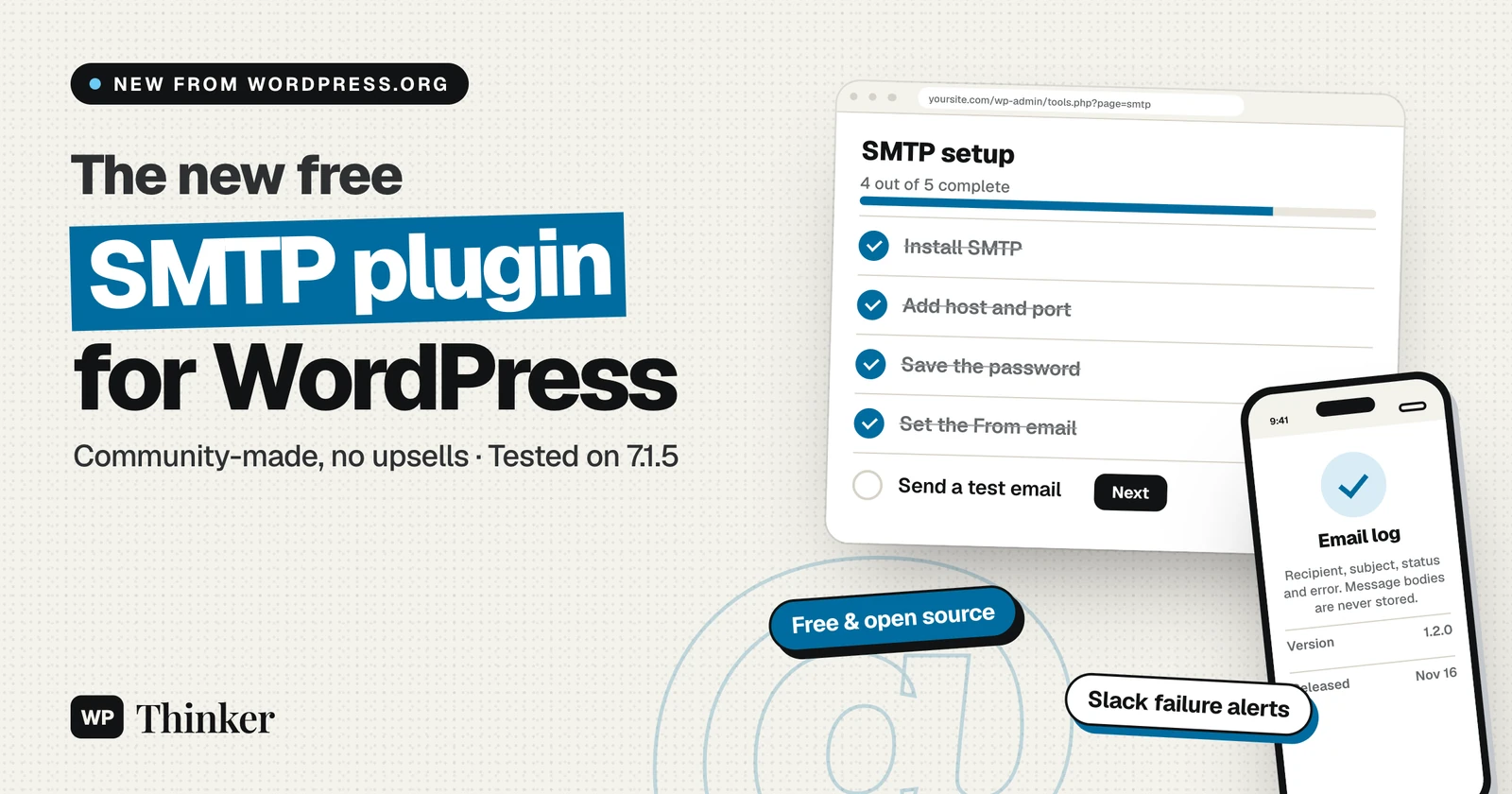
The WordPress.org Plugins Team has released SMTP, a free, community-maintained WordPress SMTP plugin that sends your site's email through a proper mail server. It came out on November 16, 2026, as version 1.2.0. For site owners, it means password resets, contact form messages and order receipts are far more likely to arrive, with no upsells or tracking attached.
We installed it on a fresh WordPress 7.1.5 test site, set it up and sent a test email to see how it reports problems. Here's what it does, what we found and how to set it up.
Key facts
| Detail | SMTP plugin |
|---|---|
| Released | November 16, 2026 (version 1.2.0) |
| Made by | The WordPress.org Plugins Team and community contributors |
| Price | Free (GPL-2.0-or-later) |
| Requires | WordPress 6.3 or later, PHP 7.4 or later |
| Settings | Tools → SMTP |
| Not supported yet | Email services that send through an HTTP API instead of SMTP |
Why WordPress needed this plugin
WordPress sends email with wp_mail(), which uses PHP's built-in mail function by default. In its announcement, the Plugins Team explains that many hosts now disable that function or block port 25 to stop spam. Cloud and container setups often have no mail server at all. When that happens, WordPress fails quietly: the site looks fine, but nobody gets the password reset.
SMTP plugins fix this by sending email through a real mail server, such as your email provider's. The team says the most popular SMTP plugins already add up to well over five million active installations. Requests to add SMTP settings to WordPress core have come up for years, but core's position is that this belongs in a plugin. The new SMTP plugin is meant to be the simple, neutral option that belongs to the community.
What the SMTP plugin does
- Works with any SMTP server: you set the host, port, encryption (none, SSL or TLS), username, password and From address.
- Supports wp-config.php settings: constants such as
SMTP_HOSTandSMTP_PASSWORDoverride the saved values and lock those fields. The team recommends this for live sites, so credentials stay out of the database. - Handles passwords carefully: on WordPress 7.2 and later, the announcement says credentials are stored through the new core Secrets API, encrypted at rest. On earlier versions, they're stored apart from the other settings. Either way, they're never shown back on the page.
- Keeps an email log: it records the recipient, subject, status and any error for each email. Message bodies and attachments are never stored, and entries are deleted after 30 days.
- Alerts you when email breaks: it can post to a Slack channel when sending fails, since a broken mailer can't email you about itself.
- Includes WP-CLI commands:
wp smtp settings set,wp smtp testandwp smtp status.
What we saw when we tested it
We installed SMTP 1.2.0 on a fresh WordPress 7.1.5 site in WordPress Playground on November 22, 2026. We pointed it at a placeholder server, smtp.example.com, so the test email was meant to fail. The point was to see how the plugin reports a problem.
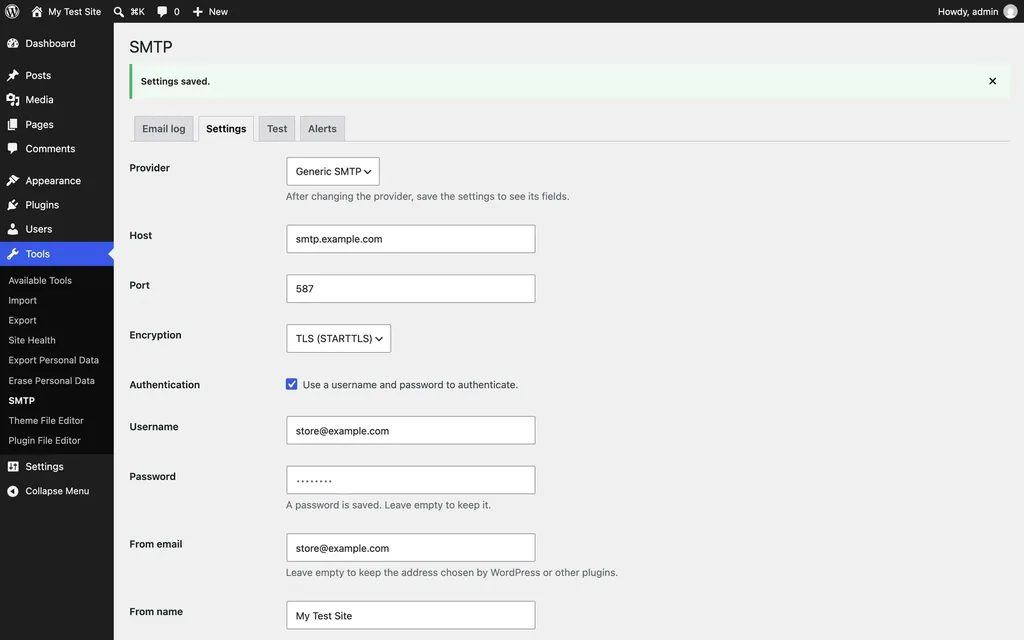
- Settings live under Tools → SMTP, with four tabs: Email log, Settings, Test and Alerts.
- The password is never shown again. After saving, the field only said "A password is saved. Leave empty to keep it."
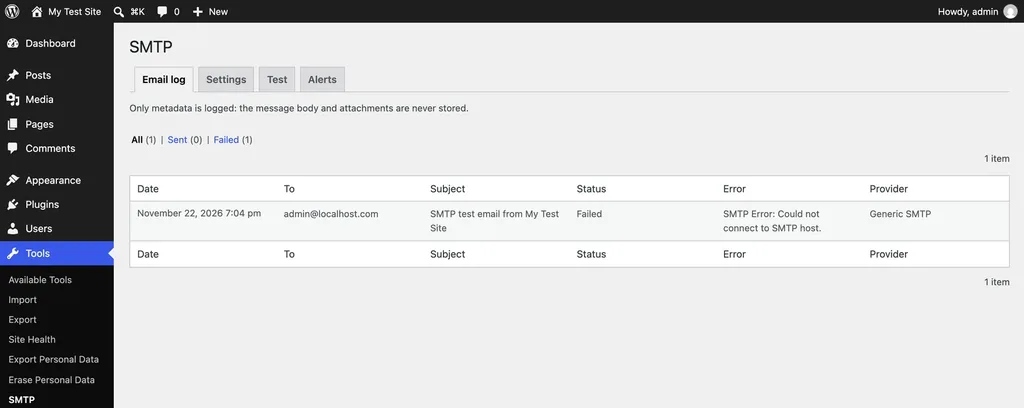
- Failures are easy to understand. The test tab showed "The test email could not be sent: SMTP Error: Could not connect to SMTP host." It also showed a short connection log.
- The email log caught it. It listed the failed test with the date, recipient, subject, status, error and provider, and nothing about the message content.
- Alerts are throttled. The Alerts tab offers Slack and sends at most one alert every 15 minutes, counting any failures in between.
One thing to know: when we checked, the plugin's directory listing said "tested up to" WordPress 6.9.12. It worked on 7.1.5 in our test, but WordPress may show a compatibility notice until that's updated.
How to set up the SMTP plugin
Before you start, get the SMTP details from your email provider or host: the server name, port, encryption type, username and password.
- Go to Plugins → Add New Plugin, search for SMTP, and install the one by WordPress.org. Then activate it.
- Open Tools → SMTP and enter your host, port and encryption. Port 587 with TLS is common, and 465 is usually used with SSL.
- Tick Authentication, then enter your username and password.
- Set the From email to an address on your own domain, and save.
- Open the Test tab and send a test email to yourself. Check your inbox and the Email log.
The plugin does nothing until a host is set, so activating it won't break your current email. For a live site, move the settings into wp-config.php:
define( 'SMTP_HOST', 'smtp.example.com' );
define( 'SMTP_PORT', 587 );
define( 'SMTP_ENCRYPTION', 'tls' );
define( 'SMTP_USER', 'store@example.com' );
define( 'SMTP_PASSWORD', 'your-app-password' );
define( 'SMTP_FROM_EMAIL', 'store@example.com' );
If emails still go missing, our guide to fixing WordPress emails covers the other common causes.
Common mistakes to avoid
- Using your normal email password: many providers, including Google and Microsoft, ask for an app password when two-step verification is on. Create one in your email account's security settings.
- Mixing up ports and encryption: pair port 587 with TLS and port 465 with SSL. A mismatch is one of the most common reasons for "Could not connect to SMTP host".
- Sending from another domain: keep the From email on the same domain as your SMTP account, or your messages may be rejected or sent to spam.
- Skipping the test: send a test email after every change, and check the Email log for errors.
What this means for you
- You use the old "SMTP" plugin: it upgrades in place. Your host, port, encryption and username are imported. The old version encrypted passwords with mcrypt, which was removed in PHP 7.2, so you'll probably be asked to enter the password again.
- Another SMTP plugin is working well for you: there's no need to switch. Choose SMTP if you want a simple tool with no upsells, run by the community.
- Your email service uses an HTTP API: stay with your current plugin for now. API sending isn't supported yet, and the team is designing it in the open on GitHub.
- You run a store: test order emails before Black Friday, as covered in our WooCommerce Black Friday checklist.
WordPress SMTP plugin: FAQs
Is the SMTP plugin free?
Yes. It's free, open source and licensed GPL-2.0-or-later, with no paid version or upsells.
Who supports the plugin?
The WordPress.org Plugins Team started it, but it belongs to the community. The team doesn't provide support itself, so questions go to the plugin's support forum on WordPress.org.
Does it work with Gmail, Outlook or my host's email?
It works with any service that offers SMTP, which includes most email providers and hosts. Use the SMTP details they give you.
Does the email log store my messages?
No. It stores only the recipient, subject, status and error, and deletes entries after 30 days.
The bottom line
The new WordPress SMTP plugin is a welcome, no-nonsense fix for one of WordPress's most common problems: emails that never arrive. It's free, keeps passwords out of sight and tells you clearly when something goes wrong. If your site's email is unreliable, or you want a neutral option without upsells, it's worth installing today. Our roundup of email plugins for WordPress covers the alternatives.
Sources
We checked these sources for this look at the WordPress SMTP plugin on November 22, 2026:
- Introducing SMTP, Make WordPress Plugins
- SMTP plugin page, WordPress.org Plugin Directory
- SMTP repository, GitHub