
WordPress makes it easy to rename a page, delete an old post or change your site's structure. The trouble starts later, when old links from Google and other websites lead to a "Page not found" error. If you are looking for free redirect plugins to send visitors to the right page and keep track of 404 errors, this article will help you.
We are here to help you pick the right one without spending a single dollar. Every plugin in this list is free in the WordPress.org plugin directory. Before writing this, we tested all ten on a fresh WordPress 7.1.5 site and checked how each one handled real broken links.
Related Articles
- How To Redirect A Page In WordPress
- How To Create A Custom 404 Error Page In WordPress
- How To Fix The WordPress Posts 404 Error
Top 10 Free Redirect Plugins At A Glance
| Plugin | Job | Active installs | Last updated | Download size |
|---|---|---|---|---|
| Redirection | Redirects and 404 log | 2 million+ | Sep 19, 2026 | 0.5 MB |
| 301 Redirects | Redirects and 404 log | 300,000+ | Aug 15, 2026 | 0.1 MB |
| 404 to 301 | Redirects and 404 log | 100,000+ | Sep 30, 2026 | 1.0 MB |
| Safe Redirect Manager | Redirect rules | 40,000+ | Sep 20, 2026 | 0.04 MB |
| Simple 301 Redirects | Simple redirects | 100,000+ | Oct 19, 2026 | 0.3 MB |
| Redirection (Inisev) | Redirect rules | 100,000+ | Nov 12, 2026 | 3.2 MB |
| 404 Solution | Smart 404 redirects | 10,000+ | Nov 19, 2026 | 4.6 MB |
| Smart Custom 404 Error Page | Custom 404 page | 100,000+ | May 21, 2026 | 0.05 MB |
| All 404 Redirect to Homepage | 404 to homepage | 200,000+ | Oct 24, 2026 | 0.5 MB |
| Page Links To | Link posts to any URL | 100,000+ | Apr 4, 2026 | 0.3 MB |
We took the install counts and dates from the WordPress.org plugin directory and measured the download sizes ourselves on November 23, 2026.
What We Found When We Tested Them
We activated each plugin on its own and tried three broken links: a missing page, a misspelled address and a renamed page. With no plugin, WordPress showed a 404 error for all three. Then, where the plugin has its own redirect screen, we added a redirect to our Sample Page there.
| Plugin | Our test redirect | Broken links out of the box |
|---|---|---|
| 301 Redirects | Worked | 404 |
| Safe Redirect Manager | Worked (302 by default) | 404 |
| Simple 301 Redirects | Worked | 404 |
| Redirection (Inisev) | Worked, 301 | 404 |
| Page Links To | Worked, 301 (set by script) | 404 |
| Redirection | Saved, but didn't fire | 404 |
| 404 to 301 | Worked, 301 | All sent to the homepage |
| All 404 Redirect to Homepage | No manual redirects | All sent to the homepage |
| 404 Solution | Not confirmed | 404 |
| Smart Custom 404 Error Page | No redirects | 404 (custom page after setup) |
For visitors, eight of the ten added no files at all. Only Page Links To and All 404 Redirect to Homepage made pages heavier.
1. Redirection
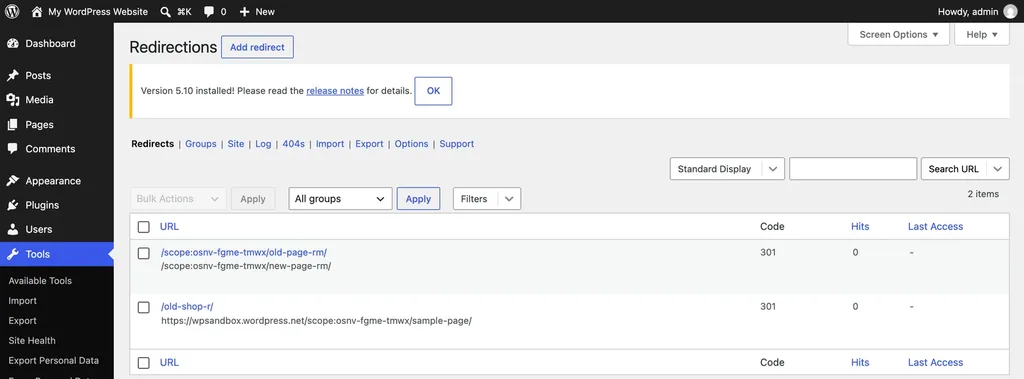
Redirection is the most popular redirect manager, with more than 2 million installs. It offers regular expressions, conditional redirects and a full 404 log, all free. It asked for a four-step setup first, where permalink monitoring is off by default. With it on, renaming a page created a 301 redirect automatically. On our browser-based test site, which runs WordPress in a subfolder, we couldn't confirm the redirects working, most likely because of that unusual setup. After saving a redirect, test it in a private window.
2. 301 Redirects
301 Redirects from WebFactory keeps things simple: pick the old address, choose a page, post or custom URL, and pick a 301, 302 or 307 code. Our test redirect worked, and it added nothing for visitors. Its 404 log doesn't store IP addresses. Wildcards, regular expressions and typo fixing are Pro features, and the Pro prices sit on the same screen as your redirects.
3. 404 To 301
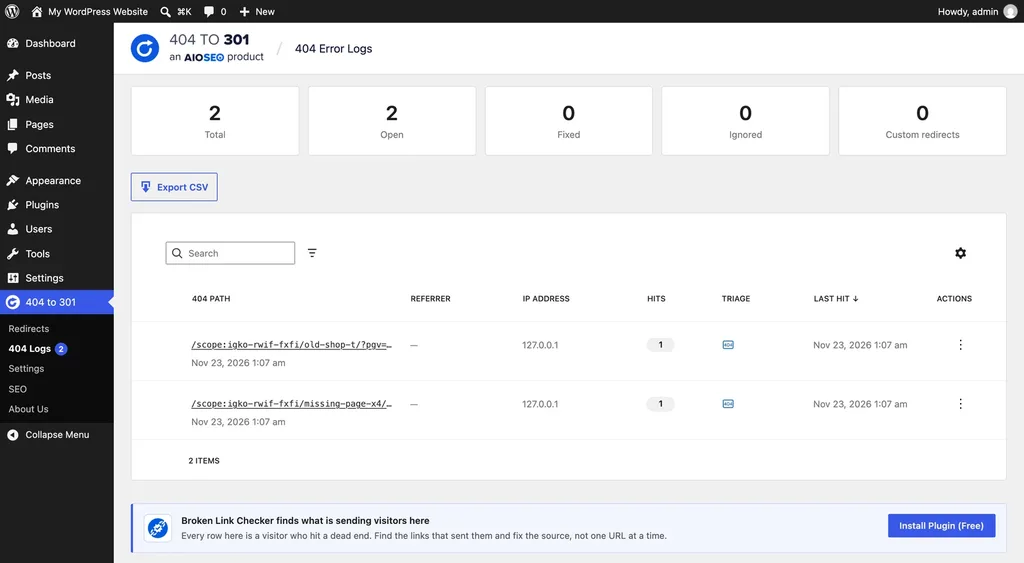
404 to 301, now an All in One SEO product, logs 404 errors and manages 301, 302 and 307 redirects with no license key. Our test redirect worked as a 301. The catch is its default: right after activation, it sent all three broken links to the homepage. Its log also stored IP addresses. It added an SEO page that promotes All in One SEO.
4. Safe Redirect Manager
Safe Redirect Manager from 10up saves each redirect as a normal WordPress post. Our redirect worked, but watch the code: new rules start as a 302 temporary redirect, so we switched ours to 301. It supports wildcards and regular expressions and allows up to 1,000 redirects by default. At 0.04 MB, it is the smallest plugin here.
5. Simple 301 Redirects
Simple 301 Redirects by BetterLinks lets you type an old path and a new URL, then click Add New. It supports wildcards and CSV import and export. Our test redirect worked right away. On activation, it opened a setup wizard asking to share usage data, which is off unless you allow it.
6. Redirection By Inisev
This plugin is also called Redirection, but it comes from Inisev. It has a friendly screen for single redirects and rules, supports 301 to 308 codes, and can send 404s to a chosen URL or a similar post. Our redirect worked as a 301 on the first try, and it logged our test 404s.
7. 404 Solution
404 Solution tries to guess the right page for a broken link, using spelling and keyword matching, and it includes a redirect manager. It asked three setup questions first, with "Redirect to the closest match" picked by default. In our test, two misspelled addresses still showed a 404 after setup, and its redirect list showed a loading error, so we couldn't confirm a manual redirect. Our browser-based test site may be the cause. It created 12 database tables and 7 scheduled tasks.
8. Smart Custom 404 Error Page
This plugin doesn't redirect anything. You design a normal page with helpful links and pick it as your 404 page. We created an "Oops, Nothing Here" page, and our missing address showed it while still returning a real 404 code, so search engines know the page is gone. NerdPress took it over after its developer retired in 2023.
9. All 404 Redirect To Homepage
This plugin sends every broken link to your homepage, or another URL you choose, with a 301 redirect. It did that the moment we activated it, even for our renamed page. It also logs 404s and adds a 404 Stats button to the toolbar, but it loaded two stylesheets, about 80 KB, for visitors. Use it with care, as Google prefers a real 404 for pages that are gone.
10. Page Links To
Page Links To makes a post or page point to any URL and redirects people who open the original address. We set a test page to point to WordPress.org with a script, and opening it returned a 301 to that address. One downside: it loaded a 35.7 KB script on every page, even before we created any links.
How To Set Up A Redirect Plugin
- First, take a backup of your website.
- Next, go to Plugins → Add New Plugin, search for the plugin by name, then click Install Now and Activate.
- Now finish any setup screen, then add your first redirect from the old address to the new one.
- After that, open the old address in a private browser window and make sure it lands on the right page.
Free Redirect Plugins: FAQs
Should I use a 301 or a 302 redirect?
Use a 301 when a page has moved for good. Google says it treats a permanent redirect (301 or 308) as a strong signal to process the new address, and a temporary one (302 or 307) only as a weak signal.
Should I send every 404 error to the homepage?
Usually not. Google says a page that is gone, with no replacement, should return a 404 or 410 code. Redirect old pages to their closest match instead.
Final Words
These free redirect plugins can save the traffic you would otherwise lose after changing a link. For simple sites, we recommend 301 Redirects or Safe Redirect Manager, plus a friendly custom 404 page. Redirection has a 404 log and can create redirects automatically, but we couldn't confirm its redirects firing on our test site, so test them first. Let us know in the comments which redirect plugin you use.
Sources
We checked these sources for this list on November 23, 2026:
- WordPress.org Plugin Directory, the plugin pages for all ten plugins
- How HTTP status codes affect Google's crawlers, Google Search Central
- Troubleshoot crawling errors (soft 404s), Google Search Central
- Safe Redirect Manager, the 1,000-redirect limit