WordPress is a great platform for building a community, and comments and contact forms make it easy for readers to talk to you. Sadly, spam bots find those forms quickly and fill them with junk links. If your Pending list is full of fake comments and you are looking for free anti-spam plugins that really work, this article will help you.
We are here to help you stop spam without spending a single dollar. Every plugin in this list is free in the WordPress.org plugin directory. Before writing this, we tested all ten on a fresh WordPress 7.1.5 site and sent the same fake comments to each one, so you know which plugins block bots on day one.
Related Articles
- How To Disable Comments In WordPress
- How To Delete WordPress Comments
- Best Comment Plugins For WordPress
Top 10 Free Anti-Spam Plugins At A Glance
| Plugin | Job | Active installs | Last updated | Download size |
|---|---|---|---|---|
| Akismet Anti-spam | Cloud spam filter | 5 million+ | Aug 18, 2026 | 0.1 MB |
| Antispam Bee | Local comment filter | 700,000+ | Aug 23, 2026 | 0.1 MB |
| WP Armour | Honeypot | 400,000+ | Nov 21, 2026 | 0.8 MB |
| Titan Anti-spam | Spam and login security | 50,000+ | Nov 13, 2026 | 3.0 MB |
| Maspik | Form and comment filter | 30,000+ | Nov 19, 2026 | 0.8 MB |
| WPBruiser | Hidden token check | 10,000+ | Nov 14, 2026 | 3.9 MB |
| Zero Spam | Bot blocking | 20,000+ | Nov 23, 2026 | 1.9 MB |
| Cloudflare Turnstile | CAPTCHA | 200,000+ | Nov 21, 2026 | 0.2 MB |
| Advanced Google reCAPTCHA | CAPTCHA | 200,000+ | Oct 6, 2026 | 0.9 MB |
| hCaptcha for WP | CAPTCHA | 70,000+ | Oct 30, 2026 | 15.4 MB |
We took the install counts and dates from the WordPress.org plugin directory and measured the download sizes ourselves on November 23, 2026.
What We Found When We Tested Them
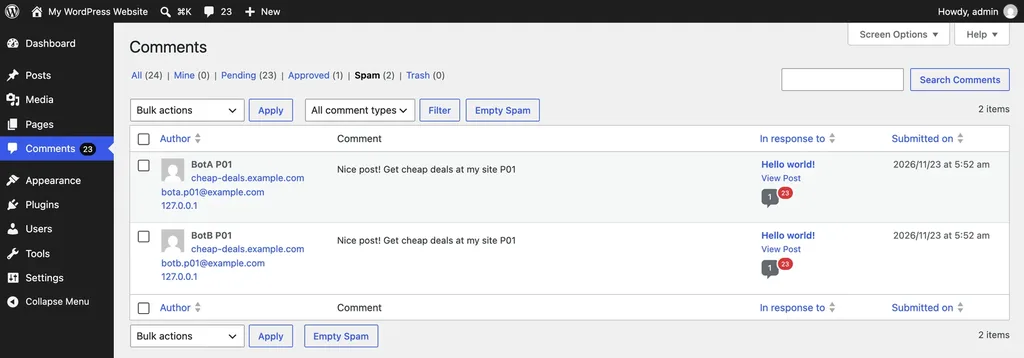
We activated each plugin on its own and sent three comments to the "Hello world!" post. A visitor filled in the form in a real browser, one bot copied the form without running JavaScript, and another bot posted straight to WordPress. With no plugin, all three landed in Pending.
| Plugin (default settings) | Real visitor | Form-copying bot | Direct bot |
|---|---|---|---|
| Antispam Bee | Pending | Spam folder | Spam folder |
| Titan Anti-spam | Pending | Spam folder | Spam folder |
| WP Armour | Pending | Blocked | Blocked |
| Maspik | Pending | Blocked | Blocked |
| WPBruiser | Pending | Blocked | Blocked |
| Akismet, Zero Spam and the three CAPTCHAs | Pending | Pending | Pending |
Five plugins stopped both bots the moment we activated them, and none of them blocked our real visitor. The other five let every comment through until they are set up. Akismet needs an API key, and the three CAPTCHA plugins need keys from Cloudflare, Google or hCaptcha.
We also checked what each plugin adds to the post page for visitors. Antispam Bee and Akismet added under 1 KB and no files, while WP Armour added the most, about 108 KB.
1. Akismet Anti-spam
Akismet is the best-known spam filter, with more than 5 million active installs. It checks every comment and contact form entry against its global spam database and keeps a status history for each comment. The catch is the API key. Keys are free for personal blogs, but commercial sites need a paid plan. Without a key, all three test comments went straight to Pending.
2. Antispam Bee
Antispam Bee is our pick for most blogs. It filters comment and trackback spam on your own server, without CAPTCHAs and without sending visitors' data to an outside service. In our test, it moved both bots to the Spam folder right after activation, with no setup at all. It is also the smallest plugin here at 0.1 MB. It only protects comments, though, so pair it with another plugin if your contact form gets spam.
3. WP Armour
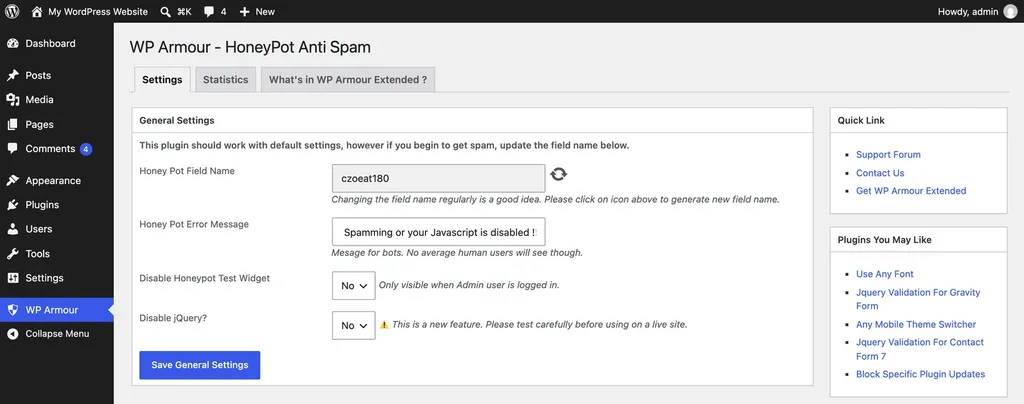
WP Armour adds a hidden honeypot field that real people never see. It protects comments, registration and popular form plugins such as Contact Form 7, WPForms and Elementor Forms with no setup. Both of our bots were stopped with an error message. Spam logs, IP blocking and keyword filters are paid features. It loads jQuery, its own script and a stylesheet on every page, about 108 KB in total, but its settings have a new "Disable jQuery" option.
4. Titan Anti-spam & Security
Titan blocks comment spam with hidden fields and a spam database, and it adds login protection too. It caught both bots and saved them in the Spam folder, while our real visitor went through. It added only one small 1.8 KB script, and only on the post page. Machine learning spam detection, two-factor login and backups need Titan Pro, and the menu shows an "Upgrade to Pro" link.
5. Maspik
Maspik combines many checks, such as honeypots, banned words, link limits and direct post protection. It stopped both bots with a "blocked as spam" message, right after activation. Country and language rules are Pro features, and the optional cloud check is limited to 100 free checks a month. It also showed a notice asking us to turn on that cloud layer, and it loads two scripts, about 13 KB, on every page.
6. WPBruiser
WPBruiser gives each protected form a hidden token that a real browser fetches in the background. Bots arrive without the token, and in our test, both bot comments were silently dropped. It also limits failed logins. The free version protects comments, login, registration and a few form plugins, while Contact Form 7, WPForms and WooCommerce need WPBruiser Pro.
7. Zero Spam For WordPress
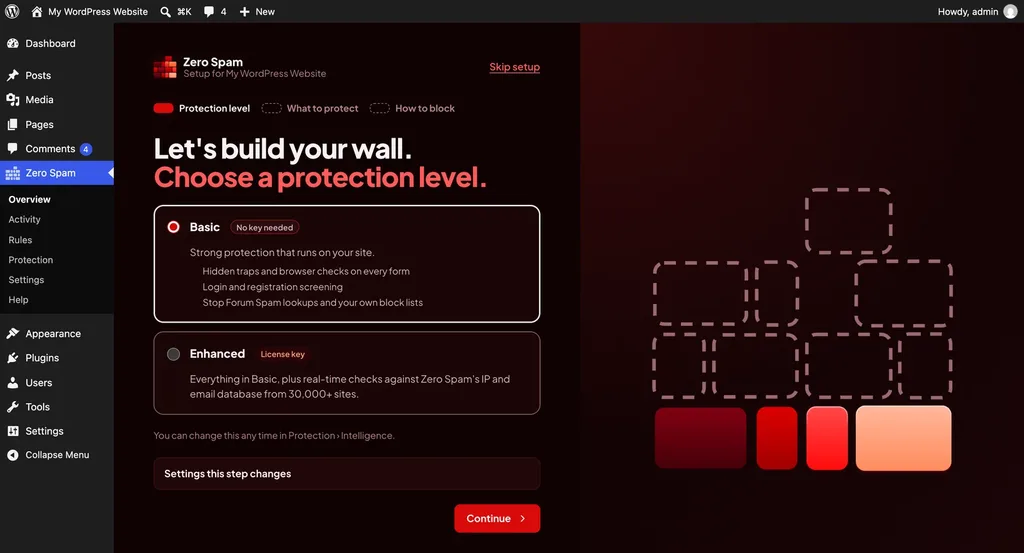
Zero Spam blocks bots before they post, so nothing lands in your moderation queue. Out of the box, it let all three test comments through. After its three-step setup wizard, where we picked the free Basic level, it turned away both bots. It also rejected our scripted visitor, and its log listed a failed browser check and an invalid email, since we used example.org test addresses. Enhanced protection needs a paid license key.
8. Simple CAPTCHA With Cloudflare Turnstile
Turnstile is Cloudflare's free, privacy-friendly alternative to reCAPTCHA. This plugin is completely free and can add it to comments, login, WooCommerce checkout and many form plugins. You need a free Cloudflare account to create a site key and secret key. Without those keys, it added nothing to our pages and let every test comment through.
9. Advanced Google reCAPTCHA
This plugin adds Google reCAPTCHA to comments, login, registration and WooCommerce forms. It also guards the login form against brute-force attacks, and it created two database tables for that on activation. Without keys, it did nothing for our comment form. If you prefer not to send visitor data to Google, Turnstile or a honeypot plugin is a better choice.
10. hCaptcha For WP
hCaptcha works with more than 60 plugins and themes and adds its own honeypot and minimum submit time checks. It is also the heaviest download here at 15.4 MB, and it added nine pages to its admin menu. Even without keys, it added about 4.7 KB and a reference to hcaptcha.com to every page. You must sign up at hCaptcha.com for a site key, and the passive modes need its Pro or Enterprise plans.
How To Install An Anti-Spam Plugin
- First, pick one plugin, not several, for the same form.
- Next, go to Plugins → Add New Plugin and search for the plugin by name.
- Now click Install Now, then Activate, and finish its setup or add your keys.
- After that, open a private browser window and leave a test comment to make sure real people can still post.
Free Anti-Spam Plugins: FAQs
Do I need a CAPTCHA to stop spam?
No. In our test, Antispam Bee, Titan, WP Armour, Maspik and WPBruiser stopped both bots without showing visitors any puzzle.
What if I don't need comments at all?
Then turn them off. The free Disable Comments plugin, with more than 1 million installs, removes comments and blocks them over the REST API and XML-RPC.
Final Words
These free anti-spam plugins can keep your comments and forms clean. For most blogs, we recommend Antispam Bee for comments and WP Armour or Maspik if your contact forms get spam too. Let us know in the comments which plugin works best on your site.
Sources
We checked these sources for this list on November 23, 2026:
- WordPress.org Plugin Directory, the plugin pages for all ten plugins
- Akismet Anti-spam, API key and pricing notes
- Maspik, free and Pro protection layers
- Disable Comments, feature list