WordPress makes it easy to publish content, but turning visitors into subscribers or customers takes a little more. A well-timed popup with a newsletter form, a discount or an important notice is one of the simplest ways to do it. If you are looking for free popup plugins and want to know what each one loads, this article will help you.
We are here to help you pick the right one without spending a single dollar. Every plugin in this list is free in the WordPress.org plugin directory, and we note the main free limits where there are any. Before writing this, we tested all ten on a fresh WordPress 7.1.5 site and measured what each one loads for visitors.
Related Articles
- Best Email Plugins For WordPress
- Best Contact Form Plugins For WordPress
- Ways To Increase Website Speed
Top 10 Free Popup Plugins At A Glance
| Plugin | Job | Active installs | Last updated | Download size |
|---|---|---|---|---|
| Popup Maker | Popups and slide-ins | 600,000+ | Sep 11, 2026 | 4.8 MB |
| Hustle | Popups and email opt-ins | 80,000+ | Nov 17, 2026 | 7.1 MB |
| Boxzilla | Light popups and slide-ins | 20,000+ | Aug 20, 2026 | 0.2 MB |
| Icegram Engage | Popups and welcome bars | 10,000+ | Nov 18, 2026 | 2.2 MB |
| PopupKit | Block-based popups | 60,000+ | Nov 9, 2026 | 2.8 MB |
| CES by Supsystic | Popups, forms and CRM | 9,000+ | Nov 23, 2026 | 14.2 MB |
| Popup Box | Popups and modals | 40,000+ | Nov 17, 2026 | 5.4 MB |
| Advanced Popups | Simple popups and bars | 50,000+ | Jul 11, 2026 | 0.07 MB |
| WP Popups | Popup builder | 30,000+ | Oct 26, 2026 | 2.1 MB |
| Brave | Drag and drop popups | 20,000+ | Oct 28, 2026 | 2.1 MB |
We took the install counts and dates from the WordPress.org plugin directory and measured the download sizes ourselves on November 23, 2026.
What We Found When We Tested Them
We activated each plugin on its own and loaded the homepage as a logged-out visitor, before creating any popup. A popup plugin should load nothing until a popup is live, but four of them didn't wait.
| Plugin | Extra files for visitors, no popup yet |
|---|---|
| Popup Maker, Hustle, Boxzilla, Icegram, PopupKit, CES | None |
| Advanced Popups | About 125 KB, including jQuery |
| WP Popups | About 165 KB, including jQuery |
| Brave | About 200 KB of its own files |
| Popup Box | About 205 KB, including jQuery |
Then we made one popup live. After we switched on Popup Maker's built-in example, it added about 200 KB, mostly jQuery and jQuery UI. A simple box we published in Boxzilla added only 15 KB, with no jQuery at all.

1. Popup Maker
Popup Maker is the most popular free popup plugin here, with more than 600,000 installs. It works with your favorite form plugins and page builders, with unlimited popups and no monthly fee. On activation, it created an example popup, switched off, and eight popup themes. The free triggers include click open, auto open and form submission, while exit intent and scroll triggers need Pro. With no popup live, it loaded nothing for visitors.
2. Hustle
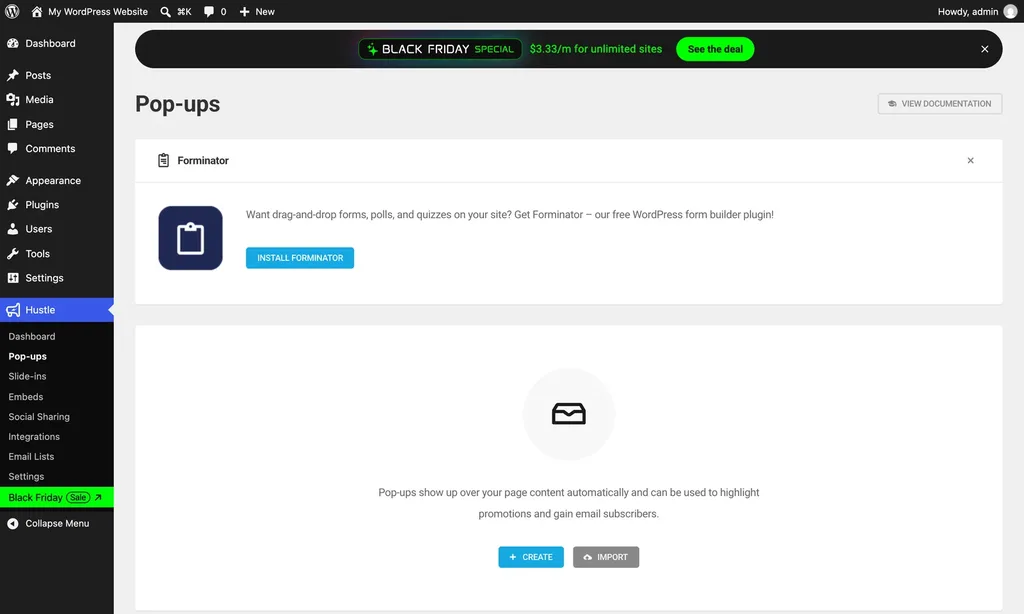
Hustle from WPMU DEV builds popups, slide-ins, opt-in forms and share bars, and it links up with many email services. Unlike most, its free version includes exit intent, scroll and time triggers. The catch is a cap on how many you can make, as unlimited ones need Pro. It loaded nothing for visitors before we created a popup, but its screens carried a Black Friday banner and a Forminator promo.
3. Boxzilla
Boxzilla is one of the lightest options here, at just 0.2 MB. You write each box like a normal post and show it after a scroll, a delay, a click or a number of page views. The box we published added only 15 KB for visitors. Exit intent and time-on-site targeting need paid add-ons.
4. Icegram Engage
Icegram Engage offers popups, top and bottom bars, slide-ins and small toast messages, with no limit on campaigns or views. It took us straight to a new campaign screen on activation and added nothing for visitors. Full-screen overlays, exit intent, A/B testing and analytics need Icegram Engage Max.
5. PopupKit
PopupKit from Wpmet builds popups from Gutenberg blocks and comes with more than 270 templates, including spin-to-win and multi-step popups. It loaded nothing for visitors, but it created ten database tables and showed a large bundle sale notice in the dashboard. It has only seven reviews so far, all five stars.
6. CES By Supsystic
CES puts a popup builder, forms, a contact list and email follow-ups in one plugin, with no limit on popups or contacts. Exit intent is a built-in trigger. It loaded nothing for visitors, but it created 20 database tables on activation. At 14.2 MB, it suits owners who want a full marketing kit, not just a popup.
7. Popup Box
Popup Box lets you build unlimited popups in the free version, including video, image and notification popups. Subscription and contact form popups, plus hover and inactivity triggers, need Pro. The downside: before we created any popup, it loaded jQuery, its script and two stylesheets on every page, about 205 KB.
8. Advanced Popups
Advanced Popups is tiny at 0.07 MB, yet it offers popup boxes, bars, cookie notices, exit intent, scroll and time triggers. It added no admin menu of its own. Still, it loaded jQuery and its files on every page, about 125 KB, before we created a popup.
9. WP Popups
WP Popups has a template builder, works with form plugins such as WPForms and Contact Form 7, and can show popups by page, referrer or device. It opened a getting started screen on activation, created a private page and loaded about 165 KB, including jQuery, for visitors with no popup live.
10. Brave
Brave has a drag and drop popup editor, 15 free presets and nine free elements, such as text, buttons, images and forms. Exit intent, scroll triggers and more presets are Pro. In our test, it loaded about 200 KB of its own files on every page before we created anything.
How To Add A Popup To Your Site
- First, pick one popup plugin and decide what the popup should do, such as collect emails or announce a sale.
- Next, go to Plugins → Add New Plugin, search for the plugin by name, then click Install Now and Activate.
- Now create your popup, choose a trigger such as a time delay or a click, and set where it should appear.
- After that, open your site in a private browser window on a phone and make sure the popup is easy to close.
Free Popup Plugins: FAQs
Which free popup plugin is lightest?
Of the two we tested with a live popup, Boxzilla. It added only 15 KB, while Popup Maker's example popup added about 200 KB.
Why isn't OptinMonster in this list?
The plugin is free, but it connects to OptinMonster's service, and its free account allows only 3 campaigns and 500 campaign impressions.
Final Words
These free popup plugins can help you grow your email list, but some load over 100 KB on every page, so check yours after setup. For most sites, we recommend Popup Maker for its features or Boxzilla for low page weight, and Hustle if you need exit intent for free. Let us know in the comments which popup plugin you use.
Sources
We checked these sources for this list on November 23, 2026:
- WordPress.org Plugin Directory, the plugin pages for all ten plugins
- Popup Maker, free and Pro triggers
- Hustle, free and Pro limits
- OptinMonster, the free account limits