Phone calls and back-and-forth emails are a slow way to fill a calendar. Whether you run a salon, a clinic or a holiday rental, letting customers pick a time on your website saves hours every week. If you are looking for the best free booking plugins for WordPress, this article will help you.
We are here to help you choose the right one without paying for it. Every plugin here is free in the WordPress.org plugin directory, and we tested all ten on a fresh WordPress 7.1.5 site.
Related Articles
- Best Calendar Plugins For WordPress
- Best Payment Plugins For WordPress
- How To Fix WordPress Not Sending Emails
Top 10 Free Booking Plugins At A Glance
| Plugin | Job | Active installs | Last updated | Download size |
|---|---|---|---|---|
| LatePoint | Appointments | 100,000+ | Nov 19, 2026 | 6.5 MB |
| Amelia | Appointments and events | 90,000+ | Nov 16, 2026 | 31.2 MB |
| Bookly | Appointments | 60,000+ | Nov 12, 2026 | 6.4 MB |
| Simply Schedule Appointments | Meetings and calls | 50,000+ | Nov 19, 2026 | 6.3 MB |
| FluentBooking | Meetings and calls | 20,000+ | Nov 4, 2026 | 3.7 MB |
| Booking Calendar | Date and rental bookings | 40,000+ | Nov 19, 2026 | 12.9 MB |
| Easy Appointments | Appointments | 10,000+ | Nov 12, 2026 | 4.6 MB |
| Appointment Hour Booking | Time-slot bookings | 10,000+ | Nov 16, 2026 | 2.2 MB |
| WP Booking System | Rental calendars | 10,000+ | Nov 10, 2026 | 2.4 MB |
| MotoPress Hotel Booking | Hotels and rentals | 10,000+ | Nov 18, 2026 | 6.3 MB |
We took the install counts and dates from the WordPress.org plugin directory and measured the download sizes ourselves on November 23, 2026.
What We Found When We Tested Them
We activated each plugin alone, added its booking form to a page and opened it as a logged-out visitor before changing any settings. We also measured the files each one adds to every page (uncompressed).
| Plugin | Booking page before setup | Added to every page |
|---|---|---|
| LatePoint | Empty services list | 7 files, about 1 MB |
| Amelia | "No employees or services" message | Nothing |
| Bookly | Empty five-step form | 20 files, about 2 MB |
| Simply Schedule Appointments | "No appointment types" message | 2 files, about 6 KB |
| FluentBooking | Needs a calendar first | Nothing |
| Booking Calendar | Working date calendar | 32 files, about 2.2 MB |
| Easy Appointments | "All Connections Have Expired" | Nothing |
| Appointment Hour Booking | Working time-slot form | Nothing |
| WP Booking System | "Calendar does not exist." | 8 files, about 631 KB |
| MotoPress Hotel Booking | Search form, no rooms yet | 18 files, about 561 KB |
Only Booking Calendar and Appointment Hour Booking showed a ready booking form the moment we activated them, and we didn't submit a test booking in any plugin. Most others showed an empty form or an error message, so finish setup before you share your booking page.
Page weight varied a lot. Five plugins loaded 561 KB to 2.2 MB on every page, even pages with no booking form, while four added nothing.
1. LatePoint
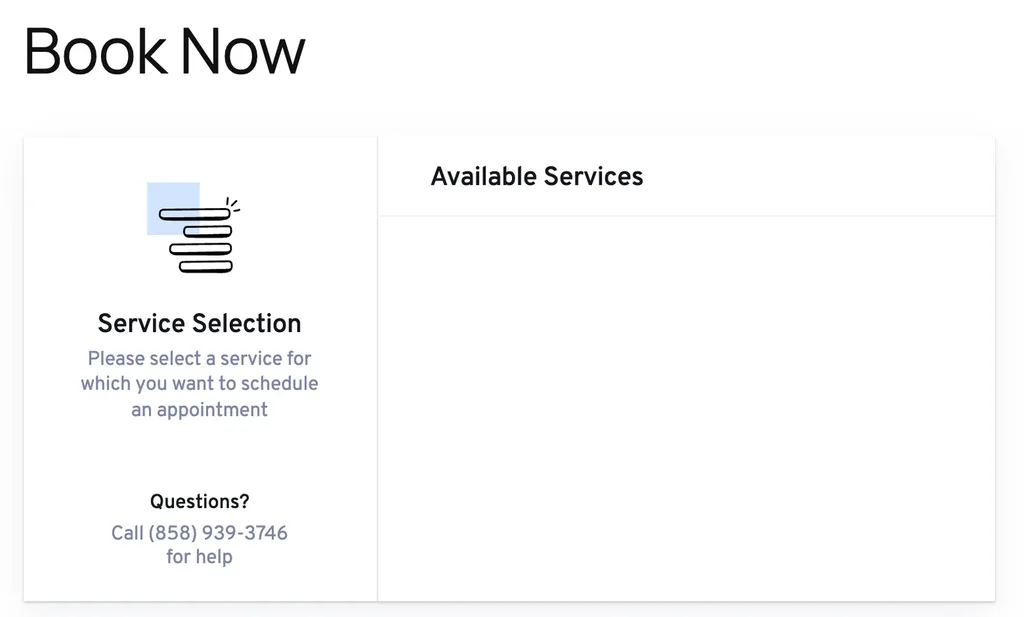
LatePoint is the most installed booking plugin here, with more than 100,000 sites. Its free version has unlimited bookings, deposits and Stripe, PayPal and Razorpay payments. Activation opened a setup wizard for your services and working hours. Before setup, its form showed no services and a placeholder phone number, so finish the wizard first. It is heavy, though: about 1 MB of files on every page, plus 44 database tables.
2. Amelia
Amelia handles appointments and events with a step-by-step booking form, and its Lite version can take Square payments. Unlimited staff, reminders and custom notices need a paid plan. It added nothing to normal pages, but its booking page loaded about 2.5 MB plus Google Fonts. Before setup, visitors saw "Oops... It seems like there are no employees or services created".
3. Bookly
Bookly shows a full five-step booking form, from Service to Done, even before you add anything. The free version is limited, though. Its plugin page says online payments, unlimited staff and services, and add-ons aren't free. It was also heavy, adding 20 files, about 2 MB, to every page, not just the booking page.
4. Simply Schedule Appointments
Simply Schedule Appointments is built for meetings and calls. Its free Basic edition has unlimited booking calendars and custom notifications. Stripe and PayPal payments, group events and SMS reminders need a paid edition. It was light: about 6 KB on every page and 48 KB on the booking page. Before setup, visitors saw "Uh oh. We ran into a problem: No appointment types have been set up yet."
5. FluentBooking
FluentBooking is built for booking one-to-one meetings, with unlimited hosts and calendars in the free version. You create a calendar before you get a booking link, so there was no form for visitors at first. It added nothing to normal pages. Calendar sync with Google or Outlook, group meetings and payments all need FluentBooking Pro.
6. Booking Calendar
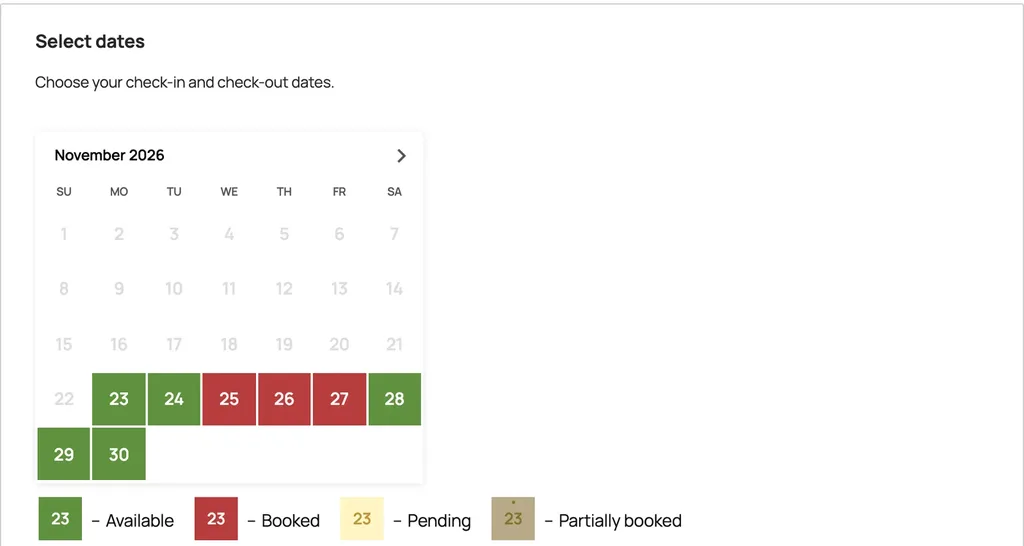
Booking Calendar is a veteran plugin for rentals and date-based bookings, with more than 40,000 installs. It was one of only two plugins with a working booking form right after activation. Be careful, though: it created seven pages and came with two sample bookings, so November 25 to 27 already showed as Booked. It was also the heaviest plugin in our test, loading 32 files, about 2.2 MB, on every page. Multiple calendars, online payments and seasonal pricing need a paid edition.
7. Easy Appointments
Easy Appointments works with locations, services and employees, and its menu numbers them in setup order. Before setup, our visitor saw "Oops! All Connections Have Expired", so you need to create a connection with valid dates first. It added nothing to normal pages, but its booking page loaded about 981 KB. Google Calendar sync needs Easy Appointments Pro.
8. Appointment Hour Booking
Appointment Hour Booking showed a ready form with no setup at all. Its default form showed a "Service 1" option, a calendar and hourly time slots from 08:00 to 16:00. It also had an email field and a security code. It created only two database tables and added nothing to normal pages, while its booking page loaded about 406 KB. Its plugin page says the free version is fully functional, and payment processing comes in its commercial versions.
9. WP Booking System
WP Booking System is made for daily rentals, with a calendar that shows free dates and a booking form. The free version gives you one calendar and one booking form, while payments, seasonal rates and deposits need the paid version. Until you create that calendar, its shortcode just said "Calendar does not exist." It also loaded eight files, about 631 KB, on every page.
10. MotoPress Hotel Booking
MotoPress Hotel Booking turns WordPress into a booking site for hotels and holiday rentals. Its free Lite version has unlimited rooms and seasonal rates. It asked us to install its Booking Confirmation and Search Results pages and showed a Black Friday upgrade notice. Its search form showed right away, just with no rooms to find yet. PayPal is built in, and more gateways need a premium add-on. It loaded 18 files, about 561 KB, on every page.
How To Install A Booking Plugin
- First, write down your services, hours and staff, because every booking plugin asks for them.
- Next, go to Plugins → Add New Plugin, search for the plugin by name, then click Install Now and Activate.
- Now finish its setup wizard and add the booking form or block to a page.
- After that, make a test booking in a private window and check that both you and the customer get the email.
Free Booking Plugins: FAQs
Can customers pay when they book?
With some plugins, yes. LatePoint's free version includes Stripe, PayPal and Razorpay, Amelia Lite can take Square payments and MotoPress Hotel Booking includes PayPal. Most of the others keep online payments for their paid versions.
Why didn't my test booking email arrive?
Booking plugins send email through WordPress, which often fails on shared hosting. A free SMTP plugin, such as the WordPress.org SMTP plugin, usually fixes it.
Final Words
These free booking plugins can fill your calendar while you sleep. For most small businesses, we recommend LatePoint if you want free card payments, or Simply Schedule Appointments for a light meeting calendar. We didn't set these two up or test a booking, so try one first. Let us know in the comments which booking plugin you use.
Sources
We checked these sources for this list on November 23, 2026:
- WordPress.org Plugin Directory, the plugin pages for all ten plugins
- Bookly, free version limits
- Amelia, Lite version limits
- LatePoint, free plugin features