WordPress is not just for blogs. With the right plugin, it can run a full online school with courses, lessons, quizzes and student progress, and you keep your students and your earnings on your own site. If you teach anything and you are looking for the best free LMS plugins for WordPress, this article will help you.
We are here to help you choose one without spending a dollar. Every plugin here is free in the WordPress.org plugin directory, and we tested all ten on a fresh WordPress 7.1.5 site.
Related Articles
- Best Membership Plugins For WordPress
- Best Payment Plugins For WordPress
- How To Make A Quiz Website In WordPress
Top 10 Free LMS Plugins At A Glance
| Plugin | Job | Active installs | Last updated | Download size |
|---|---|---|---|---|
| Tutor LMS | Course builder and selling | 90,000+ | Nov 9, 2026 | 7.7 MB |
| LearnPress | Courses and quizzes | 60,000+ | Nov 20, 2026 | 10.6 MB |
| LifterLMS | Courses and memberships | 10,000+ | Nov 17, 2026 | 8.6 MB |
| MasterStudy LMS | Courses and certificates | 10,000+ | Nov 9, 2026 | 25.6 MB |
| Masteriyo LMS | Courses with built-in payments | 6,000+ | Nov 17, 2026 | 16.5 MB |
| Sensei LMS | Block-based courses | 9,000+ | Nov 23, 2026 | 14.9 MB |
| ProfilePress | Memberships with courses | 100,000+ | Nov 12, 2026 | 6.2 MB |
| FluentCommunity | Community and courses | 8,000+ | Nov 18, 2026 | 7.0 MB |
| Quiz and Survey Master | Quizzes and exams | 40,000+ | Nov 17, 2026 | 3.6 MB |
| H5P | Interactive lessons | 40,000+ | Oct 20, 2026 | 4.7 MB |
We took the install counts and dates from the WordPress.org plugin directory and measured the download sizes ourselves on November 23, 2026.
What We Found When We Tested Them
We activated each plugin alone, noted its setup screens and new pages, and measured the files it adds to every page for a logged-out visitor (uncompressed). We also created a test course with a script in five of them and opened it as a visitor. We didn't get a test course to work in Tutor LMS.
| Plugin | First screen | Pages created | Added to every page |
|---|---|---|---|
| Tutor LMS | Onboarding wizard | 5 | 22 files, about 1.2 MB |
| LearnPress | Quick Setup notice | 7 | 5 files, about 96 KB |
| LifterLMS | Setup wizard | None yet | 15 files, about 384 KB |
| MasterStudy LMS | Setup wizard | 5 | 15 files, about 457 KB |
| Masteriyo LMS | Onboarding | 2 | 1 file, about 59 KB |
| Sensei LMS | Setup wizard | 3 | 4 files, about 118 KB |
| ProfilePress | Setup notices | None yet | 8 files, about 383 KB |
| FluentCommunity | Portal setup | None | Nothing |
| Quiz and Survey Master | Usage tracking notice | None | 25 files, about 622 KB |
| H5P | None | None | 2 files, about 19 KB |
The biggest surprise was weight. Before we made a single course, Tutor LMS loaded about 1.2 MB on every page, including jQuery UI and React, while FluentCommunity added nothing. Our test courses opened fine for visitors in LearnPress, LifterLMS, MasterStudy, Masteriyo and Sensei, with course pages from about 119 KB (Sensei) to 665 KB (Masteriyo).
1. Tutor LMS
Tutor LMS is the most installed dedicated LMS here, with more than 90,000 sites. Its free version has a course builder, quizzes and unlimited courses, plus its own cart and checkout, so you can sell without WooCommerce. Activation opened an onboarding wizard, created five pages and added an Instructor role. The catch is weight: before we made any course, it loaded 18 extra scripts on every page, about 1.2 MB. Its premium add-ons need Tutor LMS Pro.
2. LearnPress
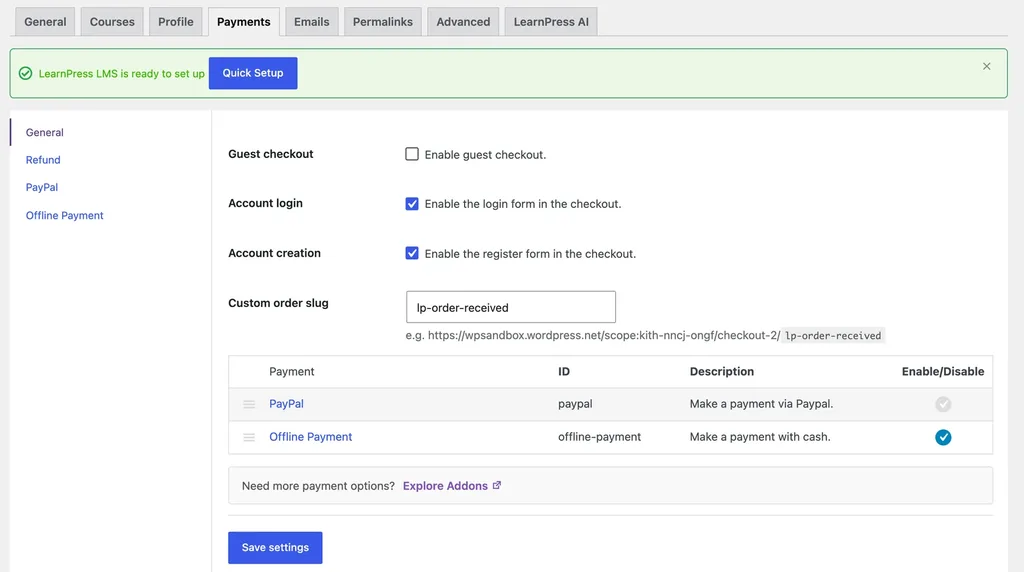
LearnPress says it is free and always will be, and it covers courses, lessons, quizzes and student profiles. On activation, it created seven pages, such as Courses, Profile and Checkout, plus 18 database tables. PayPal and offline payments are built in, while WooCommerce and Stripe payments are premium add-ons. Our test course page worked straight away. It loaded about 630 KB there and five small files, about 96 KB, on other pages.
3. LifterLMS
LifterLMS is built for course businesses, with courses, memberships, quizzes and certificates in the free core plugin. It added five admin menus and four user roles. A notice said no payment gateway was enabled, so students can only join free courses until you set up manual payments or add a payment add-on or WooCommerce. Every page loaded 13 extra scripts, about 384 KB. Premium add-ons cover extras like assignments and groups.
4. MasterStudy LMS
MasterStudy's free version includes unlimited courses, a quiz builder with eight question types and a drag-and-drop certificate builder. It opened a setup wizard, created five pages and showed two upgrade notices. Our test course page came with reviews and a wishlist button. It is heavy, though: about 457 KB on every page and 647 KB on the course page. Drip content and assignments are PRO add-ons.
5. Masteriyo LMS
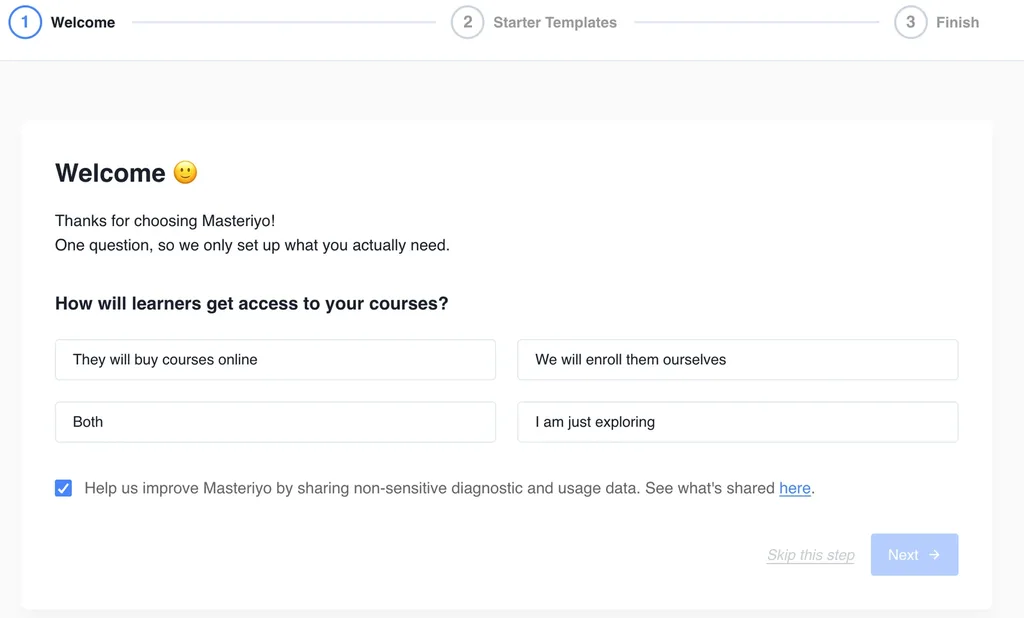
Masteriyo's checkout, payment gateways, quizzes and certificates are all free, according to its plugin page, so you can sell courses without WooCommerce. Coupons, bundles and Razorpay need Pro. Its onboarding asks whether learners will buy courses or you will enroll them, and its usage data box was ticked by default. On normal pages, it added only WordPress's Dashicons stylesheet, about 59 KB.
6. Sensei LMS
Sensei LMS comes from Automattic, the company behind WordPress.com, which uses it for its own staff training. You build courses in the block editor, with quizzes and a distraction-free Learning Mode. It showed a setup wizard and created three pages and 19 email templates. It added four stylesheets, about 118 KB, to every page. Selling courses through WooCommerce needs Sensei Pro.
7. ProfilePress
ProfilePress is mainly a membership plugin, but its free version includes a course builder with video, text and quiz lessons. You sell courses through its membership plans, and the free version adds a 2% fee on Stripe payments. After activation, it asked us to enable registration and create its Checkout and My Account pages. It also added eight files to every page, including jQuery and Select2, about 383 KB.
8. FluentCommunity
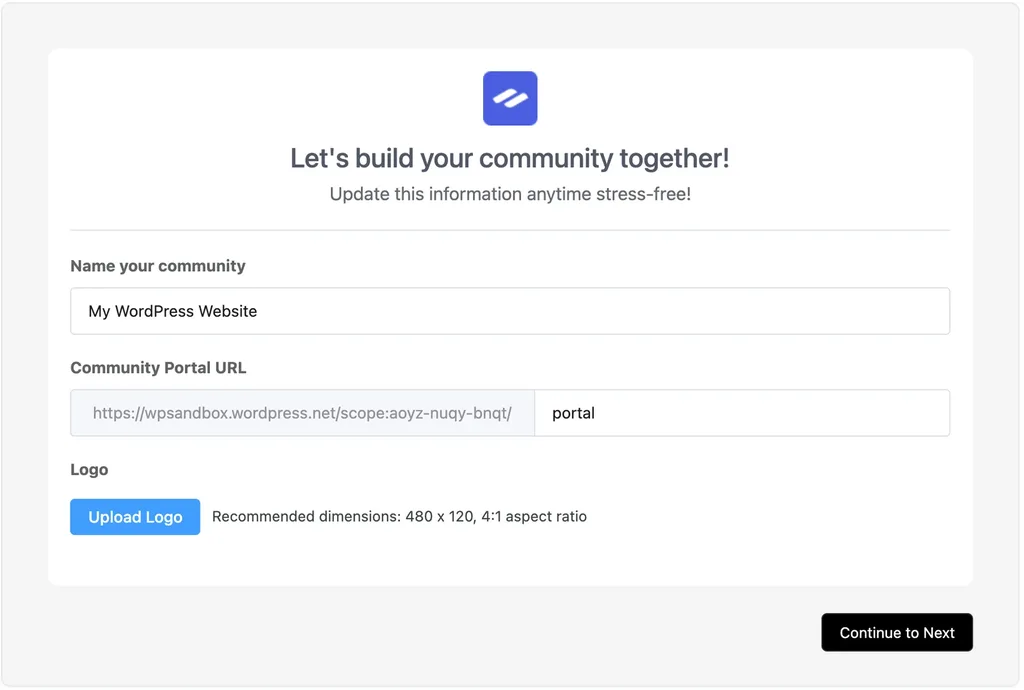
FluentCommunity combines a social community with courses, so students can discuss while they learn. Everything runs in a separate portal, at /portal/ by default, and its setup first asks for a community name. That design paid off: it added nothing to your normal pages. Courses and progress tracking are free, but quizzes and sequential lesson locking need FluentCommunity Pro.
9. Quiz And Survey Master
Quiz and Survey Master, or QSM, is a quiz specialist rather than a full LMS. It gives you unlimited quizzes, more than 12 question types and results pages for free. Its dashboard asked permission to track usage, which you can decline. But it loaded 25 extra files, about 622 KB, on every page before we made a single quiz. Premium question types and certificates need QSM Pro.
10. H5P
H5P adds interactive content, such as interactive videos, presentations, flash cards and drag and drop tasks, that you place in any post or lesson with a shortcode. It needed no setup at all and added only two small stylesheets, about 19 KB, to every page. Its plugin page lists it as tested up to WordPress 7.0.9, though it was updated on October 20, 2026.
How To Install An LMS Plugin
- First, take a backup of your website, because LMS plugins add many database tables and pages.
- Next, go to Plugins → Add New Plugin and search for the plugin by name.
- Now click Install Now, then Activate, and go through its setup wizard.
- After that, create one short test course and open it in a private browser window to see what students will see.
Free LMS Plugins: FAQs
Can I sell courses with a free LMS plugin?
Yes. LearnPress has PayPal and offline payments built in, and Tutor LMS and Masteriyo have their own checkout. Sensei needs Sensei Pro to sell through WooCommerce.
Will an LMS plugin slow down my site?
It can. In our test, the extra files on every page ranged from nothing to about 1.2 MB. Test your homepage speed before and after.
Final Words
These free LMS plugins can turn WordPress into a proper online school. For most beginners, we recommend LearnPress for its built-in payments, or Masteriyo if you want card payments and light normal pages. We didn't test payments. Let us know in the comments which LMS plugin you use.
Sources
We checked these sources for this list on November 23, 2026:
- WordPress.org Plugin Directory, the plugin pages for all ten plugins
- LearnPress, free and premium add-ons
- Sensei LMS, Sensei Pro features
- Masteriyo LMS, free payment features