Google is adding a collapsible sidebar to its desktop search pages that keeps your recent AI searches one click away. Here's what changed, what we saw when we checked google.com ourselves, and what the Google AI Mode sidebar means if you run a WordPress site.
Quick answer:
- Google started rolling out the sidebar globally on desktop on November 19, 2026. It lists your recent AI Mode searches so you can reopen them.
- You need to be signed in, with history turned on, to see your past searches. Signed out, the sidebar only offers a new thread and a sign-in prompt.
- For site owners, nothing needs to change in WordPress. AI Mode visits are already counted in Search Console, so that's where to watch for any shift.
What Google Announced
The news came from Robby Stein, Google's vice president of product for Search, in a post on X on November 19, 2026. He said Google is rolling out a collapsible sidebar on the desktop homepage, worldwide, to "easily find & jump back into your recent AI searches."
His reason was simple. People now ask Search questions that take several rounds to answer, and in Google's testing, the sidebar helped them pick up where they left off. Coverage by Android Authority and Chrome Unboxed also describes other homepage changes rolling out at the same time, including new AI shortcut buttons below the search box. Reports differ on the details, which is why we checked for ourselves.
What We Saw When We Checked Google.com
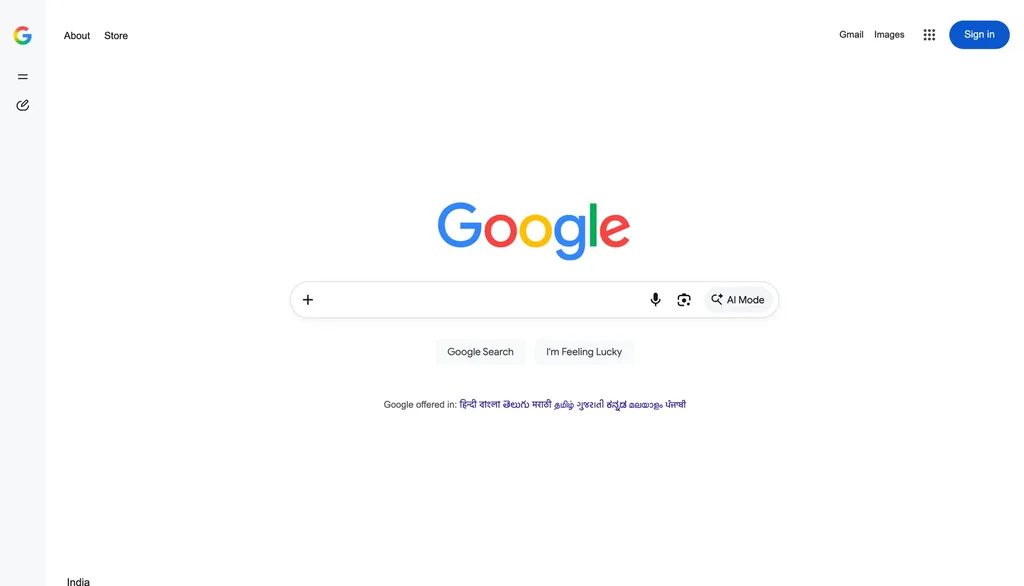
On November 20, 2026, we opened google.com from India in Chrome on a desktop, signed out, in a 1,440-pixel-wide window. Here's what we found.
- The sidebar rail is already there. A slim strip on the left of the homepage shows a menu icon, a "new thread" icon and Settings.
- The classic buttons were still there. We still saw "Google Search" and "I'm Feeling Lucky" under the search box, even though some reports say the Google Search button is being replaced. The rollout seems to vary by account and region.
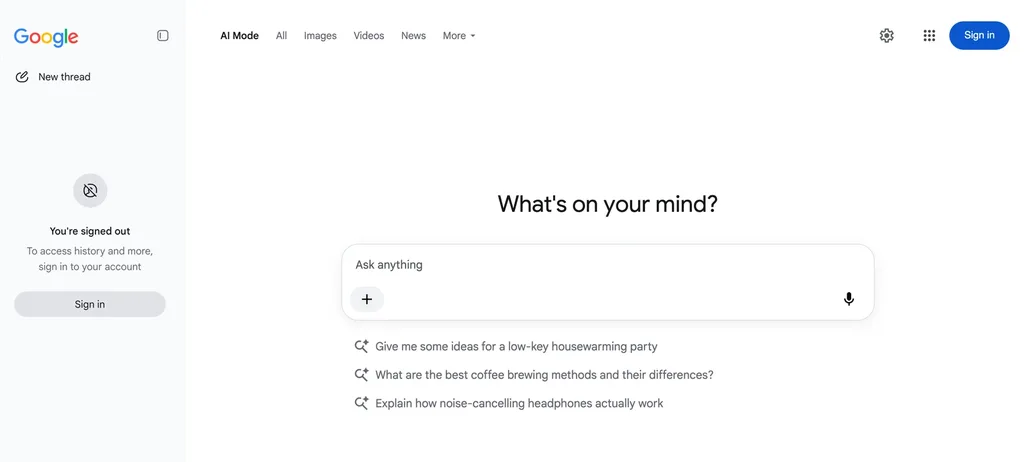
- Signed out, there's no history. Opening the sidebar in AI Mode showed only "New thread" and a message saying we were signed out and needed to sign in to access history.
- Window width matters. In a narrower window, about 800 pixels wide, the rail didn't appear at all.
| Detail | What reports say | What we saw (Nov 20, signed out, India) |
|---|---|---|
| Sidebar on the homepage | Rolling out globally on desktop | Collapsed rail visible on a wide desktop window |
| Recent AI searches | Listed in the sidebar | Needs sign-in; we only saw a sign-in prompt |
| "Google Search" button | Being replaced by AI shortcuts | Still present for us |
| Narrow windows | Not mentioned | No rail at about 800 pixels wide |
How to Use the AI Mode Sidebar
If you'd like to try it, these steps follow Google's AI Mode help page.
Before you start: you need a personal Google Account and a desktop browser window that's wide enough to show the sidebar.
- Sign in to Google. Use a personal Google Account, which Google's help pages list as a requirement for features like notebooks.
- Turn on history. For the best experience, Google recommends enabling history and personalized recommendations, since saved searches are what the sidebar lists.
- Open the sidebar. Click the menu icon at the top of the left rail on google.com, or go to AI Mode and select AI Mode history on the left.
- Pick a thread or start a new one. Choose a recent search to continue it, or click "New thread" to start fresh.
- Organize bigger projects. The same panel holds notebooks, where you can group threads and add files or links as sources. Google's notebooks help page says they sync with Gemini.
How to Delete Your AI Mode History
Because the sidebar puts your recent searches on screen, it's worth knowing how to clear them, especially on a shared computer.
- Go to AI Mode and select AI Mode history on the left.
- Choose a search and select Delete, or use Delete all at the top to clear everything.
- Check My Activity too. Google says deleted items can stay there for up to 24 hours before they're removed automatically.
There's one catch. If a search started as an AI Overview and you continued it in AI Mode, Google may save two entries. Deleting the AI Mode one doesn't remove the original from your Search history, so delete it there as well.
The Decoder also reports that Google is rolling out temporary threads in AI Mode. These aren't saved to history and don't shape future recommendations.
What the Google AI Mode Sidebar Means for WordPress Sites
The sidebar doesn't change how Google ranks pages. What it does is make longer, multi-step AI searches easier to return to, so more of your visitors' research may happen inside AI Mode. Here's what we'd do as a site owner.
- Keep watching Search Console. Google's AI features documentation says clicks and impressions from AI Mode are already included in the Performance report, under the "Web" search type, rather than as a separate search type. Compare trends over a few weeks instead of day to day. If you pull that data into a dashboard, our look at the Search Analytics API update covers this week's new filters.
- Answer the follow-up questions too. AI Mode splits a question into subtopics and searches each one. Pages that also cover the natural next questions, like costs, steps and common problems, give it more to link to.
- Don't block Googlebot to avoid AI. Google says there are no extra technical requirements for AI Mode. Blocking Googlebot in robots.txt stops Google crawling your pages for Search altogether. If you want to limit what's shown, Google points to snippet controls like
nosnippetinstead.
If you're also tracking this month's ranking changes, our guide to the Google November 2026 core update explains how to tell an update from normal swings. Our roundup of SEO plugins for WordPress covers the basics that still matter for every search feature.
Common Mistakes to Avoid
- Expecting it everywhere right away. The rollout is gradual. We saw the rail but not every change that other reports describe, so give it a few days.
- Assuming signed-out users see history. They don't. Without signing in, the sidebar only offers a new thread.
- Deleting only half a search. Searches that start in an AI Overview may also need deleting from Search history.
- Changing your site in a panic. This is a change to Google's interface, not a ranking update. Focus on helpful, current content.
Google AI Mode Sidebar: FAQs
When did Google add the AI Mode sidebar?
Google announced it on November 19, 2026, and said it's rolling out globally on the desktop homepage.
Is the sidebar available on mobile?
The announcement only mentions the desktop homepage. Google hasn't said whether the Google app or mobile browsers will get it.
Can I turn the sidebar off?
It's collapsible, so you can close it. You can also stop new searches being saved by turning off history, or by using temporary threads where they're available.
Will the sidebar reduce traffic to my site?
It's too early to say. AI Mode responses include links to websites, and that traffic is counted in Search Console, so your own data will show any change.
What to Do Next
- Check the Search Console Performance report weekly and note any change in clicks after the rollout.
- Update your most important posts so they answer the follow-up questions readers ask next.
- Try the Google AI Mode sidebar yourself, signed in, to see how your own topics appear in AI Mode.
Sources
We checked these sources for this guide to the Google AI Mode sidebar on November 20, 2026:
- Robby Stein's announcement on X, Google
- Get AI-powered responses with AI Mode, Google Search Help
- Get started with notebooks in AI Mode, Google Search Help
- AI features and your website, Google Search Central
- Android Authority and The Decoder coverage