WP Engine is one of the oldest names in managed WordPress hosting. It was founded back in 2010, it's based in Austin, Texas, and today it also owns Flywheel and the StudioPress team behind the Genesis framework. So, if you're shopping for premium WordPress hosting, you'll run into it sooner or later, and that's exactly why we wrote this WP Engine review. Think of it as our honest WP Engine hosting review for 2026.
For this review, we went through every plan, price, limit and add-on on WP Engine's website on 6 November 2026. The Essential plan starts at $35/mo (or $28/mo for the first year if you pay yearly), and the Business plan starts at $400/mo. One thing upfront, though. We didn't buy a WP Engine plan and run our own speed tests for this review, so any performance claim below is WP Engine's, and I'll say so each time.
I've used WordPress since 2014, and several of my own eCommerce sites run on it. This site, wpthinker.com, runs on a VPS we look after ourselves, so I know exactly what a managed host like WP Engine takes off your plate. Like every host, WP Engine has good sides and bad sides. So, let's have a look at them.
All prices in this review are in US dollars and exclude tax, as shown on wpengine.com in November 2026. The yearly discount applies to the first year only.
WP Engine at a Glance
| Best for | businesses, agencies and serious blogs that want managed WordPress from a big, established company |
| Starting price | $35/mo monthly, or $28/mo for the first year on yearly billing |
| Renews at | $35/mo (the yearly deal ends after year one) |
| Plans | Essential (1 to 30 sites), Business (30 to 50 sites), Enterprise (custom) |
| Free extras | SSL, SSH, daily backups, staging and dev copies, Cloudflare-powered CDN, 10 premium themes |
| Backups | Daily and on demand, kept for 30 to 60 days |
| Uptime promise | 99.99% SLA on Business and up |
| Support | 24/7 chat on every plan; phone from Business up |
| Money-back guarantee | Not listed on the current plans page |
| Our rating | 4.2 out of 5 |
WP Engine Review: The Goods
WP Engine has been doing this for a long time, and it shows. Here's what stood out when we went through the plans.
WordPress, PHP and MySQL Are Handled for You
Honestly, this is why people go to WP Engine in the first place. They keep WordPress, PHP and MySQL up to date, apply security patches, check your plugins for known risks, and block the basic DDoS attacks too. Everything is done from their dashboard, so you don't need to touch the server at all if you don't want to. Even then, SSH access is included.
I run my own VPS for this site, and believe me, those updates and patches eat up hours every month. WP Engine basically does them while you sleep.
Staging and Dev Copies in One Click
Every site gets one-click staging and development environments. So, you can try a new plugin or a theme change on a copy, check that nothing breaks, and then push it to your live site. For agencies, there's another nice touch: you can build a site for free and transfer it to your client's own WP Engine account when it's ready.
Backups Kept for a Long Time
WP Engine takes daily automatic backups, and you can make one yourself any time. Here's the part I liked. It keeps backups for at least 30 days and up to 60 days. That's a lot longer than the 14 days Kinsta keeps on its entry plans, and it really helps when you only notice a problem a few weeks later.
Caching and a Cloudflare CDN Included
For speed, WP Engine has its own caching system called EverCache, and on top of that, every plan gets a global CDN that runs on Cloudflare. What does that mean for you? Copies of your pages sit in locations near your visitors, so someone reading in Chicago and someone in Miami both get the page from close by. We didn't measure this ourselves, so take the speed part as WP Engine's claim.
10 Premium Themes and Genesis Blocks
Since WP Engine owns StudioPress, every plan comes with 10 premium themes and Genesis Blocks, a set of extra blocks for the WordPress editor. If you'd rather use your own theme, that's fine too. But for a small business that wants a clean site quickly, it's a handy freebie.
The Price Per Site Drops as You Grow
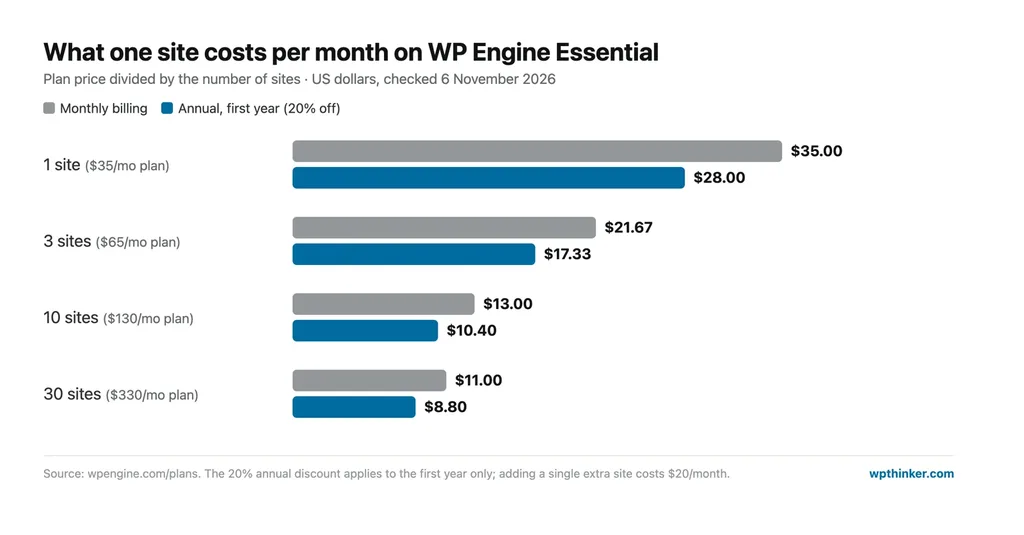
The Essential plan isn't one fixed package. You pick a size, from 1 site up to 30 sites, and the cost per site falls as you go. One site costs $35 a month, but 10 sites cost $130, which is just $13 each. At 30 sites, it's $11 a site. For agencies, that math is a big deal.
WP Engine Review: The Bads
Like any other host, WP Engine has some rough edges. Most of these won't stop you from signing up, but it's better to know them now than after you've paid.
Bandwidth Is Tight on the Smaller Sizes
This one surprised me. The 1-site plan includes 75 GB of bandwidth a month, the 3-site plan 150 GB, the 10-site plan 240 GB and the 30-site plan 550 GB. For one blog, 75 GB is usually fine. Spread 240 GB across 10 client sites, though, and it gets tight. WP Engine says taxes and overages may apply at checkout, but the plans page doesn't list the overage rates, so ask before you go over.
The Low Yearly Price Is a First-Year Deal
If you pay yearly, a 20% coupon brings the 1-site plan down to $336 for the first year, which is $28 a month. It only applies to new customers on Essential, and only for the first year. After that, the regular price is $420 a year, or $35 a month. WP Engine also says renewal pricing is subject to change.
Phone Support and the 99.99% SLA Start at $400
Essential gets 24/7 chat support, which is good. But phone support, isolated resources, managed site migrations and the 99.99% uptime SLA are all listed only from the Business plan, which starts at $400 a month. That's a big jump from $35.
Useful Extras Cost More
Some tools that sound like they should be included are paid add-ons on Essential:
- Smart Plugin Manager (automatic plugin updates with visual checks): $10 a month
- Global Edge Security (managed firewall, advanced DDoS and Cloudflare): $35 a month
- NitroPack speed optimization: $20 a month
- Site Monitoring: $5 a month
- eCommerce Performance Pack: $99 per site a month
- An extra site: $20 a month
Add Smart Plugin Manager and Global Edge Security to a 1-site plan, and you're paying $80 a month instead of $35.
No Money-Back Guarantee on the Current Plans Page
We couldn't find a money-back guarantee on WP Engine's current plans page or in its terms of service, which say fees are not refundable "except as expressly stated". Older WP Engine promotions offered a 60-day guarantee on plans it no longer sells. So, ask sales about refunds before you pay for a full year.
The 2024 Fight With WordPress.org
You might have seen this in the news. Back in September 2024, WordPress co-founder Matt Mullenweg started publicly criticizing WP Engine. Soon after, WordPress.org blocked WP Engine from its servers, the same servers that deliver plugin and theme updates. WordPress.org also replaced the listing of WP Engine's popular Advanced Custom Fields plugin with its own fork. WP Engine sued, and in December 2024 a federal judge ordered Automattic and Mullenweg to stop blocking WP Engine's access. It's worth knowing about, but it's a business dispute, not a problem with WP Engine's hosting itself.
WP Engine Hosting Plans
WP Engine's managed hosting comes in three plans: Essential, Business and Enterprise. Now, let's have a look at each one.
Essential
Prices start at $35/mo. As the name itself suggests, it's the plan most people start with. Your site shares a server with other customers here, and you just pick how big you want it:
- 1 site ($35/mo): fine for one blog or a small business site, with 25,000 visits a month and 10 GB of space.
- 3 sites ($65/mo): you get 75,000 visits and 15 GB, and WP Engine itself calls this one the best value.
- 10 sites ($130/mo): a nice fit for a small agency, with 100,000 visits and 20 GB to share.
- 30 sites ($330/mo): for a growing agency, with 400,000 visits and 50 GB.
Essential Plan Sizes Compared
| Features | 1 site | 3 sites | 10 sites | 30 sites |
|---|---|---|---|---|
| Price per month | $35 | $65 | $130 | $330 |
| First year, paid yearly | $336 | $624 | $1,248 | $3,168 |
| Buy plan | ORDER | ORDER | ORDER | ORDER |
| Limits | ||||
| Monthly visits | 25,000 | 75,000 | 100,000 | 400,000 |
| Storage | 10 GB | 15 GB | 20 GB | 50 GB |
| Bandwidth | 75 GB | 150 GB | 240 GB | 550 GB |
Before you pick one, have a quick look at the 3-site column. For $30 more than the 1-site plan, you get three sites and triple the visits, which is why WP Engine calls it the best value.
Business
Business is a big step up, starting at $400/mo (or $4,800 a year). You can run 30 to 50 sites on it, with 400,000 to 800,000 visits a month, anywhere from 50 GB to 2 TB of storage, and 550 GB of bandwidth. The big upgrades are isolated resources (your sites don't share a server with others), phone support, managed migrations, a 99.99% uptime SLA, priority onboarding and Git-based deployments. It also includes one license each of Smart Plugin Manager, Site Monitoring and NitroPack.
Enterprise
Enterprise is custom-priced, for 50+ sites and 800,000+ visits a month. It adds a dedicated account team and options for big traffic spikes. You talk to sales for a quote.
Features of WP Engine Hosting
- Managed WordPress, PHP and MySQL updates
- Free auto-renewing SSL and SSH access
- Daily and on-demand backups
- One-click staging and dev environments
- EverCache caching
- Global CDN powered by Cloudflare
- Security patching and plugin risk scans
- 10 premium themes and Genesis Blocks
- Transferable sites for agencies
- 24/7 chat support
Overall Advantages of WP Engine
- Fully managed WordPress from a long-running company
- Backups kept for 30 to 60 days
- One-click staging and dev copies
- Cloudflare-powered CDN included
- 10 premium themes and Genesis Blocks
- Price per site drops a lot at 10 and 30 sites
- Transferable sites for agencies
- 24/7 chat support
Overall Disadvantages of WP Engine
- Bandwidth starts at just 75 GB a month
- The yearly discount is for the first year only
- Phone support and the 99.99% SLA start at $400 a month
- Plugin updates and advanced security cost extra
- No money-back guarantee listed
- Overage rates aren't shown on the plans page
WP Engine vs Kinsta vs Cloudways
How does WP Engine's 1-site plan compare with two other managed options we've reviewed recently? Here are the numbers:
| WP Engine Essential (1 site) | Kinsta Single 35k | Cloudways Micro | |
|---|---|---|---|
| Price | $35/mo | $35/mo | $14/mo |
| Websites | 1 | 1 | Unlimited |
| Monthly visits | 25,000 | 35,000 | Unlimited |
| Storage | 10 GB | 10 GB | 25 GB NVMe |
| Backups kept | 30 to 60 days | 14 days | Automated (storage billed) |
| Pick it if… | you want long backup history and agency tools | you want malware cleanup and APM included | you want cloud power for less money |
For the full details, read our Kinsta review for 2026 and our Cloudways review, or try our true cost calculator to see what each one adds up to over a few years.
Who Should Choose WP Engine?
- I'd pick WP Engine for an agency that builds and hands over client sites, because transferable sites and cheap extra sizes really help.
- Small businesses that want a known brand, long backup history and free premium themes will be happy on the 1-site or 3-site plan.
- Bigger companies that need phone support and a 99.99% SLA should look at Business.
- I'd skip it if I needed lots of bandwidth on a small budget, or wanted a money-back guarantee in writing.
WP Engine FAQs
Is WP Engine good for WordPress?
Yes. WP Engine is made just for WordPress, so updates, security patches, backups and caching are all taken care of. It suits business sites and agencies best. For a tiny hobby blog, it's more than you need.
How much does WP Engine cost per month?
Essential costs $35 a month for one site, $65 for three, $130 for ten and $330 for thirty. Paying yearly saves 20% in the first year. Business starts at $400 a month.
Does WP Engine have a money-back guarantee?
We couldn't find one on the current plans page or in the terms of service. Older WP Engine plans had a 60-day guarantee, so ask sales before you buy.
Who owns WP Engine?
WP Engine is based in Austin, Texas. The investment firm Silver Lake bought a majority stake in 2018, and WP Engine itself owns Flywheel and StudioPress.
Conclusion: Our WP Engine Hosting Review Verdict
WP Engine is a solid, grown-up choice for managed WordPress in 2026. You get updates, security, long backup history, staging, a Cloudflare-powered CDN and free premium themes, and the price per site gets really good once you run 10 or more sites. If you read our Kinsta review, you'll see both cost the same $35 to start, with Kinsta including more security tools and WP Engine keeping backups longer. Watch the bandwidth limits, remember the yearly discount is a first-year deal, and budget for Smart Plugin Manager if you want automatic plugin updates. Do that, and WP Engine is an easy recommendation, especially for agencies.
We think this WP Engine hosting review helped you understand what you get and what you pay. Are you using WP Engine, or thinking about it? Don't forget to leave your feedback in the comment area below.
Our verdict
WP Engine
Managed WordPress from a long-running company, with backups kept 30 to 60 days, staging, a Cloudflare-powered CDN and free premium themes. Bandwidth is tight on small plans, the yearly discount is first-year only, and key tools cost extra.
- Performance4.5
- Ease of use4.5
- Features4
- Support4
- Value for money4
Pros
- Backups kept for 30 to 60 days
- One-click staging and dev copies
- Cloudflare-powered CDN included
- 10 premium themes and Genesis Blocks
- Cost per site drops at 10 and 30 sites
Cons
- Bandwidth starts at 75 GB a month
- Yearly discount is for the first year only
- Phone support and 99.99% SLA start at $400
- No money-back guarantee listed